> For the complete documentation index, see [llms.txt](https://docs.docbits.com/llms.txt). Markdown versions of documentation pages are available by appending `.md` to page URLs; this page is available as [Markdown](https://docs.docbits.com/overview-and-basics/faq/infor-ln-ln-integration/export-error-error-exporting-document-to-ln.-status-code-500/not-found-in-direct-debit.md).
# not found in direct debit
## **Step 1: Check LN Configuration**
1. Log in to **LN CE**.
2. Navigate to the **Options** menu and select **Run Program**.
3. In the input field, type **ACP Parameters** and press Enter to open the program.
4. Click on the arrow next to the **Actual Set** field to expand the settings.
5. Go to the **Matching** section.
* **Check the Automatic Matching Setting:**
* If the **Automatic Matching** is set to **Match to Purchase Receipt**, proceed to the next step.
* If it is **not** set to **Match to Purchase Receipt**, but you still got this error, please contact us.
## **Step 2: Open DocBits Settings**
If the **Automatic Matching** is set to **Match to Purchase Receipt**, proceed with the following steps in DocBits:
1. Open **DocBits** and go to the **Settings** section.
2. Navigate to **Document Processing**.
3. Select **Export**.
4. In the **Export** section, click on the **three dots** icon next to the export that is not working and select **Edit**.
5. In the **Edit Export Settings** menu, click **Download the LN-Mapping** file.
## **Step 3: Edit LN-Mapping File**
1. Open the downloaded **LN-Mapping** file.
2. Search for the field **IRF\_PackingSlip**.
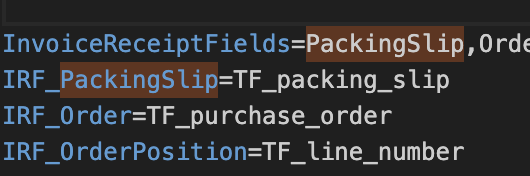
* If the field **IRF\_PackingSlip** is present and set to **nothing** (empty), update it to **TF\_packing\_slip**.
* If the field **IRF\_PackingSlip** is **not present**, add it to the file and set its value to **TF\_packing\_slip**.
3. For the field **InvoiceReceiptFields** add **PackingSlip** to the values.
It should look like the following:
## **Step 4: Add the Updated File Back to DocBits**
1. Go back to the **Export** section in DocBits where you previously downloaded the **LN-Mapping** file.
2. Upload the edited **LN-Mapping** file with the new updates.
## If you still encounter the **Error exporting document to LN** with status code **500**, please contact us
---
# Agent Instructions
This documentation is published with GitBook. GitBook is the documentation platform designed so that both humans and AI agents can read, navigate, and reason over technical content effectively. Learn more at gitbook.com.
## Querying This Documentation
If you need additional information that is not directly available in this page, you can query the documentation dynamically by asking a question.
Perform an HTTP GET request on the current page URL with the `ask` query parameter, and the optional `goal` query parameter:
```
GET https://docs.docbits.com/overview-and-basics/faq/infor-ln-ln-integration/export-error-error-exporting-document-to-ln.-status-code-500/not-found-in-direct-debit.md?ask=&goal=
```
`ask` is the immediate question: it should be specific, self-contained, and written in natural language.
`goal` is optional and describes the broader end goal you are ultimately trying to accomplish on behalf of the user. GitBook uses it to tailor the answer towards what is most useful for that goal.
The response will contain a direct answer to the question and relevant excerpts and sources from the documentation.
Use this mechanism when the answer is not explicitly present in the current page, you need clarification or additional context, or you want to retrieve related documentation sections.