> For the complete documentation index, see [llms.txt](https://docs.docbits.com/llms.txt). Markdown versions of documentation pages are available by appending `.md` to page URLs; this page is available as [Markdown](https://docs.docbits.com/administration-and-setup/settings/global-settings/email-notification.md).
# Email Notification
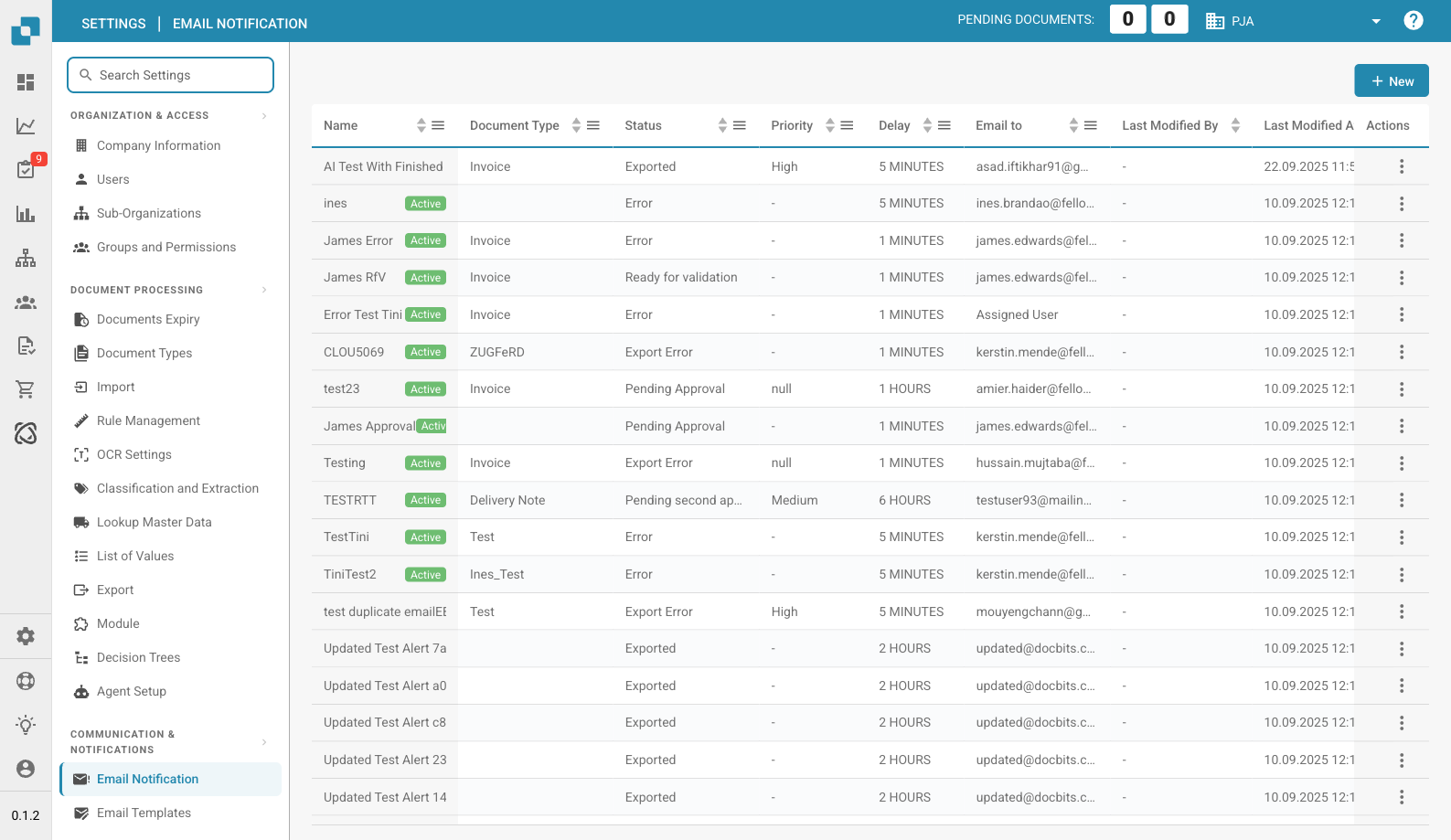
Email Notification Page
Configuring email notifications is critical. Email notifications in DocBits can be configured to notify users of various document-related events, such as: Processing completion, import or export errors, or user intervention requests. This tool is essential for maintaining effective communication and operational continuity in document processing environments. Here are some reasons why this is important:
**Real-time communication:**
* Email alerts allow users to be immediately notified of important events or changes in their document management system. This ensures that all relevant parties are immediately informed of important updates.
**Transparency and traceability:**
* By configuring email notifications, users can track and monitor the status of document processing events. This improves transparency and traceability in the document management system.
**Timely reactions:**
* Automatic notification of events such as document releases, comments, or approvals allows users to quickly respond to requests or updates. This helps increase efficiency and productivity.
**Automation of workflows:**
* Email notifications can be integrated into workflows to automatically send notifications to relevant users when certain actions are taken. This enables seamless automation of business processes.
**Reminders and deadlines:**
* Email notification configuration can be used to remind users of upcoming deadlines or outstanding tasks. This helps ensure important tasks are completed on time.
Overall, email notification configuration plays an important role in improving communication, increasing efficiency, and ensuring that document processing events are managed in a timely and effective manner. By automating notifications, organizations can ensure that important information is not lost and that all relevant parties are always kept up to date.
This setting is critical for ensuring that stakeholders are kept informed about the processing status of important documents, which aids in rapid decision-making and efficient management of document workflows.
---
# Agent Instructions
This documentation is published with GitBook. GitBook is the documentation platform designed so that both humans and AI agents can read, navigate, and reason over technical content effectively. Learn more at gitbook.com.
## Querying This Documentation
If you need additional information that is not directly available in this page, you can query the documentation dynamically by asking a question.
Perform an HTTP GET request on the current page URL with the `ask` query parameter, and the optional `goal` query parameter:
```
GET https://docs.docbits.com/administration-and-setup/settings/global-settings/email-notification.md?ask=&goal=
```
`ask` is the immediate question: it should be specific, self-contained, and written in natural language.
`goal` is optional and describes the broader end goal you are ultimately trying to accomplish on behalf of the user. GitBook uses it to tailor the answer towards what is most useful for that goal.
The response will contain a direct answer to the question and relevant excerpts and sources from the documentation.
Use this mechanism when the answer is not explicitly present in the current page, you need clarification or additional context, or you want to retrieve related documentation sections.