> For the complete documentation index, see [llms.txt](https://docs.docbits.com/llms.txt). Markdown versions of documentation pages are available by appending `.md` to page URLs; this page is available as [Markdown](https://docs.docbits.com/infor-integration-and-configuration/importing-customer-master-data/ln/suppliers-and-purchase-orders/purchase-order-faq.md).
# Purchase Order - FAQ
**Where do I check if the PurchaseOrderBOD synchronization updates are correctly implemented?**
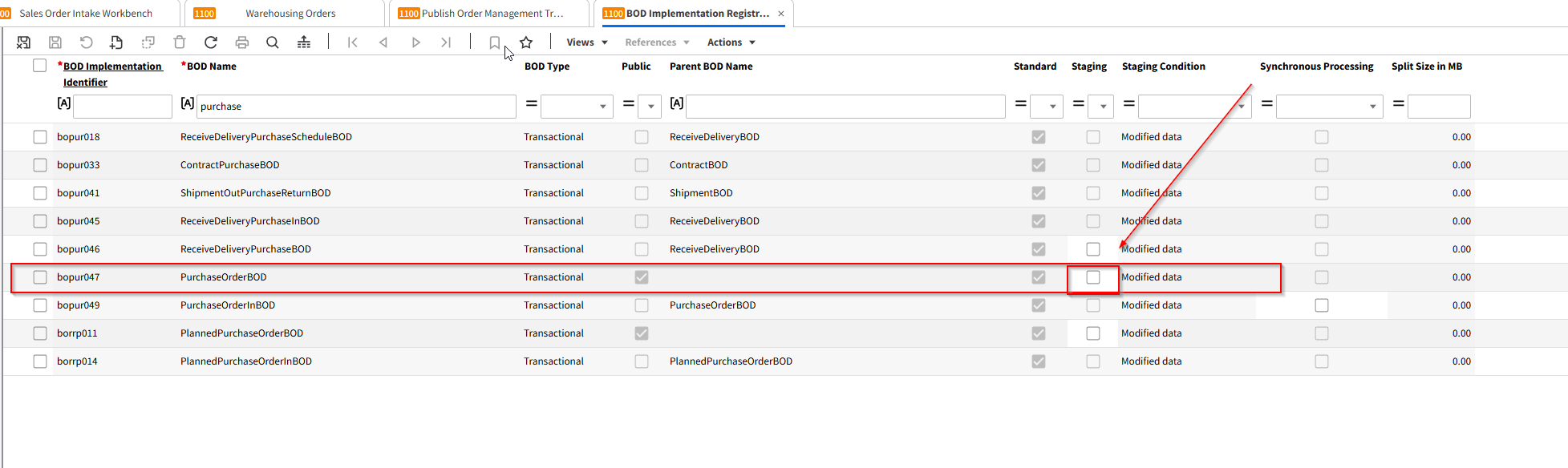
Navigate to the *BOD Implementation Registration (bobod1100m000)* session in LN. This session allows you to review, modify, and register both standard and custom BOD implementations, including the PurchaseOrderBOD.
\\
**How can I identify the specific BOD implementation I need to verify?**
Look for the BOD Implementation Identifier and BOD Name fields. The BOD Name typically indicates the type of BOD (e.g., PurchaseOrderBOD). The BOD Implementation Identifier is a unique identifier for that BOD configuration.
\\
**What does the ‘Public’ checkbox mean in the BOD Implementation Registration session?**
The Public checkbox indicates whether the BOD implementation is available for external communication.
• Selected: The BOD can be exchanged outside LN (public and protected interface).
• Cleared: The BOD is for internal LN processing only (protected interface).
\\
**I see a ‘Parent BOD Name’ field. What is it used for?**
The Parent BOD Name field shows the parent BOD if the current BOD is a derived or dependent version. If the Public checkbox is selected, this field will be empty. Otherwise, it helps you understand the hierarchy of BOD implementations.
\\
**How do I know if the BOD implementation is a standard or a custom one?**
Check the Standard checkbox.
• Selected: The BOD is a standard, LN-delivered implementation.
• Cleared: The BOD is a custom implementation that your team or a partner has defined.
\\
**What is the purpose of the ‘Staging’ checkbox?**
The Staging checkbox, if selected, means BODs are first staged rather than immediately published. They can then be published from the *Publish Staged BODs (bobod2200m000)* session.
Note: For the ProjectBudgetBOD, staging is mandatory and cannot be changed. For standard master data BODs, staging can be enabled manually, and for custom BODs, it can always be configured.
\\
**How does the ‘Synchronous Processing’ checkbox affect incoming BOD handling?**
Synchronous Processing determines the action if a follow-up process after receiving a BOD fails.
• Selected: The incoming BOD and the follow-up process must both succeed, or neither will be processed.
• Cleared: The incoming BOD is processed, but if the follow-up process fails, it must be handled manually.
\\
**Where do I verify if the ‘Stage’ feature is active or not for my BOD?**
In the *BOD Implementation Registration (bobod1100m000)* session, check the Staging checkbox. If it is not selected, staging is not active for that particular BOD.
\\
**If the PurchaseOrderBOD is not triggered on all updates, what else should I consider?**
• Confirm that the Staging option is set as intended. If staging is off, the BOD should publish immediately.
• Verify that the Synchronous Processing setting is correct for your workflow.
• Ensure that the BOD Implementation Identifier and BOD Name are correct and that you’re working on the proper BOD configuration.
• Check if the BOD is standard or custom and verify if any custom settings override standard behavior.
\\
**Are there any scenarios where I might not see the PurchaseOrderBOD updates as expected?**
Yes. If the BOD is not configured properly (wrong settings in Public, Staging, or Synchronous Processing) or if it’s a custom BOD implementation not aligned with your process requirements, updates may not trigger as expected. Review your configuration in the *bobod1100m000* session and ensure all parameters match your intended process flow.
---
# Agent Instructions
This documentation is published with GitBook. GitBook is the documentation platform designed so that both humans and AI agents can read, navigate, and reason over technical content effectively. Learn more at gitbook.com.
## Querying This Documentation
If you need additional information that is not directly available in this page, you can query the documentation dynamically by asking a question.
Perform an HTTP GET request on the current page URL with the `ask` query parameter, and the optional `goal` query parameter:
```
GET https://docs.docbits.com/infor-integration-and-configuration/importing-customer-master-data/ln/suppliers-and-purchase-orders/purchase-order-faq.md?ask=&goal=
```
`ask` is the immediate question: it should be specific, self-contained, and written in natural language.
`goal` is optional and describes the broader end goal you are ultimately trying to accomplish on behalf of the user. GitBook uses it to tailor the answer towards what is most useful for that goal.
The response will contain a direct answer to the question and relevant excerpts and sources from the documentation.
Use this mechanism when the answer is not explicitly present in the current page, you need clarification or additional context, or you want to retrieve related documentation sections.