> For the complete documentation index, see [llms.txt](https://docs.docbits.com/llms.txt). Markdown versions of documentation pages are available by appending `.md` to page URLs; this page is available as [Markdown](https://docs.docbits.com/administration-and-setup/settings/supplier-setting/export-configuration-for-supplier-portal-for-m3.md).
# Export Configuration for Supplier Portal for M3
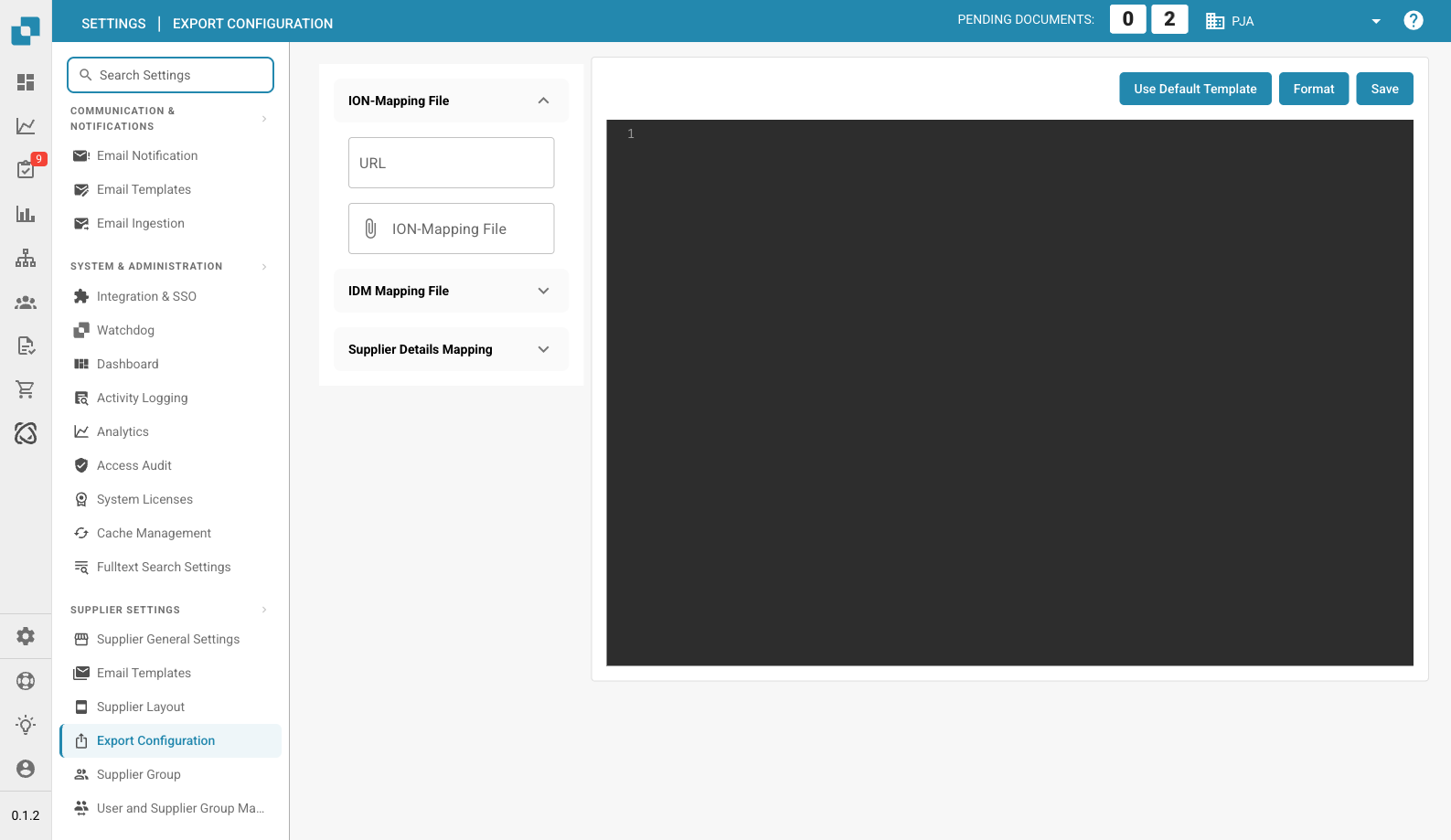
Supplier Export Configuration Page
## Overview
The export configuration file is a crucial component in the supplier portal, defining how data is mapped between the supplier portal and the ERP system. This configuration ensures that data is accurately transferred and synchronized across systems, enabling smooth and efficient operations.
## Structure of the Configuration File
The export configuration file is structured as a JSON object that contains multiple mappings. Each mapping is associated with a specific program in the ERP system and defines the actions to be performed, the fields to be mapped, and any conditions to be applied.
## Key Components
### 1. Program
* **Definition**: Specifies the ERP program that the mapping applies to.
* **Example**: `"program": "CRS620MI"`
### 2. Actions
* **Definition**: Defines the actions that can be performed, such as adding or updating records.
* **Example**:
```json
"actions": {
"add": "AddSupplier",
"update": "UpdSupplier"
}
```
### 3. Mapping
• Definition: Specifies the mapping between fields in the ERP system and fields in the supplier portal.
• Components:
• erp\_field\_name: The field name in the ERP system.
• value\_field\_name: The corresponding field name in the supplier portal.
• value: A static value to be used if no corresponding field exists in the supplier portal.
• if\_conditions: Optional conditions that determine the value based on certain criteria.
• Example:
```json
{
"erp_field_name": "SUNO",
"value_field_name": "supplier_number"
}
```
### 4. Conditional Logic (if\_conditions)
• Definition: Specifies conditions that must be met for a particular value to be used.
• Components:
• field\_name: The field name in the supplier portal that is evaluated.
• field\_value: The value that triggers the condition.
• then\_value: The value to use if the condition is met.
• Example:
```json
{
"erp_field_name": "SUTY",
"value": "0",
"if_conditions": [{
"field_name": "supplier_group",
"field_value": "FRT",
"then_value": "5"
}]
}
```
### 5. Loops (loop\_on)
• Definition: Defines the sections where the configuration should iterate over a list of items, such as address or reference details.
• Example:
```json
"loop_on": "address_details"
```
### 6. Calculated Fields (value\_field\_calculated)
• Definition: Specifies fields that should be calculated at runtime, such as generating the current date.
• Example:
```json
{
"erp_field_name": "STDT",
"value_field_calculated": "now()"
}
```
### 7. Field Mappings with Lists (mapping\_field\_name and mapping\_list)
• Definition: Maps specific values from the supplier portal to corresponding values in the ERP system based on a predefined list.
• Components:
• mapping\_field\_name: The field that determines the mapping.
• mapping\_list: A dictionary that translates values from the supplier portal to the ERP system.
• Example:
```json
{
"erp_field_name": "RFID",
"mapping_field_name": "reference_type",
"mapping_list": {
"10": "PURCHASING",
"15": "DLVRY PHN#",
"20": "COA",
"25": "QA",
"30": "FINANCE",
"35": "SALES"
}
}
```
## Example Configuration Breakdown
### Supplier Addition and Update (CRS620MI)
• Program: CRS620MI
• Actions:
• Add Supplier: AddSupplier
• Update Supplier: UpdSupplier
• Mapping Fields:
• SUNO → supplier\_number
• SUNM → name
• CSCD → supplier\_country
• TINO → tax\_id
• Additional fields include static values and conditional mappings.
### Address Details (CRS620MI)
• Loop On: ***address\_details***
• Actions:
• Add Address: AddAddress
• Update Address: AddAddress
• Mapping Fields:
• SUNO → supplier\_number
• ADR1 → address
• TOWN → city
• Additional fields include calculated fields like now() for the current date.
### Reference Details (CRS620MI)
• Loop On: ***reference\_details***
• Actions:
• Add Supplier Reference: AddSupplierRef
• Update Supplier Reference: AddSupplierRef
• Mapping Fields:
• SUNO → supplier\_number
• RFTY → reference\_type
• RFID is mapped using a list to translate types like “PURCHASING”, “QA”, and “FINANCE”.
## Using the Export Configuration
### 1. Uploading the Configuration File
#### 1. Navigate to Export Configuration:
• Go to the Export Configuration section from the main menu.
#### 2. Upload the Configuration File:
• Click on the ION-Mapping File or IDM Mapping File sections to upload the respective configuration file.
#### 3. Save the Configuration:
• After uploading, click the Save button to apply the configuration.
### 2. Using Default Templates
• Click on the Use Default Template button if you wish to revert to the default configuration template provided by the system.
### 3. Formatting the JSON
• Use the Format button to automatically format the JSON code for better readability.
## Conclusion
This configuration file is essential for ensuring that data between the supplier portal and the ERP system is correctly mapped and synchronized. By understanding the structure and key components, administrators can effectively manage and customize the export process to meet their specific business requirements.
## Full Example
```json
[{
"program": "CRS620MI",
"actions": {
"add": "AddSupplier",
"update": "UpdSupplier"
},
"mapping": [{
"erp_field_name": "SUNO",
"value_field_name": "supplier_number"
}, {
"erp_field_name": "SUNM",
"value_field_name": "name"
}, {
"erp_field_name": "SUTY",
"value": "0",
"if_conditions": [{
"field_name": "supplier_group",
"field_value": "FRT",
"then_value": "5"
}]
}, {
"erp_field_name": "CSCD",
"value_field_name": "supplier_country"
}, {
"erp_field_name": "DTFM",
"value_field_name": "date_format"
}, {
"erp_field_name": "ORTY",
"value": "F20"
}, {
"erp_field_name": "DT4T",
"value": "1"
}, {
"erp_field_name": "DTCD",
"value": "2"
}, {
"erp_field_name": "CUCD",
"value_field_name": "currency"
}, {
"erp_field_name": "TINO",
"value_field_name": "tax_id"
}, {
"erp_field_name": "PHNO",
"value_field_name": "supplier_phone"
}, {
"erp_field_name": "CRTP",
"value": "1"
}, {
"erp_field_name": "ATPR",
"value": "1"
}, {
"erp_field_name": "SUCL",
"value_field_name": "supplier_group"
}, {
"erp_field_name": "LNCD",
"value_field_name": "language"
}, {
"erp_field_name": "CONO",
"value": "781_DDD"
}, {
"erp_field_name": "TEDL",
"value": "FOB"
}, {
"erp_field_name": "TEPY",
"value_field_name": "payment_term"
}, {
"erp_field_name": "TEPA",
"value": "001"
}, {
"erp_field_name": "PYME",
"value": "CRP"
}]
}, {
"program": "CRS620MI",
"loop_on": "address_details",
"actions": {
"add": "AddAddress",
"update": "AddAddress"
},
"mapping": [{
"erp_field_name": "SUNO",
"main_value_field": "supplier_number"
}, {
"erp_field_name": "ADTE",
"value_field_name": "address_type"
}, {
"erp_field_name": "ADID",
"value_field_name": "address_type",
"if_conditions": [{
"field_name": "address_type",
"field_value": "10",
"then_value": ""
}]
}, {
"erp_field_name": "STDT",
"value_field_calculated": "now()"
}, {
"erp_field_name": "ADR1",
"value_field_name": "address"
}, {
"erp_field_name": "TOWN",
"value_field_name": "city"
}, {
"erp_field_name": "ECAR",
"value_field_name": "state"
}, {
"erp_field_name": "PONO",
"value_field_name": "postal_code"
}, {
"erp_field_name": "CSCD",
"value_field_name": "supplier_country"
}]
}, {
"program": "CRS620MI",
"loop_on": "reference_details",
"actions": {
"add": "AddSupplierRef",
"update": "AddSupplierRef"
},
"mapping": [{
"erp_field_name": "SUNO",
"main_value_field": "supplier_number"
}, {
"erp_field_name": "RFTY",
"value_field_name": "reference_type"
}, {
"erp_field_name": "RFID",
"mapping_field_name": "reference_type",
"mapping_list": {
"10": "PURCHASING",
"15": "DLVRY PHN#",
"20": "COA",
"25": "QA",
"30": "FINANCE",
"35": "SALES"
}
}, {
"erp_field_name": "YRE1",
"value_field_name": "reference_name"
}, {
"erp_field_name": "PHNO",
"value_field_name": "telephone_no"
}, {
"erp_field_name": "EMAL",
"value_field_name": "email_address"
}]
}]
```
---
# Agent Instructions
This documentation is published with GitBook. GitBook is the documentation platform designed so that both humans and AI agents can read, navigate, and reason over technical content effectively. Learn more at gitbook.com.
## Querying This Documentation
If you need additional information that is not directly available in this page, you can query the documentation dynamically by asking a question.
Perform an HTTP GET request on the current page URL with the `ask` query parameter, and the optional `goal` query parameter:
```
GET https://docs.docbits.com/administration-and-setup/settings/supplier-setting/export-configuration-for-supplier-portal-for-m3.md?ask=&goal=
```
`ask` is the immediate question: it should be specific, self-contained, and written in natural language.
`goal` is optional and describes the broader end goal you are ultimately trying to accomplish on behalf of the user. GitBook uses it to tailor the answer towards what is most useful for that goal.
The response will contain a direct answer to the question and relevant excerpts and sources from the documentation.
Use this mechanism when the answer is not explicitly present in the current page, you need clarification or additional context, or you want to retrieve related documentation sections.