> For the complete documentation index, see [llms.txt](https://docs.docbits.com/llms.txt). Markdown versions of documentation pages are available by appending `.md` to page URLs; this page is available as [Markdown](https://docs.docbits.com/administration-and-setup/settings/global-settings/company-information.md).
# Company Information
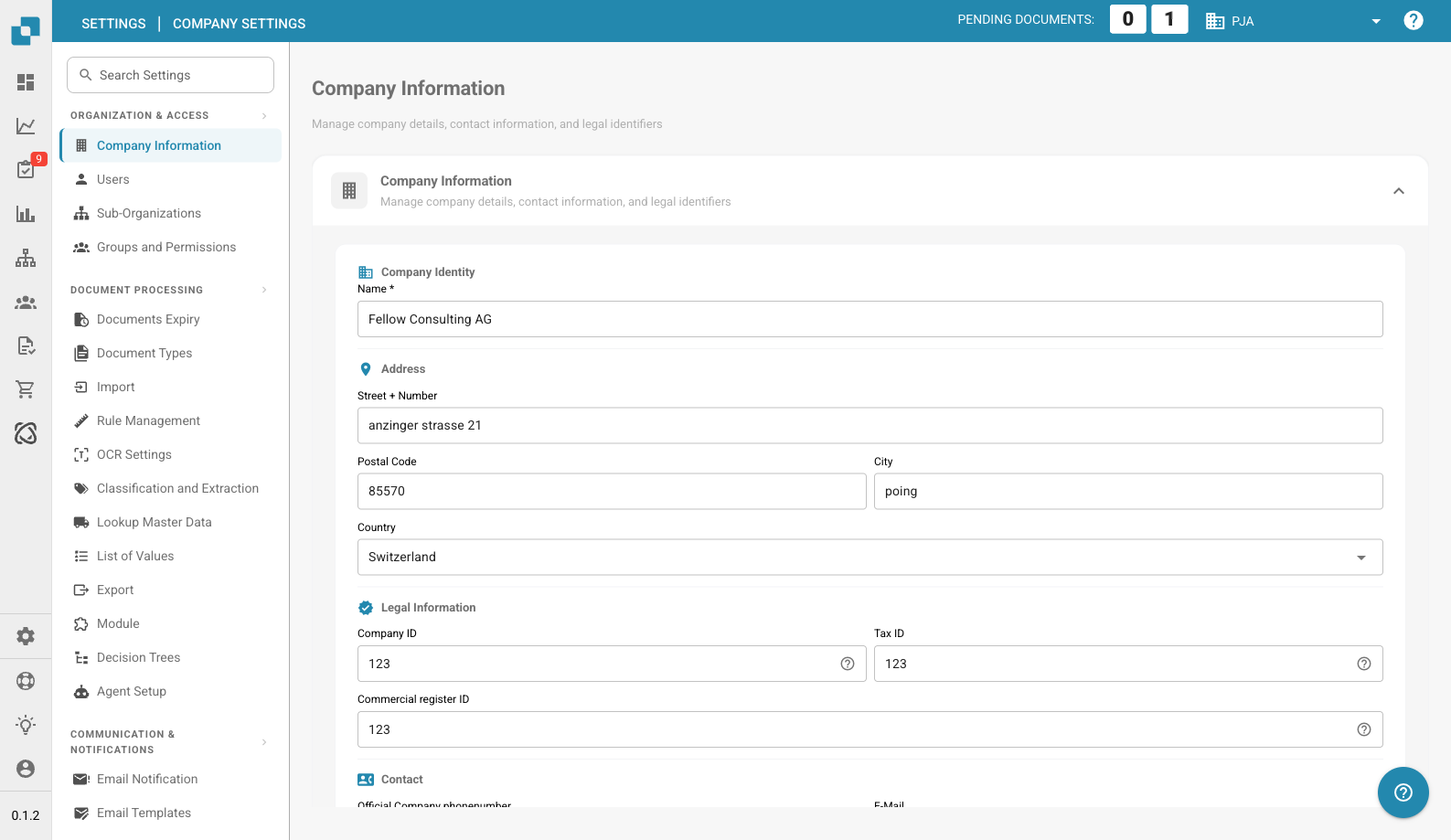
Company Information Page
The Company Information page lets you manage your company profile, preferences, and subscription details. It is organized into the following sections:
## Company Information
This section contains your core company data, grouped into four areas:
### Company Identity
* **Name** *(required)*: The legal name of your company.
### Address
* **Street + Number**: Your company's street address.
* **Postal Code**: ZIP or postal code.
* **City**: City name.
* **Country**: Select your country from the dropdown.
### Legal Information
* **Company ID**: A unique identifier for your company, used for integrations and internal reference.
* **Tax ID**: Your tax identification number for financial reporting.
* **Commercial Register ID**: Your commercial register number for legal documentation.
### Contact
* **Official Company Phone Number**: The primary phone number for your company.
* **E-Mail**: The main email address used for official communications.
After entering or updating any fields, click **Save** to apply your changes.
## Company Preferences
Configure company-wide default settings:
* **Date Pattern**: Choose how dates are displayed throughout DocBits (e.g., `%m/%d/%Y`, `%d.%m.%Y`).
* **Amount Formatting**: Select the number format for amounts (e.g., Deutsch for `1.000,00`, English for `1,000.00`).
* **New Version Info Dialog**: Toggle whether users see a notification when a new DocBits version is released.
Click **Save** after making changes.
## App-Color
Customize the primary color of the DocBits interface. This is useful for visually distinguishing different environments (e.g., dev vs. production).
* **Color**: Enter a hex color code (e.g., `#2388AE`) or use the color picker.
* Click **Save** to apply, or **Reset** to restore the default color.
## Subscription Plan
View your active subscription plans and their details:
* **Plan Name**: The name of each active plan (e.g., DocBits, DocFlow Users, DocSearch).
* **Days Left**: How many days remain until the plan expires.
* **Start Date / End Date**: The subscription period.
* **Users Count**: Total number of users in your organization.
* **Sub Organizations Count**: Number of sub-organizations configured.
* **Suppliers Count**: Number of suppliers registered.
## Subscription Usage
Monitor your monthly token and workflow consumption:
| Column | Description |
| -------------------- | ------------------------------------------------ |
| **Type** | The usage type (Document or Workflow). |
| **From / To** | The billing period dates. |
| **Tokens Used** | Number of tokens consumed in the current period. |
| **Remaining Tokens** | Tokens still available in the current period. |
Use the **Select** button to filter by specific date ranges.
---
# Agent Instructions
This documentation is published with GitBook. GitBook is the documentation platform designed so that both humans and AI agents can read, navigate, and reason over technical content effectively. Learn more at gitbook.com.
## Querying This Documentation
If you need additional information that is not directly available in this page, you can query the documentation dynamically by asking a question.
Perform an HTTP GET request on the current page URL with the `ask` query parameter, and the optional `goal` query parameter:
```
GET https://docs.docbits.com/administration-and-setup/settings/global-settings/company-information.md?ask=&goal=
```
`ask` is the immediate question: it should be specific, self-contained, and written in natural language.
`goal` is optional and describes the broader end goal you are ultimately trying to accomplish on behalf of the user. GitBook uses it to tailor the answer towards what is most useful for that goal.
The response will contain a direct answer to the question and relevant excerpts and sources from the documentation.
Use this mechanism when the answer is not explicitly present in the current page, you need clarification or additional context, or you want to retrieve related documentation sections.