> For the complete documentation index, see [llms.txt](https://docs.docbits.com/llms.txt). Markdown versions of documentation pages are available by appending `.md` to page URLs; this page is available as [Markdown](https://docs.docbits.com/administration-and-setup/workflow.md).
# Workflow
DocBits Workflow Engine
## DocBits Workflow Engine: Simplifying Process Automation
{% embed url="" %}
### Introduction
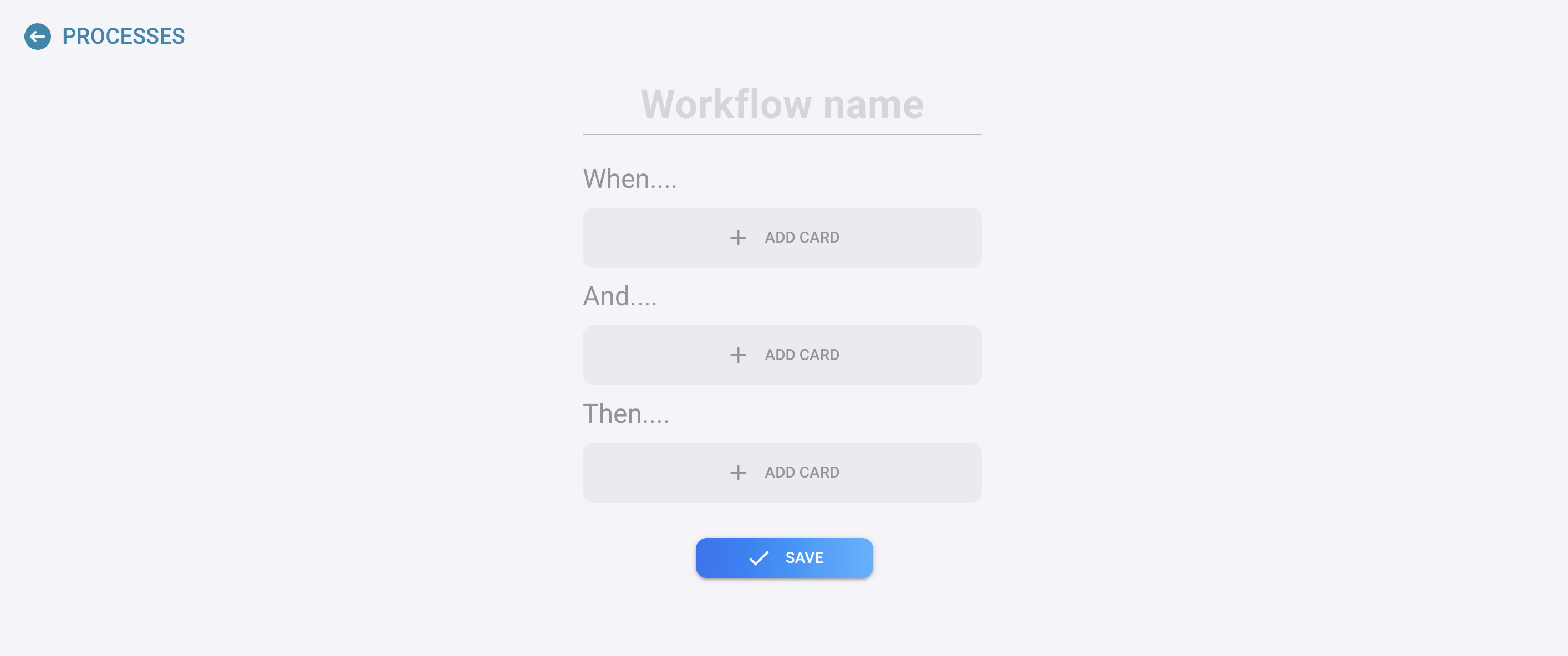
In the realm of process automation, the DocBits Workflow Engine stands out for its straightforward and intuitive approach. This engine streamlines the creation and management of workflows through a clear and simple rule-based structure. The core principle behind its design is the "Easy When-And-Then" rule, which breaks down the automation process into three fundamental components: Trigger, Condition, and Action. This guide explains how each component functions within the system and how they work together to facilitate seamless automation.
### The "Easy When-And-Then" Rule Explained
The DocBits Workflow Engine operates on a basic yet powerful principle that makes workflow automation accessible to users of all skill levels. This principle is encapsulated in the "Easy When-And-Then" rule, which can be broken down as follows:
#### [When](#when-trigger) (Trigger)
* **Definition**: The "When" component represents the *Trigger* of the workflow. This is the event or condition that initiates the execution of the workflow. Triggers can be a variety of occurrences such as the arrival of a new email, a specific date and time, or the creation of a new document.
* **Example**: "When a new customer form is submitted..."
#### [And](#and-condition) (Condition)
* **Definition**: The "And" component introduces the *Condition* that must be met for the action to proceed. Conditions serve as filters or criteria that refine the trigger, ensuring that the workflow is executed only under certain circumstances.
* **Example**: "...and the customer is from the 'Enterprise' segment..."
#### [Then](#then-action) (Action)
* **Definition**: Finally, the "Then" part specifies the *Action* to be taken once the trigger occurs and the condition is satisfied. Actions are the tasks or operations executed by the workflow, such as sending an email, updating a database, or creating a task in a project management tool.
* **Example**: "...then assign the lead to the enterprise sales team and send a welcome email."
### Combining Components for Powerful Automations
By assembling these three components—Trigger, Condition, and Action—the DocBits Workflow Engine allows users to create highly customized and efficient workflows. This modular approach not only simplifies the process of setting up automations but also offers the flexibility to create complex workflows capable of handling a wide range of tasks and processes.
### Conclusion
The DocBits Workflow Engine's "Easy When-And-Then" rule exemplifies the engine's commitment to providing a user-friendly platform for automating processes. This straightforward rule, by breaking down automation into the essential elements of Trigger, Condition, and Action, makes it easier for users to conceptualize, create, and manage workflows. Whether you are new to workflow automation or an experienced professional, the DocBits Workflow Engine offers an efficient and accessible tool to enhance productivity and streamline operations.
---
# Agent Instructions
This documentation is published with GitBook. GitBook is the documentation platform designed so that both humans and AI agents can read, navigate, and reason over technical content effectively. Learn more at gitbook.com.
## Querying This Documentation
If you need additional information that is not directly available in this page, you can query the documentation dynamically by asking a question.
Perform an HTTP GET request on the current page URL with the `ask` query parameter, and the optional `goal` query parameter:
```
GET https://docs.docbits.com/administration-and-setup/workflow.md?ask=&goal=
```
`ask` is the immediate question: it should be specific, self-contained, and written in natural language.
`goal` is optional and describes the broader end goal you are ultimately trying to accomplish on behalf of the user. GitBook uses it to tailor the answer towards what is most useful for that goal.
The response will contain a direct answer to the question and relevant excerpts and sources from the documentation.
Use this mechanism when the answer is not explicitly present in the current page, you need clarification or additional context, or you want to retrieve related documentation sections.