> For the complete documentation index, see [llms.txt](https://docs.docbits.com/llms.txt). Markdown versions of documentation pages are available by appending `.md` to page URLs; this page is available as [Markdown](https://docs.docbits.com/administration-and-setup/settings/log-settings.md).
# Log Settings
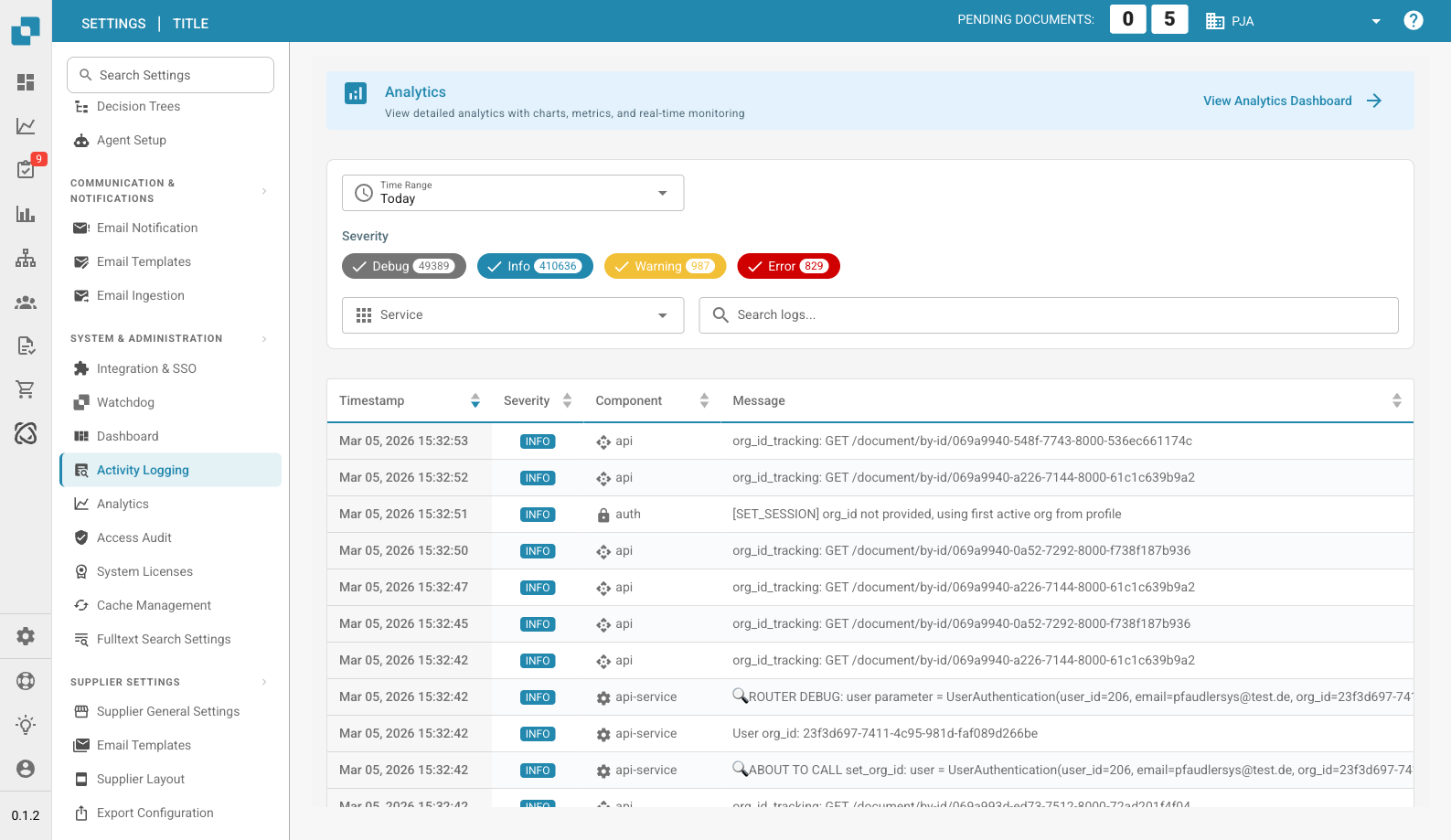
Activity Logging Page
Activity Logging provides a real-time view of system events across all DocBits services. Use it to monitor processing activity, troubleshoot errors, and audit system behavior.
## Analytics Banner
At the top of the page, a banner links to the **Analytics Dashboard** for charts, metrics, and real-time monitoring.
## Filters
| Filter | Description |
| --------------- | ----------------------------------------------------------------------------------------------------------------------------- |
| **Time Range** | Select a time window (e.g., Today, Last 7 Days, Last 30 Days). |
| **Severity** | Toggle severity levels to include or exclude: **Debug**, **Info**, **Warning**, **Error**. Each chip shows the current count. |
| **Service** | Filter logs by service (e.g., api, auth, api-service). |
| **Search logs** | Free-text search across log messages. |
## Log Table
| Column | Description |
| ------------- | ---------------------------------------------------------------------------- |
| **Timestamp** | Date and time the event occurred. Sortable. |
| **Severity** | Color-coded badge: Info (blue), Warning (yellow), Error (red), Debug (gray). |
| **Component** | The service or module that generated the log (e.g., api, auth, api-service). |
| **Message** | The full log message with event details. |
Results are paginated — use the controls at the bottom to navigate pages.
## Footer Actions
| Action | Description |
| ----------------- | ------------------------------------------------------------------ |
| **Auto-refresh** | Toggle to automatically refresh the log view at regular intervals. |
| **Refresh Now** | Manually refresh the log data. |
| **Export JSON** | Export the current filtered logs as a JSON file. |
| **Download Logs** | Download the complete log data. |
---
# Agent Instructions
This documentation is published with GitBook. GitBook is the documentation platform designed so that both humans and AI agents can read, navigate, and reason over technical content effectively. Learn more at gitbook.com.
## Querying This Documentation
If you need additional information that is not directly available in this page, you can query the documentation dynamically by asking a question.
Perform an HTTP GET request on the current page URL with the `ask` query parameter, and the optional `goal` query parameter:
```
GET https://docs.docbits.com/administration-and-setup/settings/log-settings.md?ask=&goal=
```
`ask` is the immediate question: it should be specific, self-contained, and written in natural language.
`goal` is optional and describes the broader end goal you are ultimately trying to accomplish on behalf of the user. GitBook uses it to tailor the answer towards what is most useful for that goal.
The response will contain a direct answer to the question and relevant excerpts and sources from the documentation.
Use this mechanism when the answer is not explicitly present in the current page, you need clarification or additional context, or you want to retrieve related documentation sections.