> For the complete documentation index, see [llms.txt](https://docs.docbits.com/llms.txt). Markdown versions of documentation pages are available by appending `.md` to page URLs; this page is available as [Markdown](https://docs.docbits.com/chinese/zui-zhong-yong-hu-yu-he-zuo-huo-ban/end-user-section/technical-support-in-docbits/debug-collector.md).
# 调试收集器
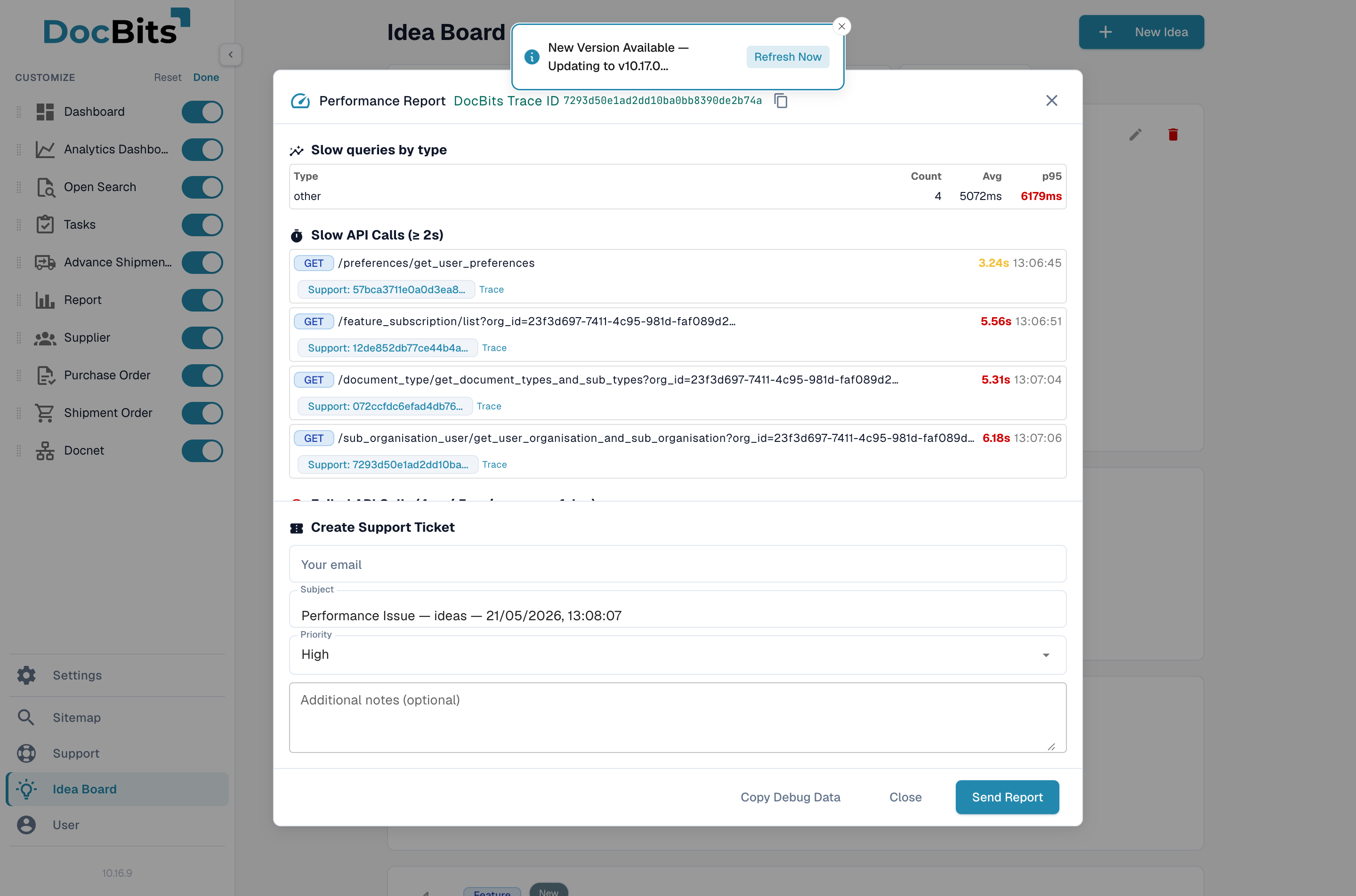
调试收集器会完整捕获您的 DocBits 会话快照,包括网络活动、错误、浏览器环境和性能指标,并将其打包为 JSON 报告;您还可以选择在同一对话框中直接创建支持工单。
## 如何访问
在 Windows 和 Linux 上按 Ctrl + Shift + P,或在 macOS 上按 Cmd + Shift + P。性能报告对话框会立即打开。
性能报告对话框会显示捕获的快照以及内置的支持工单表单。
## 捕获的内容
* **API 调用** — 最近 60 次 REST 和 WebSocket 调用,包括耗时、状态码和访问过的 URL。耗时超过两秒的调用会单独标记。
* **错误** — 浏览器控制台中最近的 JavaScript 错误和未处理的 Promise 拒绝。
* **控制台日志** — 应用程序最近的日志消息。
* **环境** — 浏览器版本、操作系统、屏幕尺寸和已启用的功能标志。
* **用户上下文** — 拍摄快照时您的角色、组织以及所在页面。
* **性能指标** — 页面加载耗时(LCP、FCP)、内存使用情况和 DOM 大小。
* **跟踪 ID** — 用于将快照与后端日志条目关联起来的关联 ID。
## 从对话框创建支持工单
您无需手动下载或附加任何内容——对话框内置了**创建支持工单**表单。
1. 填写您的电子邮件地址,保留建议的主题或自行替换,选择优先级,并添加说明问题发生时您正在进行什么操作的备注。
2. 点击**发送报告**。JSON 快照会随工单一并附上,工单也会在这一步创建。
这样就完成了——支持团队会收到包含复现问题所需全部数据的工单。
如果您想在本地保留一份快照,请使用**复制调试数据**将 JSON 复制到剪贴板,或者使用浏览器的“另存为”功能将报告保存为 `.json` 文件。
## 隐私与数据处理
* 在构建快照之前,系统会从捕获的 API 调用中移除身份验证令牌和敏感标头。
* 在您点击**发送报告**之前,任何数据都不会离开浏览器——快捷键只会打开对话框。
如果您处理过包含客户数据的文档,请在发送前检查快照。URL 中显示的文档 ID 也会出现在报告中。
---
# Agent Instructions
This documentation is published with GitBook. GitBook is the documentation platform designed so that both humans and AI agents can read, navigate, and reason over technical content effectively. Learn more at gitbook.com.
## Querying This Documentation
If you need additional information that is not directly available in this page, you can query the documentation by asking a question.
Perform an HTTP GET request on the following URL with the `ask` and `goal` query parameters:
```
GET https://docs.docbits.com/chinese/zui-zhong-yong-hu-yu-he-zuo-huo-ban/end-user-section/technical-support-in-docbits/debug-collector.md?ask=&goal=
```
`ask` is the immediate question: it should be specific, self-contained, and written in natural language.
`goal` is what the user is ultimately trying to achieve, the reason they need the answer. Sharing it helps GitBook give you a better, more relevant answer. A goal is most helpful when it describes the outcome the user wants rather than restating the question. For example, with `ask=how do I create an API token`, a goal like `automate deployments from our CI pipeline` lets GitBook tailor the answer to that use case.
The response will contain a direct answer to the question and relevant excerpts and sources from the documentation.
Use this mechanism when the answer is not explicitly present in the current page, you need clarification or additional context, or you want to retrieve related documentation sections.