> For the complete documentation index, see [llms.txt](https://docs.docbits.com/llms.txt). Markdown versions of documentation pages are available by appending `.md` to page URLs; this page is available as [Markdown](https://docs.docbits.com/chinese/zui-zhong-yong-hu-yu-he-zuo-huo-ban/end-user-section/global-quick-search.md).
# 全局快速搜索
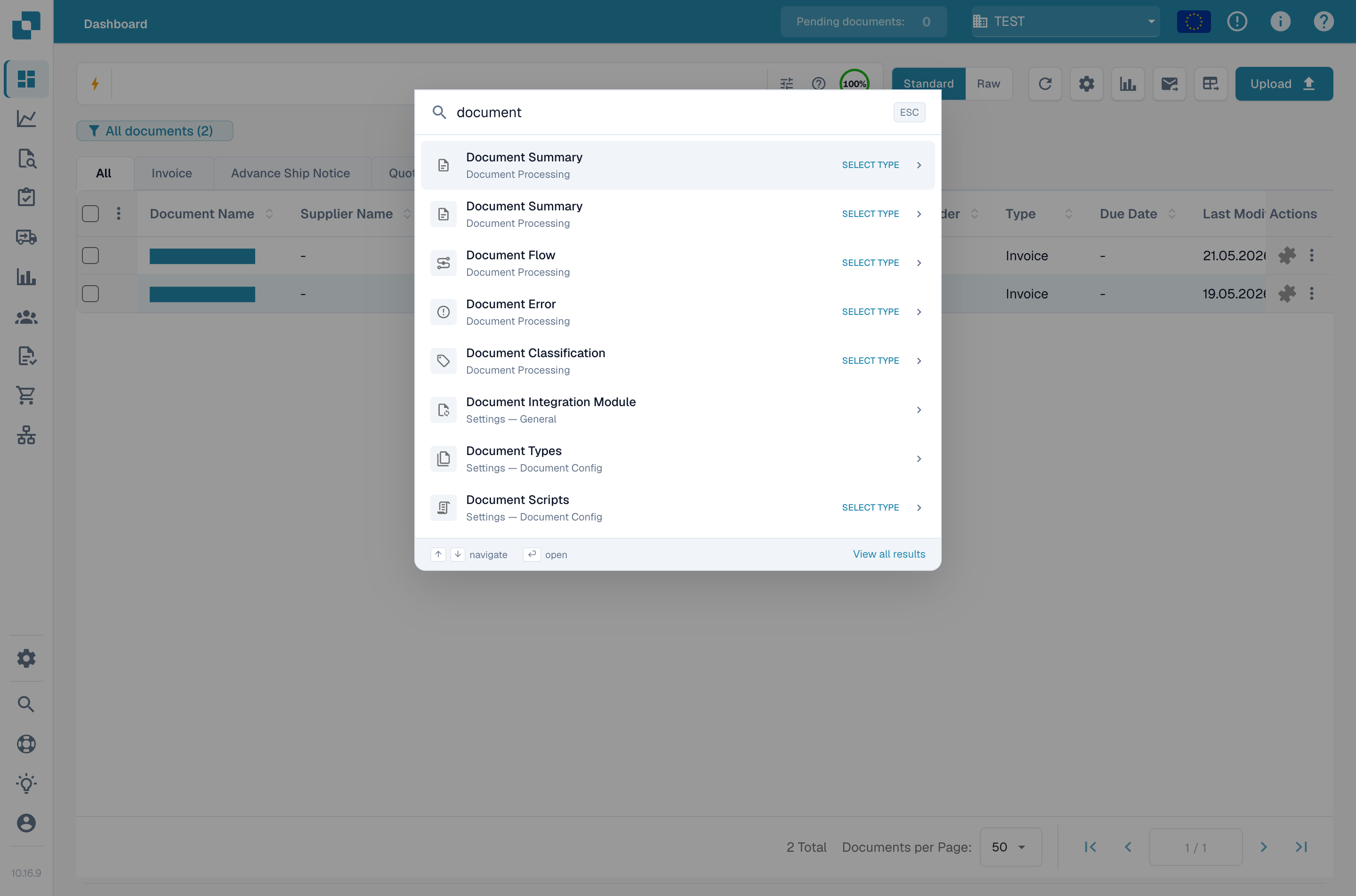
全局快速搜索是一个由键盘驱动的启动器,可在 DocBits 的任何位置查找页面、设置、仪表板和页面内功能。如果你已经知道要找什么,它可以替代逐项点击侧边栏。
## 如何访问
在 macOS 上按 Cmd + K,或在 Windows 和 Linux 上按 Ctrl + K。在任何屏幕上都可以使用此快捷键。
快速搜索会在当前页面上方打开。
## 搜索
开始输入即可筛选页面和页面内功能目录。快速搜索采用模糊匹配,因此输入部分词语或略有拼写错误也能找到正确条目。系统按相关性排序并显示前八个结果。
每个结果会显示:
* 功能或页面标签。
* 所属类别(设置、仪表板、验证等)。
* 表明条目类型的小徽标——页面、对话框、侧边栏、面板、菜单或操作。
使用向上和向下箭头键高亮显示结果,然后按 Enter 打开。按 Esc 关闭弹窗。
结果列表只显示你有权限使用的条目。非管理员用户看不到仅限管理员使用的条目。
## 最近搜索
搜索框为空时,快速搜索会显示你最近的五条查询,方便你只按一次键就返回常用位置。最近搜索按浏览器存储,不会在设备之间同步。
## 用于文档查找的选择器模式
某些目标需要额外信息才能打开,例如“按 ID 打开文档”需要先输入文档 ID。选择此类条目后,快速搜索会切换到**选择器模式**:
* 对于文档 ID,输入或粘贴 ID,然后按 Enter。
* 对于文档类型,从内嵌列表中选择类型。
选择器模式会遵循仪表板的状态权限,因此你只能看到有权打开的文档。
## 查看所有结果
如果八个可见结果不够,请点击页脚中的**查看所有结果**链接,以当前搜索内容作为预筛选条件打开[站点地图](/chinese/zui-zhong-yong-hu-yu-he-zuo-huo-ban/end-user-section/sitemap.md)。
## 键盘快捷键参考
| 按键 | 操作 |
| --------------------------------------------- | ----------- |
| Cmd/Ctrl + K | 从任何位置打开快速搜索 |
| ↑ / ↓ | 在结果之间移动 |
| Enter | 打开高亮显示的结果 |
| Esc | 关闭弹窗 |
---
# Agent Instructions
This documentation is published with GitBook. GitBook is the documentation platform designed so that both humans and AI agents can read, navigate, and reason over technical content effectively. Learn more at gitbook.com.
## Querying This Documentation
If you need additional information that is not directly available in this page, you can query the documentation by asking a question.
Perform an HTTP GET request on the following URL with the `ask` and `goal` query parameters:
```
GET https://docs.docbits.com/chinese/zui-zhong-yong-hu-yu-he-zuo-huo-ban/end-user-section/global-quick-search.md?ask=&goal=
```
`ask` is the immediate question: it should be specific, self-contained, and written in natural language.
`goal` is what the user is ultimately trying to achieve, the reason they need the answer. Sharing it helps GitBook give you a better, more relevant answer. A goal is most helpful when it describes the outcome the user wants rather than restating the question. For example, with `ask=how do I create an API token`, a goal like `automate deployments from our CI pipeline` lets GitBook tailor the answer to that use case.
The response will contain a direct answer to the question and relevant excerpts and sources from the documentation.
Use this mechanism when the answer is not explicitly present in the current page, you need clarification or additional context, or you want to retrieve related documentation sections.