> For the complete documentation index, see [llms.txt](https://docs.docbits.com/llms.txt). Markdown versions of documentation pages are available by appending `.md` to page URLs; this page is available as [Markdown](https://docs.docbits.com/chinese/infor-ji-cheng-yu-pei-zhi/importing-customer-master-data/ln/suppliers-and-purchase-orders/purchase-order-faq.md).
# 采购订单 - 常见问题
**在哪里可以检查 PurchaseOrderBOD 同步更新是否已正确实施?**
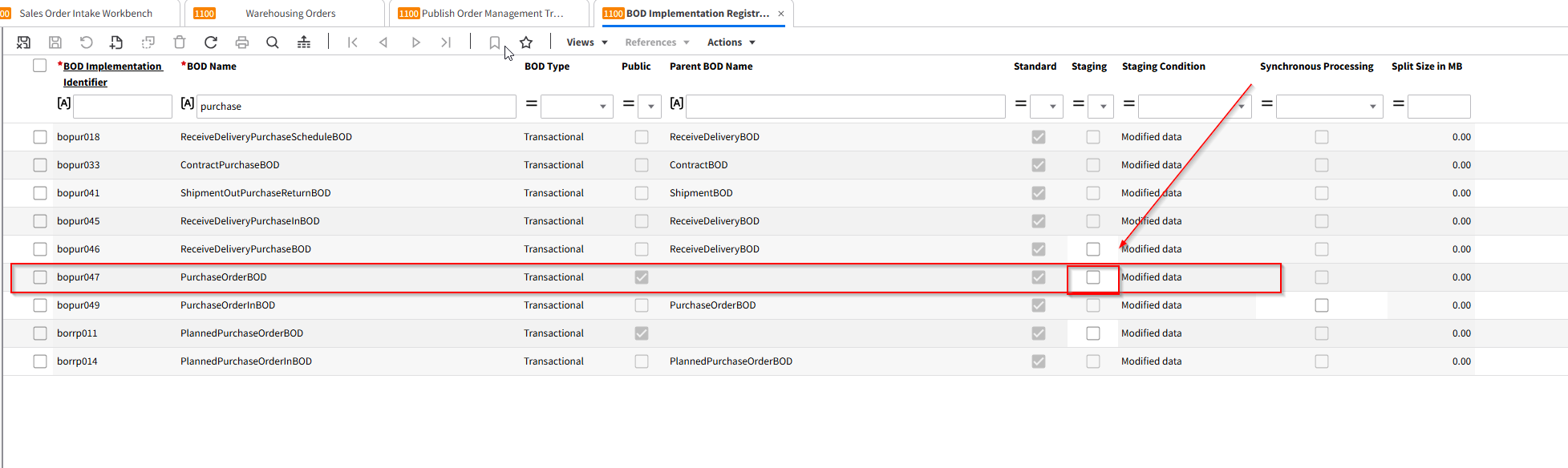
在 LN 中导航到 *BOD Implementation Registration (bobod1100m000)* 会话。此会话允许你查看、修改和注册标准及自定义 BOD 实施,包括 PurchaseOrderBOD。
\\
**如何识别需要验证的特定 BOD 实施?**
查看 BOD Implementation Identifier 和 BOD Name 字段。BOD Name 通常表示 BOD 的类型(例如 PurchaseOrderBOD)。BOD Implementation Identifier 是该 BOD 配置的唯一标识符。
\\
**BOD Implementation Registration 会话中的“Public”复选框是什么意思?**
Public 复选框用于指示该 BOD 实施是否可用于外部通信。
• 已选中:可以在 LN 外部交换该 BOD(公共和受保护接口)。
• 未选中:该 BOD 仅用于 LN 内部处理(受保护接口)。
\\
**我看到一个“Parent BOD Name”字段。它有什么用途?**
Parent BOD Name 字段显示当前 BOD 为派生版本或依赖版本时的父 BOD。如果选中了 Public 复选框,此字段将为空。否则,它可以帮助你了解 BOD 实施的层级结构。
\\
**如何判断 BOD 实施是标准实施还是自定义实施?**
查看 Standard 复选框。
• 已选中:该 BOD 是 LN 提供的标准实施。
• 未选中:该 BOD 是由你的团队或合作伙伴定义的自定义实施。
\\
**“Staging”复选框有什么作用?**
如果选中 Staging 复选框,BOD 将先暂存,而不是立即发布。之后可以在 *Publish Staged BODs (bobod2200m000)* 会话中发布这些 BOD。
注意:对于 ProjectBudgetBOD,暂存是强制要求,且无法更改。对于标准主数据 BOD,可以手动启用暂存;对于自定义 BOD,始终可以进行配置。
\\
**“Synchronous Processing”复选框会如何影响传入 BOD 的处理?**
Synchronous Processing 用于确定接收到 BOD 后的后续流程失败时要采取的操作。
• 已选中:传入 BOD 和后续流程都必须成功,否则两者都不会处理。
• 未选中:传入 BOD 会被处理,但如果后续流程失败,则必须手动处理。
\\
**在哪里可以验证我的 BOD 是否启用了“Stage”功能?**
在 *BOD Implementation Registration (bobod1100m000)* 会话中,查看 Staging 复选框。如果未选中,则该特定 BOD 未启用暂存。
\\
**如果 PurchaseOrderBOD 并非在所有更新时都触发,还应考虑什么?**
• 确认 Staging 选项的设置符合预期。如果关闭暂存,BOD 应立即发布。
• 验证 Synchronous Processing 设置是否符合你的工作流。
• 确保 BOD Implementation Identifier 和 BOD Name 正确,并确认你使用的是正确的 BOD 配置。
• 检查该 BOD 是标准还是自定义实施,并确认是否有自定义设置覆盖了标准行为。
\\
**是否存在某些情况下无法按预期看到 PurchaseOrderBOD 更新?**
是。如果 BOD 配置不正确(Public、Staging 或 Synchronous Processing 设置有误),或者自定义 BOD 实施不符合流程要求,更新可能无法按预期触发。请在 *bobod1100m000* 会话中检查配置,并确保所有参数都符合预期的流程。
---
# Agent Instructions
This documentation is published with GitBook. GitBook is the documentation platform designed so that both humans and AI agents can read, navigate, and reason over technical content effectively. Learn more at gitbook.com.
## Querying This Documentation
If you need additional information that is not directly available in this page, you can query the documentation by asking a question.
Perform an HTTP GET request on the following URL with the `ask` and `goal` query parameters:
```
GET https://docs.docbits.com/chinese/infor-ji-cheng-yu-pei-zhi/importing-customer-master-data/ln/suppliers-and-purchase-orders/purchase-order-faq.md?ask=&goal=
```
`ask` is the immediate question: it should be specific, self-contained, and written in natural language.
`goal` is what the user is ultimately trying to achieve, the reason they need the answer. Sharing it helps GitBook give you a better, more relevant answer. A goal is most helpful when it describes the outcome the user wants rather than restating the question. For example, with `ask=how do I create an API token`, a goal like `automate deployments from our CI pipeline` lets GitBook tailor the answer to that use case.
The response will contain a direct answer to the question and relevant excerpts and sources from the documentation.
Use this mechanism when the answer is not explicitly present in the current page, you need clarification or additional context, or you want to retrieve related documentation sections.