> For the complete documentation index, see [llms.txt](https://docs.docbits.com/llms.txt). Markdown versions of documentation pages are available by appending `.md` to page URLs; this page is available as [Markdown](https://docs.docbits.com/chinese/infor-ji-cheng-yu-pei-zhi/importing-customer-master-data/ln/auto-accounting.md).
# 自动会计
当 Infor LN 管理员希望 DocBits 使用导入的财务主数据进行自动会计时,请使用本指南。旧版页面展示了来自某个 Infor 租户的 48 个界面。该租户的连接点名称、映射、凭据和端点地址不能作为可复用的配置。
## 在 DocBits 中查找设置
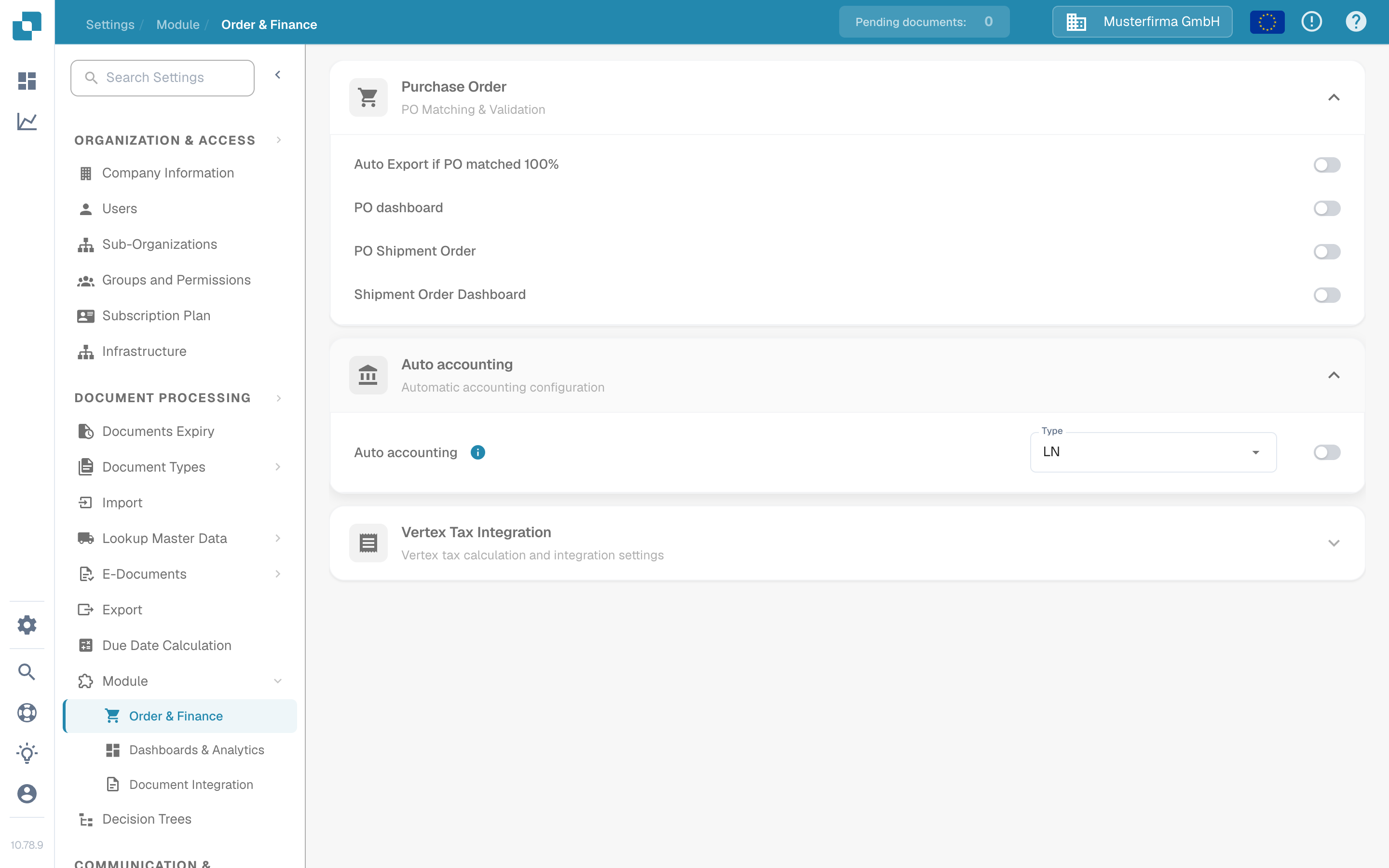
使用管理员账户打开 **Settings → Module → Order & Finance → Auto accounting**。**Type** 菜单提供 **LN** 和 **M3**。对于 LN 集成,请确认所选类型为 **LN**。只有在确认目标 LN 公司、BOD 流和已导入的主数据无误后,才启用开关。更改类型或开关可能会影响会计行为,因此请遵循组织的变更流程。
以下英文截图来自合成环境 **DocBits Documentation Test A** Sandbox。在该组织中,已选择 **LN**,且 Auto accounting 处于**关闭**状态。菜单已打开,但未选择其他值;没有保存任何设置。
找到 Auto accounting,并在启用之前确认所选类型。
此 Sandbox 提供 LN 和 M3 两种类型;未更改任何选项。
## 准备 LN 和 ION
1. 确认 LN 公司、会计实体、DocBits 组织和目标环境。与 DocBits 管理员商定当前哪个 API 操作和字段映射将接收科目和维度。请将 API 凭据保存在经批准的密钥存储中,切勿放入截图或 Jira 附件。
2. 在 LN 中配置 BOD 发布并验证发布数据设置。Infor 在其 [LN BOD 发布指南](https://docs.infor.com/ln/10.7.in/en-us/lnolh/help/tc/onlinemanual/000520.html)中介绍了 **BOD Parameters (tcbod0100m000)** 和 **Validate Publishing Data Setup (tcbod0300m000)**。
3. 检查 LN 版本和 DocBits 接收操作所需的名词。先前的示例使用 `Sync.ChartOfAccounts` 和 `Sync.CodeDefinition` 传输会计科目表和维度数据。Infor 的 [Publish Financial Master Data (tfbia0200m000)](https://docs.infor.com/ln/2025.x/en-us/lnolh/tfolh/help/tf/bia/tfbia0200m000.html)列出了会计科目表和 CodeDefinition 选项。只有在指定并批准维度映射后,才会显示某些 CodeDefinition 选项卡。在路由这些文档之前,请确认租户中的确切文档版本和字段。
4. 在 **ION Desk → Connect → Connection Points** 中,将 LN 源连接到经批准的 DocBits API 目标。在 **Data Flows** 中路由所选文档,检查筛选器和映射,然后保存并激活。Infor 区分了[保存流与激活流](https://docs.infor.com/inforos/latest/en-us/useradminlib_cloud/iondeskceug/lsm1436532178755.html)。
5. 在 LN 中使用非敏感测试标识符。在 **Publish Financial Master Data** 中,先使用 **Count** 或 **Simulate** 检查所选内容,然后仅在管理员批准的变更流程下使用 **Publish**。发布操作并非针对特定目标:Infor 表示,它会将数据发送给所有订阅方。请在 [ION OneView](https://docs.infor.com/inforos/latest/en-us/useradminlib_cloud/iondeskceug/lsm1436532196155.html)中跟踪该标识符及任何错误。
## 确认 DocBits 中的结果
请 DocBits 管理员在当前导入日志或 API 日志中验证接收到的记录、组织和会计字段。如果相关查找表已开放,请在 **Settings → Document Processing → Lookup Master Data** 下搜索同一标识符。ION 流成功激活本身并不能证明 DocBits 已接受记录。如果缺少某个值,请先比较源 BOD、ION 映射、API 响应和目标组织,再启用自动会计。
本次端到端测试无法使用 LN 租户或实时财务 BOD 传输。新的 Sandbox 图片仅验证当前 DocBits 控件。租户管理员必须验证最终映射和会计结果。
---
# Agent Instructions
This documentation is published with GitBook. GitBook is the documentation platform designed so that both humans and AI agents can read, navigate, and reason over technical content effectively. Learn more at gitbook.com.
## Querying This Documentation
If you need additional information that is not directly available in this page, you can query the documentation by asking a question.
Perform an HTTP GET request on the following URL with the `ask` and `goal` query parameters:
```
GET https://docs.docbits.com/chinese/infor-ji-cheng-yu-pei-zhi/importing-customer-master-data/ln/auto-accounting.md?ask=&goal=
```
`ask` is the immediate question: it should be specific, self-contained, and written in natural language.
`goal` is what the user is ultimately trying to achieve, the reason they need the answer. Sharing it helps GitBook give you a better, more relevant answer. A goal is most helpful when it describes the outcome the user wants rather than restating the question. For example, with `ask=how do I create an API token`, a goal like `automate deployments from our CI pipeline` lets GitBook tailor the answer to that use case.
The response will contain a direct answer to the question and relevant excerpts and sources from the documentation.
Use this mechanism when the answer is not explicitly present in the current page, you need clarification or additional context, or you want to retrieve related documentation sections.