> For the complete documentation index, see [llms.txt](https://docs.docbits.com/llms.txt). Markdown versions of documentation pages are available by appending `.md` to page URLs; this page is available as [Markdown](https://docs.docbits.com/chinese/guan-li-yu-she-zhi/workflow/standard-workflow-builder/standard-workflow/purchase-invoice-2nd-approval-unit-price.md).
# 采购发票 - 单价二次审批
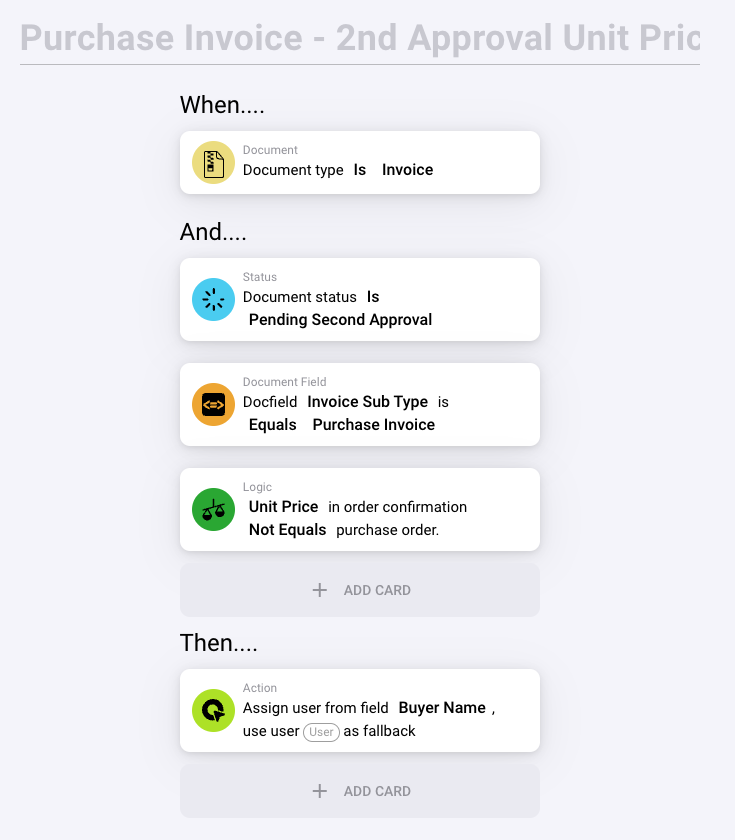
此标题表示该规则用于管理采购发票的第二审批阶段,重点是验证单价。
#### 规则配置:
1. **当……**
* **文档类型为 Invoice**:此条件确保规则仅对被识别为发票的文档触发,从而筛除其他文档类型,确保工作流适用。
2. **并且……**
* **文档状态为 Pending Second Approval**:这表示发票正处于等待二次审批的阶段。此步骤通常用于在最终处理前进行额外审核。
* **文档字段 Invoice Sub Type 等于 Purchase Invoice**:此条件进一步将规则的适用范围限定为分类为“采购发票”的发票,以区别于其他发票子类型。
* **逻辑:order confirmation 中的 Unit Price 不等于 purchase order**:此逻辑检查至关重要,它会比较订单确认中的单价与原始采购订单中的单价。如果两者不匹配,就会触发操作,这可能表明存在需要解决的差异。
#### 操作(然后……):
* **从 Buyer Name 字段分配用户;使用 User 作为备用用户**:如果满足指定条件(即单价不匹配),系统会自动将发票分配给买方(即“Buyer Name”字段中指定的人员)以供进一步审核。如果“Buyer Name”字段为空或未指定,则会分配默认用户(可能是管理员或其他指定员工)作为备用人员来处理审批。
#### 此规则的目的:
* **确保准确性和合规性**:此规则对于确保发票处理准确并符合约定条款至关重要。发现单价差异时触发审核,有助于系统防止财务错误或潜在欺诈。
* **简化审批流程**:根据特定差异自动分配审核任务,有助于简化审批流程,并确保相关人员及时处理问题。
* **加强财务监督**:要求进行二次审批,尤其是基于价格匹配的二次审批,可以强化组织内部的财务控制和问责机制。
---
# Agent Instructions
This documentation is published with GitBook. GitBook is the documentation platform designed so that both humans and AI agents can read, navigate, and reason over technical content effectively. Learn more at gitbook.com.
## Querying This Documentation
If you need additional information that is not directly available in this page, you can query the documentation by asking a question.
Perform an HTTP GET request on the following URL with the `ask` and `goal` query parameters:
```
GET https://docs.docbits.com/chinese/guan-li-yu-she-zhi/workflow/standard-workflow-builder/standard-workflow/purchase-invoice-2nd-approval-unit-price.md?ask=&goal=
```
`ask` is the immediate question: it should be specific, self-contained, and written in natural language.
`goal` is what the user is ultimately trying to achieve, the reason they need the answer. Sharing it helps GitBook give you a better, more relevant answer. A goal is most helpful when it describes the outcome the user wants rather than restating the question. For example, with `ask=how do I create an API token`, a goal like `automate deployments from our CI pipeline` lets GitBook tailor the answer to that use case.
The response will contain a direct answer to the question and relevant excerpts and sources from the documentation.
Use this mechanism when the answer is not explicitly present in the current page, you need clarification or additional context, or you want to retrieve related documentation sections.