> For the complete documentation index, see [llms.txt](https://docs.docbits.com/llms.txt). Markdown versions of documentation pages are available by appending `.md` to page URLs; this page is available as [Markdown](https://docs.docbits.com/chinese/guan-li-yu-she-zhi/workflow/standard-workflow-builder/standard-workflow/purchase-invoice-2nd-approval-quantity-export.md).
# 采购发票 - 第二次审批数量导出
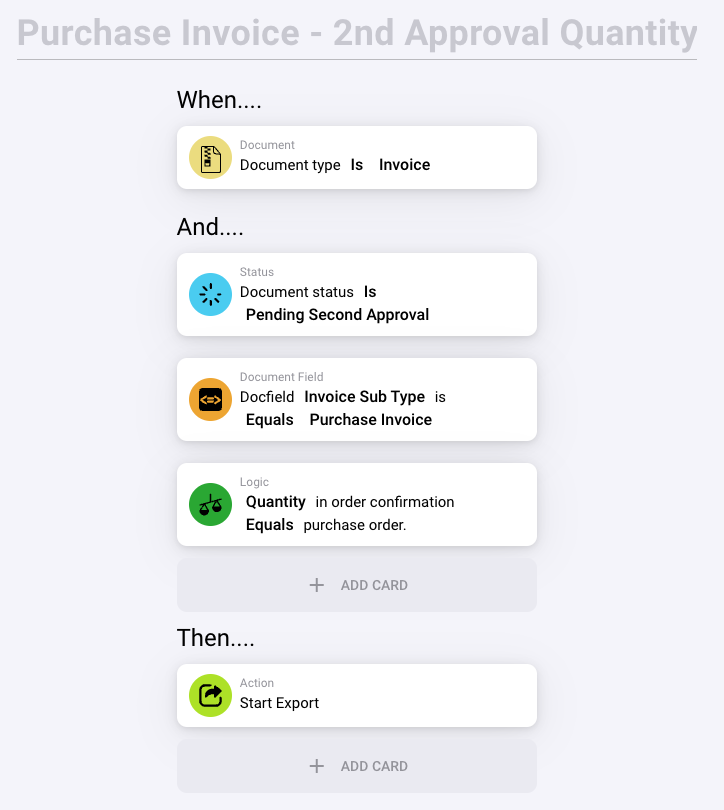
此标题表示该规则用于管理采购发票的第二次审批阶段,重点关注数量明细,确保发票上的数量与原始采购订单上的数量一致。
#### 规则配置:
1. **当……**
* **文档类型为发票**:此条件确保规则仅对标记为发票的文档启用,这对于准确引导工作流至关重要。
2. **并且……**
* **文档状态为待第二次审批**:这表示该发票当前正在等待第二次审批。此阶段通常会增加额外的审核,以确保交易最终完成前的准确性。
* **文档字段“发票子类型”等于“采购发票”**:此条件进一步限定,规则仅适用于分类为“采购发票”的发票,从而将其与其他类型的发票区分开来。
* **逻辑:订单确认中的数量等于采购订单中的数量**:此条件会检查订单确认中列出的数量是否与采购订单中的数量一致。它确保只有在数量一致时,发票处理才会继续,这对库存管理和财务准确性至关重要。
#### 操作(然后……):
* **开始导出**:发票满足指定条件(即订单确认与采购订单中的数量一致)后,将触发“开始导出”操作。这可能涉及导出发票数据以供进一步处理,例如发送到其他财务系统或用于报告。
#### 此规则的用途:
* **确保准确性和一致性**:通过验证订单确认与采购订单中的数量是否一致,系统有助于保持库存准确,并防止可能影响财务报告或库存管理的差异。
* **简化财务处理**:确认数量后自动导出数据,可减少人工处理,加快财务处理周期。
* **加强合规性和监督**:要求进行第二次审批以核实数量,可增加一层监督,这对于遵守财务政策和控制要求至关重要。
此规则清楚地展示了如何有效运用工作流自动化,在组织内精准、高效地处理财务文档,尤其适用于涉及大量交易且需要细致验证的采购流程。
---
# Agent Instructions
This documentation is published with GitBook. GitBook is the documentation platform designed so that both humans and AI agents can read, navigate, and reason over technical content effectively. Learn more at gitbook.com.
## Querying This Documentation
If you need additional information that is not directly available in this page, you can query the documentation by asking a question.
Perform an HTTP GET request on the following URL with the `ask` and `goal` query parameters:
```
GET https://docs.docbits.com/chinese/guan-li-yu-she-zhi/workflow/standard-workflow-builder/standard-workflow/purchase-invoice-2nd-approval-quantity-export.md?ask=&goal=
```
`ask` is the immediate question: it should be specific, self-contained, and written in natural language.
`goal` is what the user is ultimately trying to achieve, the reason they need the answer. Sharing it helps GitBook give you a better, more relevant answer. A goal is most helpful when it describes the outcome the user wants rather than restating the question. For example, with `ask=how do I create an API token`, a goal like `automate deployments from our CI pipeline` lets GitBook tailor the answer to that use case.
The response will contain a direct answer to the question and relevant excerpts and sources from the documentation.
Use this mechanism when the answer is not explicitly present in the current page, you need clarification or additional context, or you want to retrieve related documentation sections.