> For the complete documentation index, see [llms.txt](https://docs.docbits.com/llms.txt). Markdown versions of documentation pages are available by appending `.md` to page URLs; this page is available as [Markdown](https://docs.docbits.com/chinese/guan-li-yu-she-zhi/setup/watchdog.md).
# WatchDog
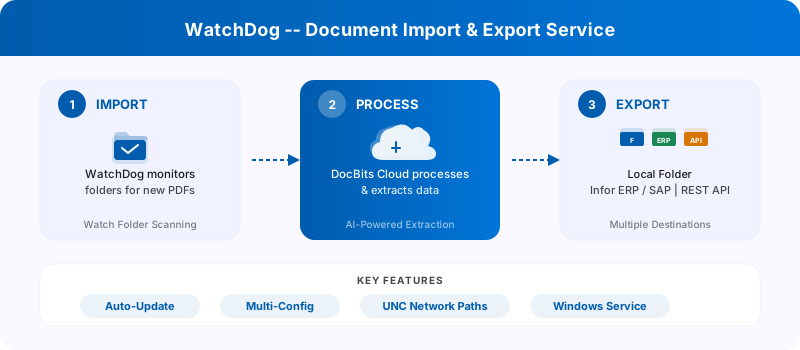
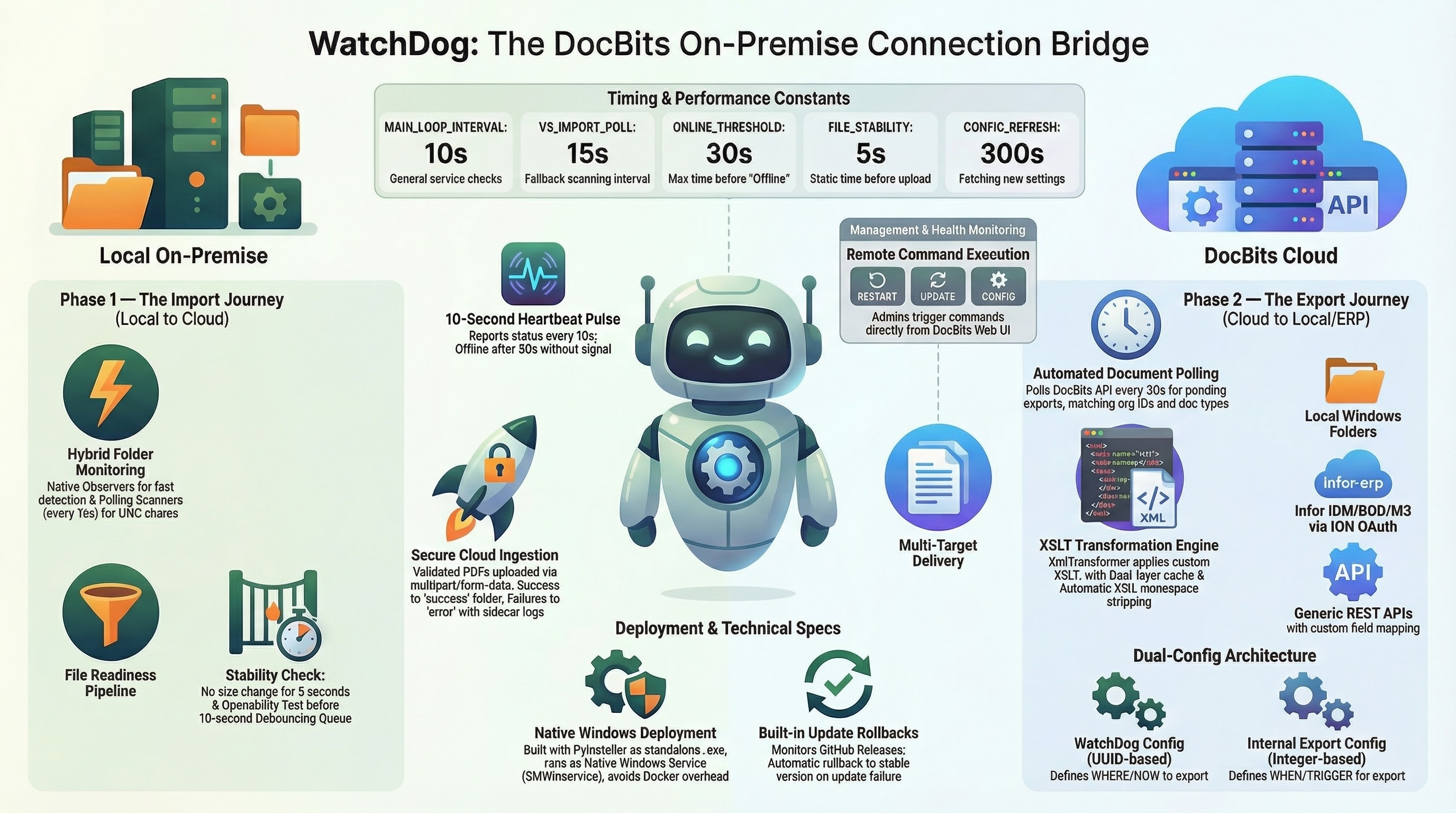
**WatchDog** 是一项基于 Windows 的本地部署服务,可监控本地文件夹中的新文档,将其上传到 DocBits Cloud 进行处理,并将处理完成的文档导出到本地文件夹或 ERP 系统。
## 主要功能
* **自动监控文件夹** — 监控本地路径和 UNC 网络路径中的新 PDF 文件
* **支持多种配置** — 每个实例支持多个导入和导出配置
* **6 种导出方式** — 本地文件夹、Infor IDM、Infor BOD、ION API、GLS840MI、REST API
* **自动更新** — 自动更新版本,失败时回滚
* **远程管理** — 通过 DocBits 界面重启、更新和配置
## 快速入门
### 1. 下载 WatchDog
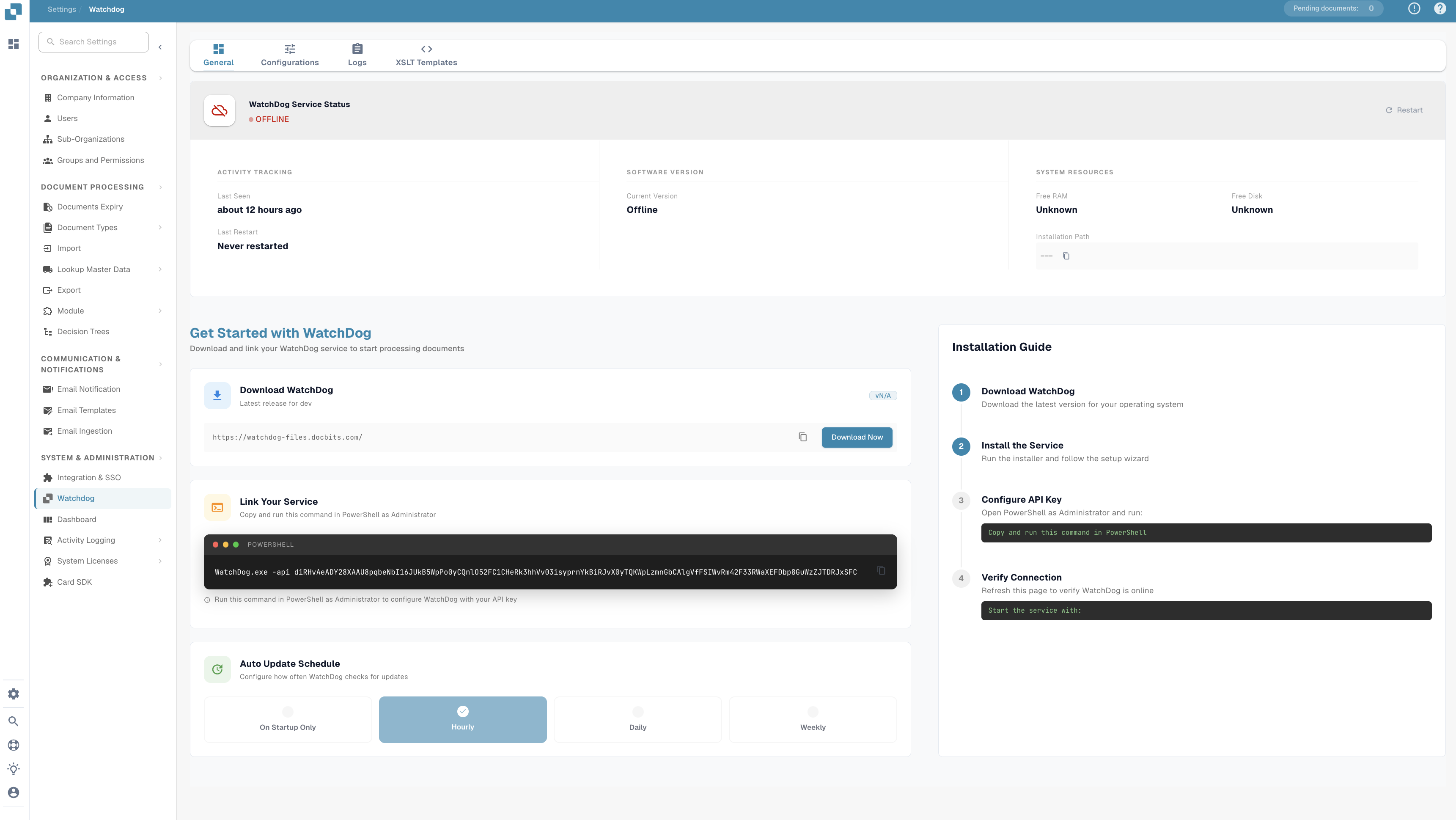
在 DocBits 应用的 **设置 → 文档处理 → WatchDog → 常规选项卡** 中下载 `WatchDog.exe`。
### 2. 使用 API 密钥进行配置
以管理员身份打开 **命令提示符** 并运行:
```powershell
WatchDog.exe -api YOUR_API_KEY
```
> **注意:** API 密钥可在 DocBits 的 WatchDog 常规选项卡下的设置中找到。此密钥用于将 WatchDog 连接到您的 DocBits 组织。
### 3. 安装为 Windows 服务
```powershell
WatchDog.exe install
WatchDog.exe start
```
### 4. 在 DocBits 中创建配置
所有导入和导出配置都直接在 **DocBits 应用** 中创建:
**设置 → 文档处理 → WatchDog → 配置选项卡**
* **导入配置** — 定义监控文件夹和文档类型
* **导出配置** — 定义导出目标、XSLT 模板和导出方式
> **重要:** 导出配置必须指定**文档类型**(`doc_type`)。未指定文档类型的配置将被拒绝。
### 5. 自动启动(可选)
如需在启动时自动启动 WatchDog:
1. 打开 **服务**(`Win + R` → `services.msc`)
2. 在列表中找到 **WatchDog**
3. 将**启动类型**设为**自动(延迟启动)**
## 命令参考
| 命令 | 描述 |
| ----------------------------- | --------------------- |
| `WatchDog.exe -api KEY` | 配置 API 密钥并连接到 DocBits |
| `WatchDog.exe install` | 安装为 Windows 服务 |
| `WatchDog.exe start` | 启动服务 |
| `WatchDog.exe stop` | 停止服务 |
| `WatchDog.exe debug` | 以控制台模式运行以进行故障排查 |
| `WatchDog.exe --version` | 显示当前版本 |
| `WatchDog.exe --list-folders` | 列出已配置的监控文件夹 |
| `WatchDog.exe remove` | 卸载服务 |
## 更多资源
* [WatchDog 安装](/chinese/guan-li-yu-she-zhi/setup/watchdog/watchdog-installation.md)
* [WatchDog 配置](/chinese/guan-li-yu-she-zhi/setup/watchdog/watchdog-v2-configuration.md)
* [WatchDog 管理员常见问题](/chinese/guan-li-yu-she-zhi/setup/watchdog/watchdog-admin-faq.md)
---
# Agent Instructions
This documentation is published with GitBook. GitBook is the documentation platform designed so that both humans and AI agents can read, navigate, and reason over technical content effectively. Learn more at gitbook.com.
## Querying This Documentation
If you need additional information that is not directly available in this page, you can query the documentation by asking a question.
Perform an HTTP GET request on the following URL with the `ask` and `goal` query parameters:
```
GET https://docs.docbits.com/chinese/guan-li-yu-she-zhi/setup/watchdog.md?ask=&goal=
```
`ask` is the immediate question: it should be specific, self-contained, and written in natural language.
`goal` is what the user is ultimately trying to achieve, the reason they need the answer. Sharing it helps GitBook give you a better, more relevant answer. A goal is most helpful when it describes the outcome the user wants rather than restating the question. For example, with `ask=how do I create an API token`, a goal like `automate deployments from our CI pipeline` lets GitBook tailor the answer to that use case.
The response will contain a direct answer to the question and relevant excerpts and sources from the documentation.
Use this mechanism when the answer is not explicitly present in the current page, you need clarification or additional context, or you want to retrieve related documentation sections.