> For the complete documentation index, see [llms.txt](https://docs.docbits.com/llms.txt). Markdown versions of documentation pages are available by appending `.md` to page URLs; this page is available as [Markdown](https://docs.docbits.com/chinese/guan-li-yu-she-zhi/settings/global-settings/integration/api-key-management.md).

# API 密钥管理

如何查找和创建 API 密钥，以便其他系统访问 DocBits

API 密钥可让其他系统（例如 ERP、脚本或合作伙伴应用程序）无需用户登录即可与 DocBits 通信。您的组织可以根据需要创建任意数量的密钥，并分别管理每个密钥：为密钥命名、决定是否设置有效期，以及在密钥泄露时单独撤销。

每个集成都可以使用自己的密钥，因此您可以单独停用某个密钥，而不影响其他密钥。

## 打开 API 密钥管理

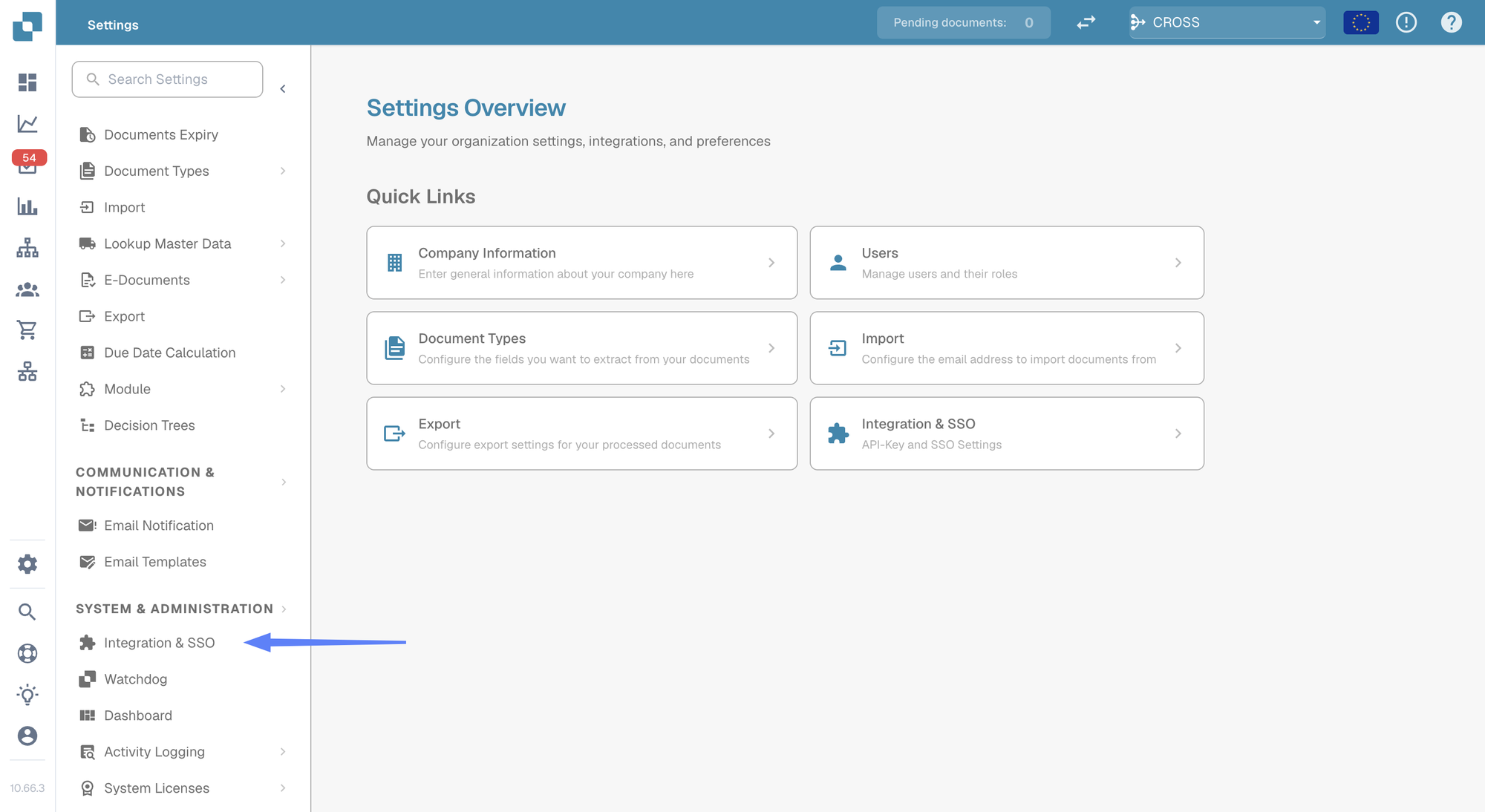
前往 **Settings**，然后在 **System & Administration** 下选择 **Integration & SSO**。

<figure><img src="https://1870485400-files.gitbook.io/~/files/v0/b/gitbook-x-prod.appspot.com/o/spaces%2FlPczlNw8zzYNLfjfispX%2Fuploads%2Fgit-blob-9164f34163b7f0c6ce1871eea9f3971aa415db74%2Fapi-key-settings-overview.png?alt=media" alt="设置概览，左侧菜单中的 Integration &#x26; SSO 已突出显示"><figcaption><p>Settings → Integration &#x26; SSO</p></figcaption></figure>

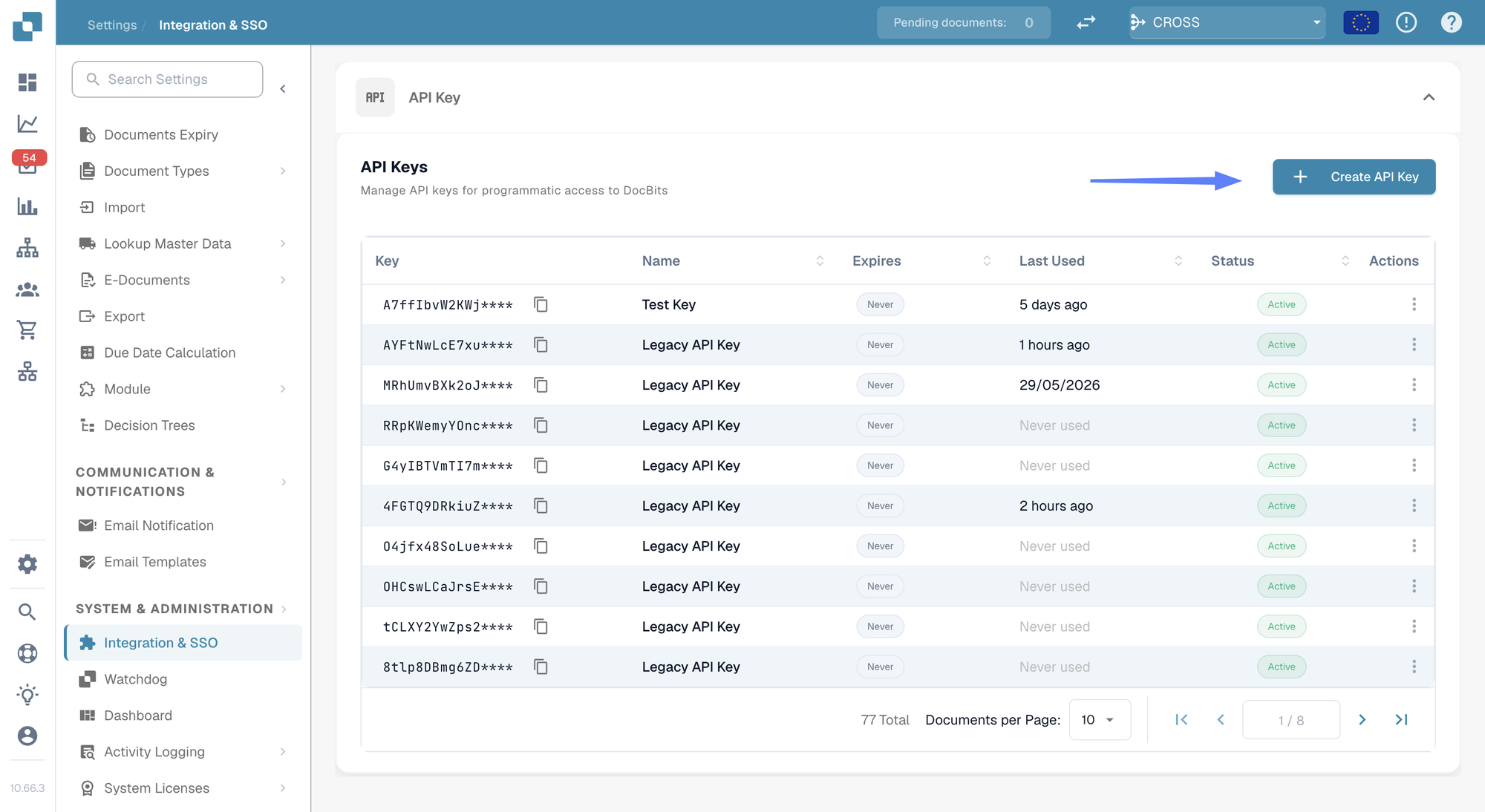
页面顶部的 **API Key** 部分会列出您组织的所有密钥。

<figure><img src="https://1870485400-files.gitbook.io/~/files/v0/b/gitbook-x-prod.appspot.com/o/spaces%2FlPczlNw8zzYNLfjfispX%2Fuploads%2Fgit-blob-80e9141204557807c68da305b23ed60a6ffa6938%2Fapi-key-list.png?alt=media" alt="API Keys 列表，Create API Key 按钮已突出显示"><figcaption><p>API Keys 列表</p></figcaption></figure>

## 了解列表

<figure><img src="https://1870485400-files.gitbook.io/~/files/v0/b/gitbook-x-prod.appspot.com/o/spaces%2FlPczlNw8zzYNLfjfispX%2Fuploads%2Fgit-blob-6ec0d07fbb68518af275ea5f33af60f85a9c80ae%2Fapi-key-list-row.png?alt=media" alt="API 密钥列表中的单行内容"><figcaption><p>每行显示一个密钥</p></figcaption></figure>

| 列             | 说明                                                                          |
| ------------- | --------------------------------------------------------------------------- |
| **Key**       | 密钥的前几个字符，后接 `****`。创建密钥后，系统不会再次显示其余部分，请参阅[创建 API 密钥](#creating-an-api-key)。 |
| **Name**      | 您为密钥指定的名称，下方会显示其描述。                                                         |
| **Expires**   | 密钥停止工作的日期；如果未设置有效期，则显示 **Never**。                                           |
| **Last Used** | 最近一次使用此密钥发送请求的时间。**Never used** 表示尚无系统使用过此密钥，有助于找出可以安全删除的密钥。                |
| **Status**    | **Active** 表示密钥可用。已撤销的密钥将被永久停用。                                             |
| **Actions**   | 三点菜单，可在其中撤销密钥。                                                              |

如果密钥数量超过单页显示范围，请使用列表底部的分页控件。

{% hint style="info" %}
**Last Used** 是查找无人再需要的密钥最快捷的方式。从未使用过或数月未使用的密钥，通常可以考虑撤销。
{% endhint %}

## 创建 API 密钥 <a href="#creating-an-api-key" id="creating-an-api-key"></a>

1. 点击 API Keys 部分右上方的 **+ Create API Key**。
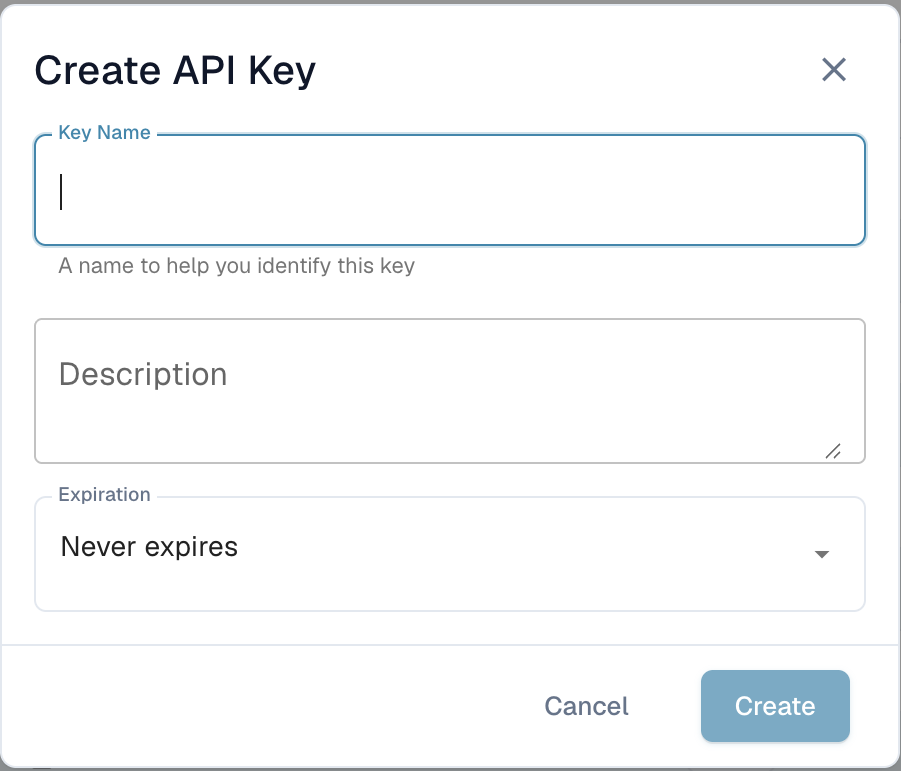
2. 填写对话框：

<figure><img src="https://1870485400-files.gitbook.io/~/files/v0/b/gitbook-x-prod.appspot.com/o/spaces%2FlPczlNw8zzYNLfjfispX%2Fuploads%2Fgit-blob-4477a249adfbb5b2b7756defc547dbc305dc5736%2Fapi-key-create-dialog.png?alt=media" alt="Create API Key 对话框"><figcaption><p>创建新密钥</p></figcaption></figure>

| 字段              | 填写内容                                                                         |
| --------------- | ---------------------------------------------------------------------------- |
| **Key Name**    | 必填。请使用将要使用此密钥的系统名称，例如 `M3 Production`、`Invoice Import Script`，以便日后识别密钥对应的集成。 |
| **Description** | 选填。可备注密钥的用途或设置者。                                                             |
| **Expiration**  | 选择到期日期，或保留 **Never expires**。设置到期日期更安全：如果日后忘记了该集成，密钥也会自动失效。                  |

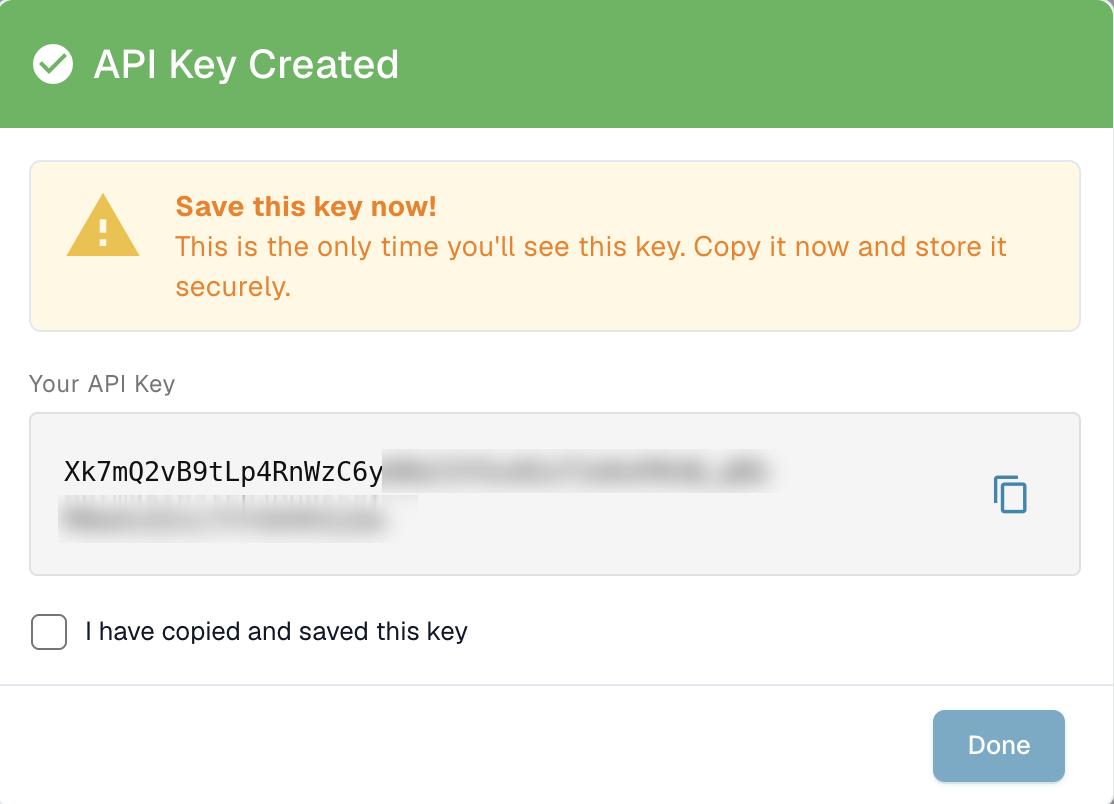
3. 点击 **Create**。DocBits 会显示新密钥：

<figure><img src="https://1870485400-files.gitbook.io/~/files/v0/b/gitbook-x-prod.appspot.com/o/spaces%2FlPczlNw8zzYNLfjfispX%2Fuploads%2Fgit-blob-9c8c746b746d75d3c22f5a7d96d71151c5d61a1f%2Fapi-key-created.png?alt=media" alt="API Key Created 对话框，仅显示一次完整密钥"><figcaption><p>完整密钥仅在此时显示</p></figcaption></figure>

4. 点击复制图标复制密钥，然后直接粘贴到将使用该密钥的系统中，或粘贴到密码管理器中。
5. 勾选 **I have copied and saved this key**，然后点击 **Done**。

{% hint style="danger" %}
**完整密钥仅显示一次。** DocBits 只存储密钥的单向哈希值和一小段用于识别的前缀。管理员和 DocBits 支持人员都无法根据该哈希值取回原始完整密钥。如果您丢失了密钥，请撤销该密钥并创建一个新密钥。
{% endhint %}

请像对待密码一样妥善保管密钥。任何持有密钥的人都可以操作您组织的文档和数据。

有关密码哈希、TLS、供应商可见性，以及 DocBits 密钥与已连接系统凭据之间的区别，请参阅[凭据的安全存储](/chinese/gai-shu-yu-ji-chu/secure-storage-of-credentials.md)。


---

# Agent Instructions
This documentation is published with GitBook. GitBook is the documentation platform designed so that both humans and AI agents can read, navigate, and reason over technical content effectively. Learn more at gitbook.com.

## Querying This Documentation
If you need additional information that is not directly available in this page, you can query the documentation by asking a question.

Perform an HTTP GET request on the following URL with the `ask` and `goal` query parameters:

```
GET https://docs.docbits.com/chinese/guan-li-yu-she-zhi/settings/global-settings/integration/api-key-management.md?ask=<question>&goal=<user_goal>
```

`ask` is the immediate question: it should be specific, self-contained, and written in natural language.
`goal` is what the user is ultimately trying to achieve, the reason they need the answer. Sharing it helps GitBook give you a better, more relevant answer. A goal is most helpful when it describes the outcome the user wants rather than restating the question. For example, with `ask=how do I create an API token`, a goal like `automate deployments from our CI pipeline` lets GitBook tailor the answer to that use case.

The response will contain a direct answer to the question and relevant excerpts and sources from the documentation.

Use this mechanism when the answer is not explicitly present in the current page, you need clarification or additional context, or you want to retrieve related documentation sections.