> For the complete documentation index, see [llms.txt](https://docs.docbits.com/llms.txt). Markdown versions of documentation pages are available by appending `.md` to page URLs; this page is available as [Markdown](https://docs.docbits.com/chinese/guan-li-yu-she-zhi/settings/global-settings/groups-users-and-permissions/users/login-analytics.md).
# 登录分析
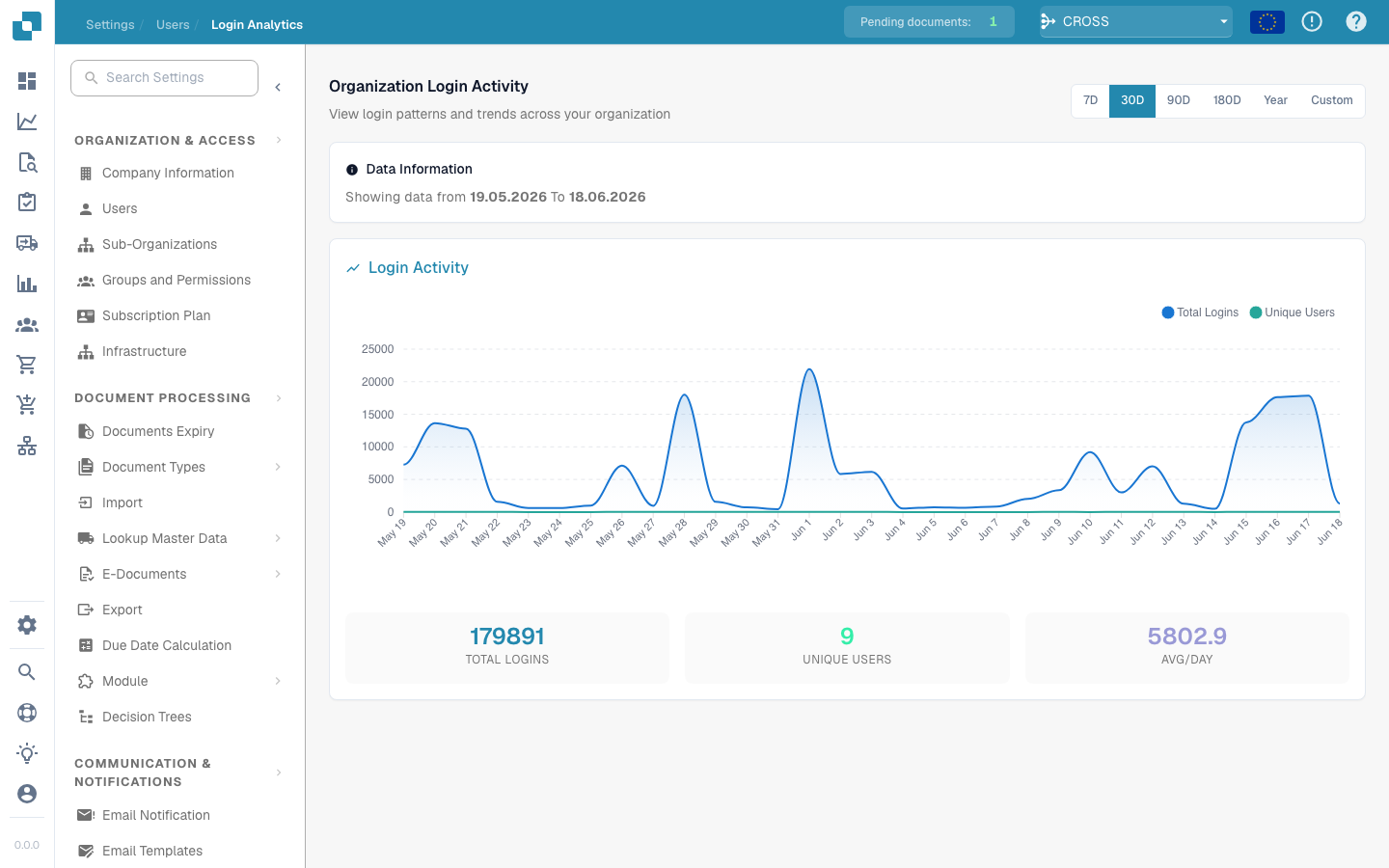
**登录分析**为管理员提供一个只读的组织级视图,展示用户*何时*以及*多久*登录一次 DocBits。它可以回答“登录量是否在增长?”“本月有多少位不同的用户处于活跃状态?”以及“使用高峰出现在什么时候?”等问题,同时不会暴露任何用户的凭据或个人数据。
> \*\*访问方式:\*\*打开 **设置 → 组织与访问权限 → 用户**,然后点击右上角的 **登录分析** 按钮(`/settings/login-analytics`)。
所选时间段内的组织登录活动
## 时间范围
使用右上角的选择器选择要分析的时间段:**7D**、**30D**、**90D**、**180D**、**Year** 或 **Custom**(可自由选择日期范围)。页面上的所有内容——图表和摘要卡片——都会根据所选时间段重新计算。
**数据信息**横幅会显示当前查看的确切时间范围(例如 *显示 19.05.2026 至 18.06.2026 的数据*),让您始终清楚这些数字涵盖哪些日期。
## 登录活动图表
图表展示所选时间段内的两个数据系列:
| 数据系列 | 含义 |
| --------- | -------------------- |
| **总登录次数** | 每天的登录次数,包括同一用户的重复登录。 |
| **独立用户数** | 当天登录的*不同*用户数量。 |
将鼠标悬停在任意数据点上,即可查看当天的确切数值。峰值表示最繁忙的日期;如果**独立用户数**曲线较平稳,而**总登录次数**曲线波动明显,则表示少数用户进行了多次登录。
## 摘要卡片
图表下方的三张卡片汇总了整个所选时间段的数据:
| 卡片 | 含义 |
| ---------- | --------------- |
| **总登录次数** | 此时间段内的所有登录次数。 |
| **独立用户数** | 至少登录过一次的不同用户数量。 |
| **日均登录次数** | 此时间段内每天的平均登录次数。 |
## 隐私
登录分析仅报告**汇总**数据——组织整体的次数和趋势。它不会列出单个用户、电子邮件地址或 IP 地址。若要查看或编辑某个人的账户,请改用[用户](/chinese/guan-li-yu-she-zhi/settings/global-settings/groups-users-and-permissions/users.md)页面。
---
# Agent Instructions
This documentation is published with GitBook. GitBook is the documentation platform designed so that both humans and AI agents can read, navigate, and reason over technical content effectively. Learn more at gitbook.com.
## Querying This Documentation
If you need additional information that is not directly available in this page, you can query the documentation by asking a question.
Perform an HTTP GET request on the following URL with the `ask` and `goal` query parameters:
```
GET https://docs.docbits.com/chinese/guan-li-yu-she-zhi/settings/global-settings/groups-users-and-permissions/users/login-analytics.md?ask=&goal=
```
`ask` is the immediate question: it should be specific, self-contained, and written in natural language.
`goal` is what the user is ultimately trying to achieve, the reason they need the answer. Sharing it helps GitBook give you a better, more relevant answer. A goal is most helpful when it describes the outcome the user wants rather than restating the question. For example, with `ask=how do I create an API token`, a goal like `automate deployments from our CI pipeline` lets GitBook tailor the answer to that use case.
The response will contain a direct answer to the question and relevant excerpts and sources from the documentation.
Use this mechanism when the answer is not explicitly present in the current page, you need clarification or additional context, or you want to retrieve related documentation sections.