> For the complete documentation index, see [llms.txt](https://docs.docbits.com/llms.txt). Markdown versions of documentation pages are available by appending `.md` to page URLs; this page is available as [Markdown](https://docs.docbits.com/chinese/guan-li-yu-she-zhi/settings/global-settings/document-types/rule-conditions-applies-when.md).

# 规则条件（应用条件）

## 概述

DocBits 的每项规则功能中都有一个 **Applies when**（应用条件）部分。它决定**规则适用于哪些文档（对于表格规则，则适用于哪些行）**。规则的实际任务——触发验证错误、更改值、选择布局——只有在条件为真时才会执行。

以下三项规则功能使用相同的条件构建器：

| 功能                                                                                                                     | 构建器中的标签                                | 条件为真时……                 | 条件为假时……          | 留空时……                    |
| ---------------------------------------------------------------------------------------------------------------------- | -------------------------------------- | ----------------------- | ---------------- | ------------------------ |
| [自定义验证规则](/chinese/guan-li-yu-she-zhi/settings/global-settings/document-types/custom-validation-rules.md)              | 步骤 2 **Applies when**                  | 执行步骤 3 中的检查             | 跳过规则——不显示错误或警告   | 对每份文档都执行检查               |
| [转换规则](/chinese/guan-li-yu-she-zhi/settings/global-settings/document-types/transformation-rules.md)                    | 步骤 2 **When it runs** → **Only when…** | 工作流会更改该值                | 保留原值             | 选择 **Always**：对每份文档都执行规则 |
| [布局选择规则](/chinese/guan-li-yu-she-zhi/settings/global-settings/document-types/layout-manager/layout-selection-rules.md) | 步骤 2 **Applies when**                  | 文档会使用此规则的布局（优先采用第一个匹配项） | DocBits 会尝试下一条规则 | 该规则会在其优先级下匹配每份文档         |

在这里了解一次，就能在各处使用。

{% hint style="info" %}
条件只决定规则**是否**适用。条件本身不会更改数据，也不会显示消息。“供应商税号必须填写”是验证规则的**检查**；“仅适用于德国发票”是它的**条件**。
{% endhint %}

## 阅读条件

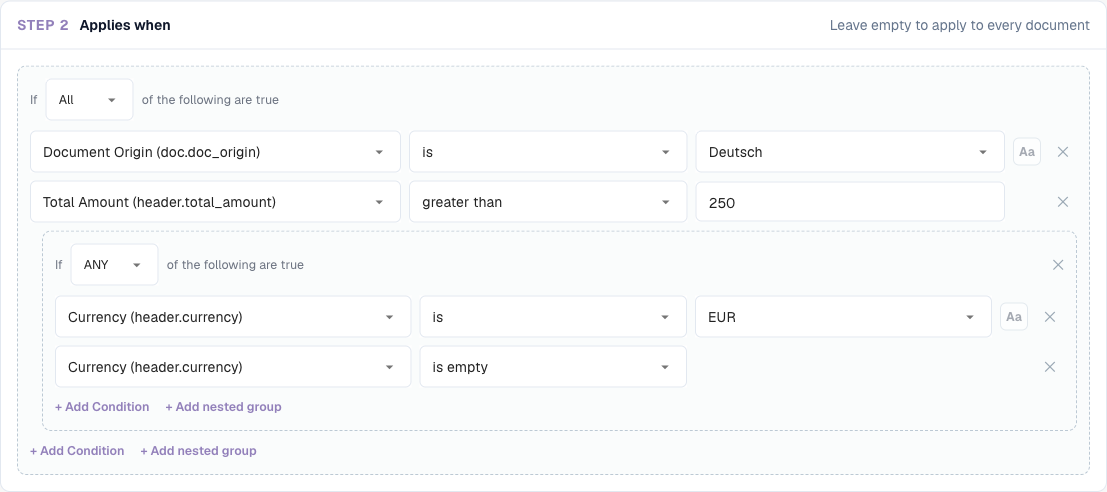
条件读起来就像一个句子。下面的构建器表示：

> **如果以下条件全部成立（ALL）**：Document Origin **is** Deutsch、Total Amount **greater than** 250，并且（以下条件**任意一项成立（ANY）**：Currency **is** EUR、Currency **is empty**）。

<figure><img src="https://1870485400-files.gitbook.io/~/files/v0/b/gitbook-x-prod.appspot.com/o/spaces%2FlPczlNw8zzYNLfjfispX%2Fuploads%2Fgit-blob-8606cf1d4cf9f4d8190516c68cf39de040bd0edf%2Fapplies-when-nested-example.png?alt=media" alt="包含两行条件和一个嵌套 ANY 组的条件"><figcaption><p>两个条件通过 ALL 组合，并包含一个通过 ANY 组合的嵌套组</p></figcaption></figure>

满足该条件时，规则适用于以下文档：

| 文档 | 来源 | 总金额    | 币种    | 是否适用？ | 原因             |
| -- | -- | ------ | ----- | ----- | -------------- |
| A  | DE | 469.18 | EUR   | **是** | 三个部分都为真        |
| B  | DE | 469.18 | *(空)* | **是** | ANY 组为真，因为币种为空 |
| C  | DE | 120.00 | EUR   | 否     | 120 不大于 250    |
| D  | DE | 469.18 | USD   | 否     | ANY 组的两行条件都不成立 |
| E  | AT | 469.18 | EUR   | 否     | 来源不是 DE        |

## 基本组成部分

### 条件行

每行包含四个部分：

| 部分           | 含义                                                                                 |
| ------------ | ---------------------------------------------------------------------------------- |
| **Field**    | 要检查的值：文档属性、标题字段、表格列或 JSON 路径。请参阅[可用字段](#fields-you-can-use)。                       |
| **Operator** | 比较值的方式——*is*、*contains*、*greater than*、*is empty* 等。请参阅[运算符](#operators)。          |
| **Value**    | 用来与字段比较的值。选择 *is empty* / *is not empty* 时，此项会隐藏。对于值列表固定的字段（来源、状态、币种等），请从下拉列表中选择值。 |
| **Aa**       | 忽略大小写。仅适用于文本比较。启用后，`gmbh` 会匹配 `GmbH`。                                              |

点击 **✕** 可移除一行。

### ALL 和 ANY

组开头的选择器决定如何组合其中的条件行：

* 以下条件\*\*全部（All）\*\*成立——每一行都必须为真（AND）。
* 以下条件\*\*任意一项（ANY）\*\*成立——至少有一行必须为真（OR）。

### 嵌套组

点击 **+ Add nested group** 可在组内添加一个组。嵌套组在父组中计为一行，因此可以混合使用 AND 和 OR：

* *ALL of*：来源为 DE，**ANY of**（币种为 EUR，币种为空）
* *ANY of*：供应商为 10040，**ALL of**（供应商为 20723，总金额大于 1000）

组可以根据需要多层嵌套。请保持易读：对于几乎所有业务规则，两层就足够了。

### 空条件

如果不添加任何条件行，则规则没有条件并且**始终适用**（对于布局规则，它会在其优先级下匹配每份文档）。对于必须在所有地方运行的规则，这是合适的选择，例如“清理发票编号前后的空格”或“数量必须为正数”。

## 可用字段 <a href="#fields-you-can-use" id="fields-you-can-use"></a>

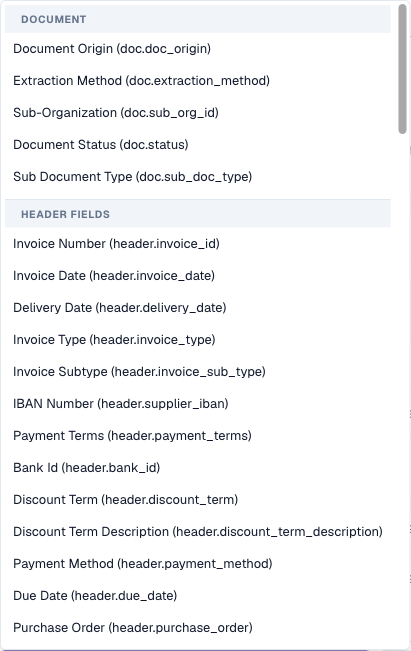
打开字段下拉列表，可以查看按来源分组的所有字段。输入文字可筛选列表。

<figure><img src="https://1870485400-files.gitbook.io/~/files/v0/b/gitbook-x-prod.appspot.com/o/spaces%2FlPczlNw8zzYNLfjfispX%2Fuploads%2Fgit-blob-1a5215ebd0ad0dc609686333aa925b7a7b685d57%2Fapplies-when-field-picker.png?alt=media" alt="包含 Document 和 Header 字段组的字段选择器"><figcaption><p>字段选择器：先显示文档属性，然后显示文档类型的标题字段</p></figcaption></figure>

### 文档属性（`doc.`）

DocBits 掌握的文档自身信息，与提取字段无关：

| 选择器中的字段               | 键                       | 示例值                                                             | 典型用途                                |
| --------------------- | ----------------------- | --------------------------------------------------------------- | ----------------------------------- |
| **Document Origin**   | `doc.doc_origin`        | `DE`、`AT`、`US`（显示为 Deutsch、Austria、United States）               | 按国家设置规则和布局                          |
| **Extraction Method** | `doc.extraction_method` | `ELECTRONIC_DOCUMENT`、`FELLOW_KV2`、`MANUAL`                     | 区别处理电子发票（XRechnung、ZUGFeRD）和扫描版 PDF |
| **Document Status**   | `doc.status`            | Ready for validation、Pending Approval、Pending second approval 等 | 按工作流阶段设置布局；设置仅在审批前适用的规则             |
| **Sub Document Type** | `doc.sub_doc_type`      | 您的子类型，例如贷项通知单                                                   | 仅适用于一种子类型的规则                        |

### 标题字段（`header.`）

文档类型中的每个字段，例如 **Invoice Number**（`header.invoice_id`）、**Supplier ID**（`header.supplier_id`）、**Total Amount**（`header.total_amount`）、**Currency**（`header.currency`）、**Supplier Tax ID**（`header.supplier_tax_id`）、**Purchase Order**（`header.purchase_order`）。选择器会显示标签，并在括号中显示技术键。使用的值是该字段当前的值，包括用户所做的更正。

### 表格列（`row.`）

当前表格行中的列，例如 `row.QUANTITY` 或 `row.ITEM_NUMBER`。在每行执行一次的规则中，选择器才会在 **Table columns**（表格列）下显示这些字段：

* **Table line**（表格行）级别的验证规则
* **Table column**（表格列）范围的转换规则

在这些规则中，系统会**分别检查每一行**的条件。不匹配的行会被跳过；其他行仍会继续处理。

<figure><img src="https://1870485400-files.gitbook.io/~/files/v0/b/gitbook-x-prod.appspot.com/o/spaces%2FlPczlNw8zzYNLfjfispX%2Fuploads%2Fgit-blob-89d99002ed3a9fc10589599b03229fa9fce1906d%2Fapplies-when-row-condition.png?alt=media" alt="一项行条件：ITEM_NUMBER 不为空"><figcaption><p>逐行条件：仅检查包含项目编号的行</p></figcaption></figure>

每份文档只运行一次的规则（标题规则、整张表格规则、布局规则）不能使用 `row.` 字段，因为没有单独的一行可供检查。

### 自定义 JSON 路径（高级）

在选择器底部，选择 **Advanced → Custom JSON path…** 会将字段转换为标记为 `$path` 的自由文本框。它可以读取文档提取数据中的任意位置的值，即使该值不属于文档类型中的字段。

<figure><img src="https://1870485400-files.gitbook.io/~/files/v0/b/gitbook-x-prod.appspot.com/o/spaces%2FlPczlNw8zzYNLfjfispX%2Fuploads%2Fgit-blob-11b9c8fcf4a8999bfc99d0ce6f8d360ab42ca6c5%2Fapplies-when-json-path.png?alt=media" alt="JSON 路径条件"><figcaption><p>针对文档导入渠道的 JSON 路径条件</p></figcaption></figure>

* 路径以 `$` 开头，用 `.name` 表示键，用 `[0]` 表示列表位置，例如 `$.metadata.import_channel` 或 `$.shipping.addresses[0].country`。
* 路径必须以单个值结尾。如果路径以列表或对象结尾，则会被视为空值。
* JSON 路径条件行提供 *is*、*is not*、*matches*、*is empty* 和 *is not empty* 运算符。

请谨慎使用 JSON 路径。它们依赖提取数据的内部结构；使用文档类型字段更容易理解和维护。

### 各类字段的适用范围

|                | 验证：标题字段 | 验证：表格行 | 验证：整张表格 | 转换：标题 / 路由 / 表格行 | 转换：表格列 | 布局选择 |
| -------------- | ------- | ------ | ------- | ---------------- | ------ | ---- |
| `doc.` 文档属性    | ✓       | ✓      | ✓       | ✓                | ✓      | ✓    |
| `header.` 标题字段 | ✓       | ✓      | ✓       | ✓                | ✓      | ✓    |
| `row.` 表格列     | –       | ✓      | –       | –                | ✓      | –    |
| `$` JSON 路径    | ✓       | ✓      | ✓       | ✓                | ✓      | ✓    |

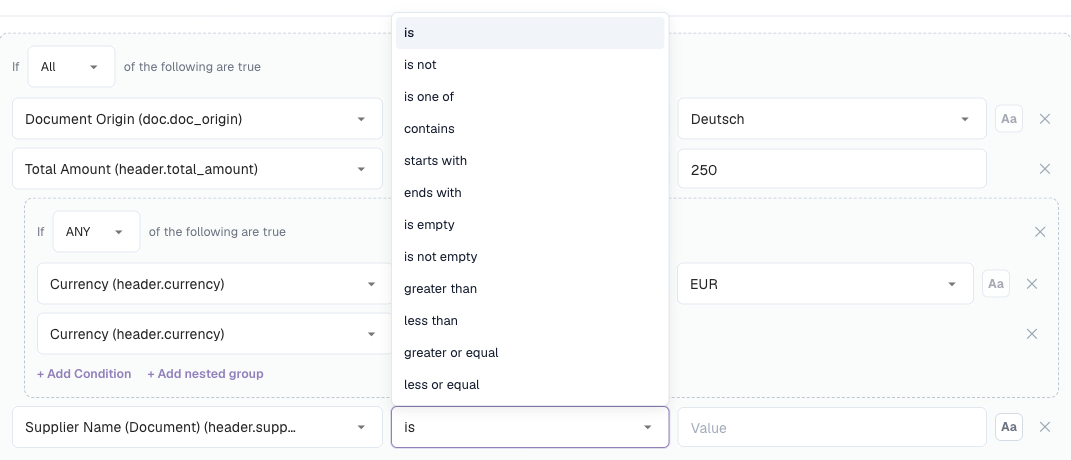
## 运算符 <a href="#operators" id="operators"></a>

<figure><img src="https://1870485400-files.gitbook.io/~/files/v0/b/gitbook-x-prod.appspot.com/o/spaces%2FlPczlNw8zzYNLfjfispX%2Fuploads%2Fgit-blob-108203680e40831122bde102f4d1222cd6321636%2Fapplies-when-text-operators.png?alt=media" alt="文本字段的运算符列表"><figcaption><p>文本字段可用的运算符</p></figcaption></figure>

| 运算符                                      | 条件为真时……         | 值         | 示例                                              |
| ---------------------------------------- | --------------- | --------- | ----------------------------------------------- |
| **is**                                   | 字段等于该值          | 一个值       | Supplier ID **is** `20723`                      |
| **is not**                               | 字段不等于该值         | 一个值       | Currency **is not** `EUR`                       |
| **is one of**                            | 字段等于列表中的任意一个值   | 用逗号分隔的多个值 | Supplier ID **is one of** `10040, 10041, 20723` |
| **contains**                             | 该值出现在字段中的任意位置   | 文本        | Supplier Name **contains** `GmbH`               |
| **starts with**                          | 字段以该值开头         | 文本        | Invoice Number **starts with** `GS-`            |
| **ends with**                            | 字段以该值结尾         | 文本        | Purchase Order **ends with** `-IT`              |
| **matches**                              | 正则表达式在字段中找到匹配项  | 正则表达式     | Invoice Number **matches** `^INV-\d{6}$`        |
| **is empty**                             | 字段没有值（缺失或仅包含空格） | –         | Purchase Order **is empty**                     |
| **is not empty**                         | 字段有值            | –         | Purchase Order **is not empty**                 |
| **greater than** / **less than**         | 字段是大于 / 小于该值的数字 | 数字        | Total Amount **greater than** `10000`           |
| **greater or equal** / **less or equal** | 与上面相同，但也包括该值本身  | 数字        | Total Amount **less or equal** `250`            |

### 字段提供的运算符

运算符列表会根据字段类型调整：

| 字段类型                                        | 运算符                                                                                   |
| ------------------------------------------- | ------------------------------------------------------------------------------------- |
| 文本                                          | 所有运算符                                                                                 |
| 数字和金额（Total Amount、Quantity 等）              | is、is not、greater than、less than、greater or equal、less or equal、is empty、is not empty |
| 值列表固定的字段（Document Origin、Status、Currency 等） | is、is not、is one of、is empty、is not empty                                             |
| 日期（Invoice Date、Due Date 等）                 | is、is not、is empty、is not empty                                                       |
| 是 / 否                                       | is、is not、is empty、is not empty                                                       |
| 自定义 JSON 路径                                 | is、is not、matches、is empty、is not empty                                               |

{% hint style="warning" %}
**条件中无法使用&#x20;*****before*****&#x20;或&#x20;*****after*****&#x20;比较日期。**“到期日晚于发票日期”或“发票日期距今超过 90 天”应作为验证规则的**检查**（**Compare fields**），而不是写在 *Applies when* 中。
{% endhint %}

## 值的比较方式

了解以下规则可以避免大多数意外情况：

1. **数字按数值比较。** 如果两边看起来都是数字，`250`、`250.00` 和 `250,00` 相等。系统可以识别 `1.234,56` 这类符合区域格式的金额。
2. **其他所有值都按文本比较，并移除首尾空格。** `" EUR "` 等于 `EUR`。
3. **大小写会影响比较结果**，除非启用了 **Aa**（忽略大小写）。
4. **空值有特殊规则。** 字段缺失或为空时：
   * 对 **is empty** 和 **is not**，条件为真；
   * 对 **is**、**is one of**、**contains**、**starts with**、**ends with**、**matches** 和所有数字比较，条件为假。

{% hint style="warning" %}
由于规则 4，*Currency **is not** EUR* 对**没有币种**的文档也会返回真。如果这不是您想要的结果，请添加第二行 *Currency **is not empty***。
{% endhint %}

{% hint style="info" %}
由于规则 1，即使看起来像代码的值，也会按数值比较：`007` **is** `7` 的结果为真。如果代码中的前导零有意义，请使用 **matches** 并设置类似 `^007$` 的模式。
{% endhint %}

## 示例

**仅适用于德国文档** — `Document Origin` **is** `Deutsch`。

**仅适用于电子发票** — `Extraction Method` **is** `ELECTRONIC_DOCUMENT`。例如，对于用于修复 OCR 错误的规则，可使用 **is not** 将电子发票排除在外。

**一组供应商** — `Supplier ID` **is one of** `10040, 10041, 20723`。

{% hint style="info" %}
对于值通过下拉列表选择的字段（来源、状态、币种），**is one of** 只能让您选择一个条目。要接受多个值，请创建一个 **ANY** 组，并为每个值添加一行 **is** 条件。
{% endhint %}

**某个供应商的高金额发票** — **All of**：`Supplier ID` **is** `20723`，`Total Amount` **greater than** `10000`。

**没有采购订单的发票** — `Purchase Order` **is empty**。这是“成本中心必填”规则的典型条件。

**除贷项通知单之外的所有文档** — `Invoice Type` **is not** `credit_note`（请使用您的组织在该字段中存储的值）。

**通过电子邮件接收的发票** — 自定义 JSON 路径 `$.metadata.import_channel` **is** `EMAIL`。

**仅处理物料行**（表格行 / 表格列规则）— `row.ITEM_NUMBER` **is not empty**。没有物料编号的运费或折扣行会被跳过。

**第二审批阶段**（Approval 屏幕上的布局规则）— `Document Status` **is** `Pending second approval`。

**欧盟货币或币种为空** — **All of**：`Document Origin` **is** `Deutsch`，**ANY of**（`Currency` **is** `EUR`，`Currency` **is empty**）。这就是本页开头展示的条件。

## 测试和调试条件

每项功能都允许您在依赖条件之前先试用：

* **验证规则** — **Test rule** 会对真实文档运行规则。“*Rule skipped — scope not matched*”表示该文档的条件为假。请参阅[Test rule](/chinese/guan-li-yu-she-zhi/settings/global-settings/document-types/custom-validation-rules.md#test-rule)。
* **转换规则** — **Live preview** 中提供 **Condition values**：为条件中的每个字段输入一个值，然后查看“*Conditions match — rule runs*”或“*Conditions do not match — rule is skipped*”。
* **布局选择规则** — **Live preview · /resolve** 面板会显示示例文档匹配了哪条规则。

### 查看日志中的条件跟踪 <a href="#read-the-condition-trace-in-the-logs" id="read-the-condition-trace-in-the-logs"></a>

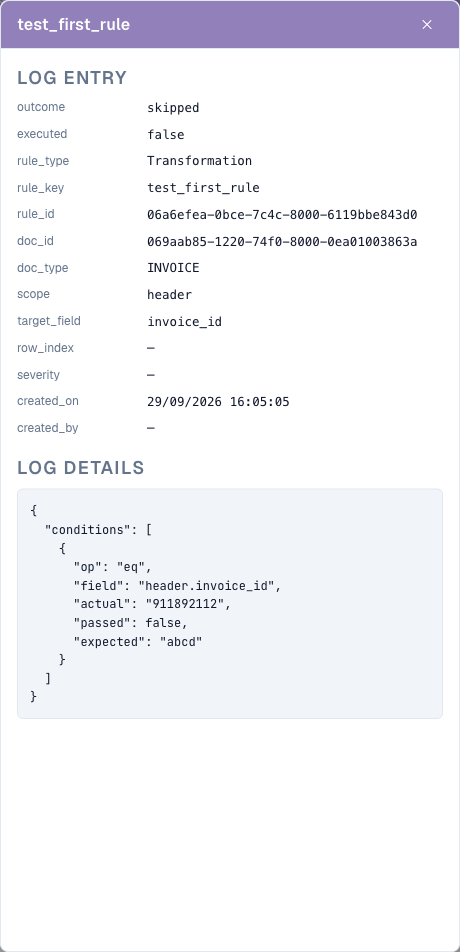
在规则中启用 **Log execution**。系统随后会将每次评估写入 **Document Types → (document type) → Logs**。打开一个条目，在 **Log details** 下可以查看每一行条件、规则预期的值、文档实际具有的值，以及该条件行是否通过。

<figure><img src="https://1870485400-files.gitbook.io/~/files/v0/b/gitbook-x-prod.appspot.com/o/spaces%2FlPczlNw8zzYNLfjfispX%2Fuploads%2Fgit-blob-3c4046b951bdac1c77f68a6f6cba36ae26e8d141%2Frule-execution-log-detail.png?alt=media" alt="包含条件跟踪的日志条目"><figcaption><p>该日志条目说明规则为何被跳过：规则预期值为 <code>abcd</code>，文档中的值为 <code>911892112</code></p></figcaption></figure>

可以按 **Rule key**、**Rule ID** 或 **Document** 搜索日志，也可以按规则类型、结果和日期筛选。完成后请再次关闭 **Log execution**——每次评估都会写入一个条目，而规则会在每次保存时运行。

## 常见错误

| 现象                  | 原因                           | 修复方法                                                  |
| ------------------- | ---------------------------- | ----------------------------------------------------- |
| 规则从不适用              | 值的大小写或拼写不同（`Gmbh` 与 `GmbH`）  | 启用 **Aa**，或从文档中准确复制该值                                 |
| 规则适用于没有该字段的文档       | 空字段也会满足 **is not** 条件        | 添加 *field* **is not empty**                           |
| *greater than* 从不匹配 | 字段不是数字，或者是日期                 | 使用数字字段；在验证检查中比较日期                                     |
| 规则适用于过多文档           | 条件行使用 **ANY** 而不是 **All** 组合 | 检查每个组的选择器                                             |
| 选择器中没有表格列           | 规则对每份文档只运行一次                 | 使用 **Table line** 级别（验证规则）或 **Table column** 范围（转换规则） |
| 条件在预览中有效，但在文档上无效    | 预览使用了您输入的值                   | 对真实文档使用 **Test rule** 进行测试，或检查日志跟踪                    |


---

# Agent Instructions
This documentation is published with GitBook. GitBook is the documentation platform designed so that both humans and AI agents can read, navigate, and reason over technical content effectively. Learn more at gitbook.com.

## Querying This Documentation
If you need additional information that is not directly available in this page, you can query the documentation by asking a question.

Perform an HTTP GET request on the following URL with the `ask` and `goal` query parameters:

```
GET https://docs.docbits.com/chinese/guan-li-yu-she-zhi/settings/global-settings/document-types/rule-conditions-applies-when.md?ask=<question>&goal=<user_goal>
```

`ask` is the immediate question: it should be specific, self-contained, and written in natural language.
`goal` is what the user is ultimately trying to achieve, the reason they need the answer. Sharing it helps GitBook give you a better, more relevant answer. A goal is most helpful when it describes the outcome the user wants rather than restating the question. For example, with `ask=how do I create an API token`, a goal like `automate deployments from our CI pipeline` lets GitBook tailor the answer to that use case.

The response will contain a direct answer to the question and relevant excerpts and sources from the documentation.

Use this mechanism when the answer is not explicitly present in the current page, you need clarification or additional context, or you want to retrieve related documentation sections.