> For the complete documentation index, see [llms.txt](https://docs.docbits.com/llms.txt). Markdown versions of documentation pages are available by appending `.md` to page URLs; this page is available as [Markdown](https://docs.docbits.com/chinese/guan-li-yu-she-zhi/settings/global-settings/document-types/regex/editing-and-saving-regex-patterns.md).

# 编辑和保存正则表达式模式

## 修改现有模式指南，以及测试这些更改以确保其按预期工作且不会破坏现有功能的重要性。

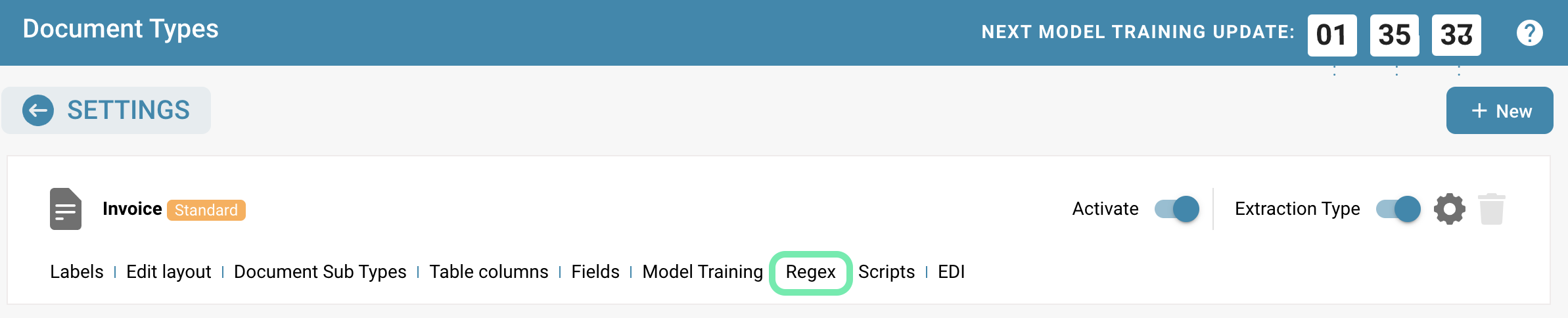
**如需编辑现有正则表达式模式，并确保更改按预期工作且不会破坏现有功能，请参阅以下指南：**

<figure><img src="https://1870485400-files.gitbook.io/~/files/v0/b/gitbook-x-prod.appspot.com/o/spaces%2FlPczlNw8zzYNLfjfispX%2Fuploads%2Fgit-blob-9ab291482253d550b1aad3d3ed1cd6003f8c6af4%2FBildschirmfoto%202024-05-22%20um%2012.46.56.png?alt=media" alt=""><figcaption><p>设置：文档类型</p></figcaption></figure>

<figure><img src="https://1870485400-files.gitbook.io/~/files/v0/b/gitbook-x-prod.appspot.com/o/spaces%2FlPczlNw8zzYNLfjfispX%2Fuploads%2Fgit-blob-84e28bfda70d29bdb6fec2ae0e26eb62d5818348%2FBildschirmfoto%202024-05-22%20um%2014.18.25.png?alt=media" alt=""><figcaption></figcaption></figure>

**分析现有模式：**

* 检查现有正则表达式模式，了解它捕获哪些数据以及其工作方式。
* 确定需要更改的模式部分，以及这些更改对所捕获数据的影响。

**例如：需要读取发票金额：**

* (?<=Rechnungsbetrag:)\[\s]\*((((\d+)\[,.]{1,10})+\d{0,2})|(\d+(?!,)))

  Rechnungsbetrag: 100.00
* 读取带千位分隔点的金额，但不要传递该点

  \[\d.]*\[,\d]*

  允许的字符：0123456789,
* 需要读取值“P32180”。此处的锚定词是“Invoice Date”。

  (?<=InvoiceDate )\[\s]\*P\d{5}

  Customer number Invoice number Invoice date P32180 613976 05/13/2019

<figure><img src="https://1870485400-files.gitbook.io/~/files/v0/b/gitbook-x-prod.appspot.com/o/spaces%2FlPczlNw8zzYNLfjfispX%2Fuploads%2Fgit-blob-21a2cf5e920d9c63b49ad069532dfd079d577a54%2Fimage%20(223).png?alt=media" alt=""><figcaption></figcaption></figure>

**记录更改：**

* 记录计划对正则表达式模式所做的更改。
* 说明计划添加哪些新模式，以及现有模式的哪些部分可能需要更改或移除。

**准备测试数据：**

* 收集能够代表正则表达式模式通常捕获的不同类型数据的测试数据。
* 确保测试数据涵盖常见情况和边缘情况，以验证更改的稳健性。

**更改正则表达式模式：**

* 按计划更改正则表达式模式。
* 这可能包括添加新模式、移除或调整现有部分，或优化模式以提升性能。

**测试更改：**

* 将更新后的正则表达式模式应用于测试数据，并仔细检查结果。
* 验证该模式仍能正确捕获所需数据，且不会对数据或系统的其他部分造成意外影响。

**调试和调整：**

* 如果测试结果不符合预期或出现意外问题，请仔细检查所做的更改，并根据需要进一步调整。
* 这可能包括还原某些更改，或添加额外调整以解决问题。

**记录更改：**

* 更新正则表达式模式的文档，反映所做的更改。
* 描述更新后的模式和更改原因，帮助其他开发人员理解并使用该模式。

**保存更改：**

* 确认更改成功且按预期工作后，将更新后的正则表达式模式保存到代码库或配置文件中，以便日后使用。

<figure><img src="https://1870485400-files.gitbook.io/~/files/v0/b/gitbook-x-prod.appspot.com/o/spaces%2FlPczlNw8zzYNLfjfispX%2Fuploads%2Fgit-blob-420936e02e6c0b681213eeb296d68d3ea22c298f%2Fimage%20(224).png?alt=media" alt=""><figcaption><p>保存更改</p></figcaption></figure>

按照这些步骤并仔细测试正则表达式模式的更改，可确保模式持续正常工作，同时满足新的需求。


---

# Agent Instructions
This documentation is published with GitBook. GitBook is the documentation platform designed so that both humans and AI agents can read, navigate, and reason over technical content effectively. Learn more at gitbook.com.

## Querying This Documentation
If you need additional information that is not directly available in this page, you can query the documentation by asking a question.

Perform an HTTP GET request on the following URL with the `ask` and `goal` query parameters:

```
GET https://docs.docbits.com/chinese/guan-li-yu-she-zhi/settings/global-settings/document-types/regex/editing-and-saving-regex-patterns.md?ask=<question>&goal=<user_goal>
```

`ask` is the immediate question: it should be specific, self-contained, and written in natural language.
`goal` is what the user is ultimately trying to achieve, the reason they need the answer. Sharing it helps GitBook give you a better, more relevant answer. A goal is most helpful when it describes the outcome the user wants rather than restating the question. For example, with `ask=how do I create an API token`, a goal like `automate deployments from our CI pipeline` lets GitBook tailor the answer to that use case.

The response will contain a direct answer to the question and relevant excerpts and sources from the documentation.

Use this mechanism when the answer is not explicitly present in the current page, you need clarification or additional context, or you want to retrieve related documentation sections.