> For the complete documentation index, see [llms.txt](https://docs.docbits.com/llms.txt). Markdown versions of documentation pages are available by appending `.md` to page URLs; this page is available as [Markdown](https://docs.docbits.com/chinese/guan-li-yu-she-zhi/settings/global-settings/document-types/more-settings.md).

# 更多设置

## 概述

**更多设置**包含属于某一种文档类型的选项，例如发票。在此处启用的设置仅适用于该文档类型。本页面由多个可折叠卡片组成，每张卡片对应一个主题。展开卡片即可查看其中的设置。

<figure><img src="https://1870485400-files.gitbook.io/~/files/v0/b/gitbook-x-prod.appspot.com/o/spaces%2FlPczlNw8zzYNLfjfispX%2Fuploads%2Fgit-blob-77d17c4acd01cf0683cc75906611102a878d1d4b%2Fdoc-type-settings-overview.png?alt=media" alt="发票文档类型的“更多设置”页面卡片"><figcaption><p>“更多设置”页面中的卡片，当前均已折叠。</p></figcaption></figure>

## 如何访问

1. 前往 **Settings** → **Global Settings** → **Document Types**。
2. 选择文档类型，然后点击 **More Settings**。

页面顶部的面包屑显示 **Settings / Document Types / More Settings**。页面右侧的设置助手会说明当前展开卡片中的设置。

| 卡片                                                                                                                                      | 可在此设置的内容                           |
| --------------------------------------------------------------------------------------------------------------------------------------- | ---------------------------------- |
| [Purchase Order](#purchase-order)                                                                                                       | 采购订单匹配、容差、采购订单行导出、供应商物料编号          |
| [Manage Layouts](#manage-layouts-custom-validation-rules-and-transformation-rules)                                                      | “Manage Layouts”概览的开关              |
| [Custom Validation Rules](#manage-layouts-custom-validation-rules-and-transformation-rules)                                             | 此文档类型的自定义验证规则                      |
| [Transformation Rules](#manage-layouts-custom-validation-rules-and-transformation-rules)                                                | 读取一个值、分步更改并写回的规则                   |
| [Approval & Rejection](#approval-and-rejection)                                                                                         | 审批工作流以及审核中和拒绝表单                    |
| [Vertex Tax Verification](/chinese/guan-li-yu-she-zhi/settings/global-settings/document-types/more-settings/vertex-tax-verification.md) | 设计 Vertex 税务验证表单                   |
| [E-Invoice Validation](#e-invoice-validation)                                                                                           | 验证 XRechnung、ZUGFeRD 和 Factur-X 发票 |
| [Table Extraction](#table-extraction)                                                                                                   | 跳过提取表格的验证                          |
| [Export Settings](#export-settings)                                                                                                     | 多次导出、PDF 格式、备用导出                   |
| [Duplicate Detection](#duplicate-detection)                                                                                             | 检测并阻止重复文档                          |

## Purchase Order <a href="#purchase-order" id="purchase-order"></a>

**Purchase Order** 卡片（**PO Matching & Validation**）用于控制此类型的文档如何与采购订单匹配。

<figure><img src="https://1870485400-files.gitbook.io/~/files/v0/b/gitbook-x-prod.appspot.com/o/spaces%2FlPczlNw8zzYNLfjfispX%2Fuploads%2Fgit-blob-4c3be28f028c98485e5c03568d04e2178f72d05e%2Fdoc-type-settings-po-options.png?alt=media" alt="包含多个开关的 Purchase Order 卡片"><figcaption><p>包含各项选项的 Purchase Order 卡片。</p></figcaption></figure>

* [**Purchase Order**](/chinese/guan-li-yu-she-zhi/settings/global-settings/document-types/more-settings/purchase-order/purchase-order.md)：切换是否在“Purchase Order Matching”屏幕中处理该文档。你也可以指定匹配所依据的数量。
* [**PO match server side**](/chinese/guan-li-yu-she-zhi/settings/global-settings/document-types/more-settings/purchase-order/purchase-order-matching-rules.md)：使用可配置的规则集进行匹配。点击 **Configure PO Matching Rules** 可打开[规则页面](/chinese/guan-li-yu-she-zhi/settings/global-settings/document-types/more-settings/purchase-order/purchase-order-matching-rules.md)。
* [**PO table in layout builder**](/chinese/guan-li-yu-she-zhi/settings/global-settings/document-types/more-settings/purchase-order/po-table-in-layout-builder.md)：允许在布局生成器中加入采购订单表格，以自定义文档布局。
* [**Auto check for PO updates**](/chinese/guan-li-yu-she-zhi/settings/global-settings/document-types/more-settings/purchase-order/auto-check-for-po-updates.md)：当采购订单已更新时，在“Purchase Order Matching”屏幕中显示视觉提示，提醒用户刷新。
* **Auto update PO data**：有新数据时自动更新采购订单数据。此开关属于 **Auto check for PO updates**。
* [**Consumed PO line status**](/chinese/guan-li-yu-she-zhi/settings/global-settings/document-types/more-settings/purchase-order/consumed-po-line-status.md)：在匹配屏幕中为采购订单行应用颜色标记。
* [**Calculate PO unit price**](/chinese/guan-li-yu-she-zhi/settings/global-settings/document-types/more-settings/purchase-order/calculate-po-unit-price.md)：使用净金额和数量计算采购订单单价，而不是提取单价。
* [**Export not matched PO lines**](/chinese/guan-li-yu-she-zhi/settings/global-settings/document-types/more-settings/purchase-order/export-not-matched-po-lines.md)：关闭时仅导出已匹配的行。开启时导出所有采购订单行，即使它们尚未匹配。
* **Ignore Already Matched Lines**：在新的匹配过程中跳过已匹配的行。
* [**Update Document Purchase Order Status**](/chinese/guan-li-yu-she-zhi/settings/global-settings/document-types/more-settings/purchase-order/update-document-purchase-order-status.md)：每当采购订单状态发生变化时，更新仪表板上的 PO Status 列。
* [**Allow Auto Export For Non Matchable PO Lines**, **Auto Match & Export visible to** 和 **Use Lines Net Amount for Matched Total visible to**](/chinese/guan-li-yu-she-zhi/settings/global-settings/document-types/more-settings/purchase-order/auto-match-and-export-options.md)：决定谁可以看到 Auto Match & Export 快捷操作，以及哪些文档可以自动导出。

### 以图表形式查看匹配规则

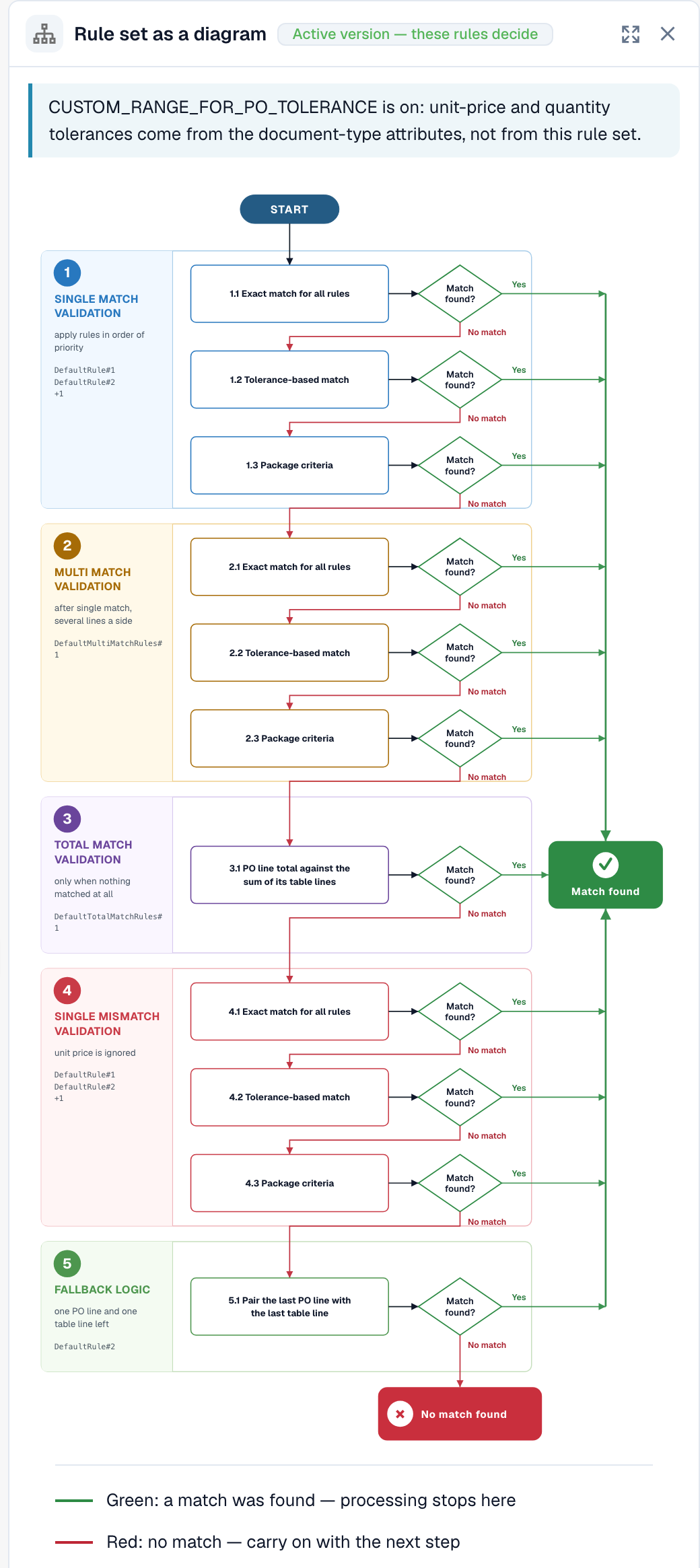
PO 匹配规则不只是一个列表。DocBits 可以将当前启用的规则集绘制成流程图。你可以查看规则的尝试顺序以及匹配在哪一步停止。

1. 在 **Purchase Order** 卡片中开启 **PO match server side**，然后点击 **Configure PO Matching Rules**。
2. 点击页面顶部的 **Rule set as a diagram**。图表将在规则旁边的面板中打开。

<figure><img src="https://1870485400-files.gitbook.io/~/files/v0/b/gitbook-x-prod.appspot.com/o/spaces%2FlPczlNw8zzYNLfjfispX%2Fuploads%2Fgit-blob-632ffd136176b4a806994200f631b56eaf59c052%2Fpo-match-rules-diagram.png?alt=media" alt="规则集图表，包含从单项匹配验证到回退逻辑的五个阶段"><figcaption><p>规则集图表。自上而下共五个阶段。</p></figcaption></figure>

从上到下阅读图表。DocBits 按以下顺序尝试各阶段：**Single match validation**、**Multi match validation**、**Total match validation**、**Single mismatch validation** 和 **Fallback logic**。每个阶段最多尝试三轮：**Exact match for all rules**、**Tolerance-based match** 和 **Package criteria**。绿色箭头表示已找到匹配项，处理随即停止。红色箭头表示未找到匹配项，因此 DocBits 会继续下一步。最后的结果为 **Match found** 或 **No match found**。

图表下方的面板列出 **Rules by priority, per stage**。对于每条规则，你可以看到它比较的列、容差以及 **Auto match**、**Manual match** 和 **Fallback** 选项。

<figure><img src="https://1870485400-files.gitbook.io/~/files/v0/b/gitbook-x-prod.appspot.com/o/spaces%2FlPczlNw8zzYNLfjfispX%2Fuploads%2Fgit-blob-e7de31503be9de319d25b093ad89303006386e55%2Fpo-match-rules-diagram-rules-by-stage.png?alt=media" alt="按阶段和优先级排列的规则列表，显示比较列、容差和规则选项"><figcaption><p>图表下方：各阶段的规则及其比较的列。</p></figcaption></figure>

\*\*示例。\*\*发票行的物料编号为 4711、数量为 10、单价为 10.40。采购订单行的物料编号为 4711、数量为 10、单价为 10.00。单价容差为 5 %。

* 第 **1.1 Exact match for all rules** 轮失败，因为 10.40 不等于 10.00。红色箭头指向下一轮。
* 第 **1.2 Tolerance-based match** 轮成功。差异为 4 %，在 5 % 的容差范围内。绿色箭头指向 **Match found**，处理随即停止。

在图表中，这条路径依次经过 1.1、1.2，然后到达 **Match found**。如需查看单个文档经过的路径，请参阅 [PO matching diagnosis](/chinese/guan-li-yu-she-zhi/analytics-dashboard/touchless-intelligence/touchless-po-matching-diagnosis.md)。如需了解规则页面的全部详情，请参阅 [Purchase Order Matching Rules](/chinese/guan-li-yu-she-zhi/settings/global-settings/document-types/more-settings/purchase-order/purchase-order-matching-rules.md)。

### PO 容差设置

<figure><img src="https://1870485400-files.gitbook.io/~/files/v0/b/gitbook-x-prod.appspot.com/o/spaces%2FlPczlNw8zzYNLfjfispX%2Fuploads%2Fgit-blob-6adff5cc9a1c3e31203c930258817b8f6a6a8d50%2Fdoc-type-settings-po-tolerance.png?alt=media" alt="PO Tolerance Setting 区块，包含数量和单价容差"><figcaption><p>数量和单价的容差。</p></figcaption></figure>

[**PO Tolerance Setting**](/chinese/guan-li-yu-she-zhi/settings/global-settings/document-types/more-settings/purchase-order/purchase-order-tolerance-settings-additional-purchase-order-tolerance.md)允许你为数量和单价设置容差级别，以免较小的差异被标记为不匹配。你可以为每个值选择金额和单位，单位可以是绝对**数值**（**Value**）或百分比（**%**）。此区块还包含用于运费、费用和税款的[**Additional PO Tolerance Setting**](/chinese/guan-li-yu-she-zhi/settings/global-settings/document-types/more-settings/purchase-order/purchase-order-tolerance-settings-additional-purchase-order-tolerance.md#setting-to-configure-additional-purchase-order-tolerance-settings)，以及 [**PO disable statuses**](/chinese/guan-li-yu-she-zhi/settings/global-settings/document-types/more-settings/purchase-order/purchase-order-disable-statuses.md)。

{% hint style="info" %}
当文档类型属性 `CUSTOM_RANGE_FOR_PO_TOLERANCE` 启用时，单价和数量容差取自这些文档类型设置，而非规则集。如果是这种情况，[PO 匹配规则页面](/chinese/guan-li-yu-she-zhi/settings/global-settings/document-types/more-settings/purchase-order/purchase-order-matching-rules.md)上的规则图表会显示提示。
{% endhint %}

### 供应商物料编号映射

<figure><img src="https://1870485400-files.gitbook.io/~/files/v0/b/gitbook-x-prod.appspot.com/o/spaces%2FlPczlNw8zzYNLfjfispX%2Fuploads%2Fgit-blob-d7b98f6ffec33d50b88138370936dd9d5e048eab%2Fdoc-type-settings-po-supplier-item-map.png?alt=media" alt="Supplier Item Number Map 表格"><figcaption><p>Supplier Item Number Map。</p></figcaption></figure>

[**Supplier Item Number Map**](/chinese/guan-li-yu-she-zhi/settings/global-settings/document-types/more-settings/purchase-order/supplier-item-number-map-admin-documentation.md)将供应商物料编号映射到你的内部物料编号，这样即使供应商使用自己的编号，行项目也能匹配。按列搜索即可查找条目。

## Manage Layouts、Custom Validation Rules 和 Transformation Rules <a href="#manage-layouts-custom-validation-rules-and-transformation-rules" id="manage-layouts-custom-validation-rules-and-transformation-rules"></a>

Purchase Order 卡片下方紧接着有三张卡片：

* **Manage Layouts**：为此文档类型启用 Manage Layouts 概览。请参阅 [Layout Manager](/chinese/guan-li-yu-she-zhi/settings/global-settings/document-types/layout-manager.md)。
* **Custom Validation Rules**：启用自定义验证规则。点击 **Manage Validation Rules** 可打开规则。请参阅 [Custom Validation Rules](/chinese/guan-li-yu-she-zhi/settings/global-settings/document-types/custom-validation-rules.md)。
* **Transformation Rules**：启用转换规则。点击 **Manage Transformation Rules** 可打开规则。请参阅 [Transformation Rules](/chinese/guan-li-yu-she-zhi/settings/global-settings/document-types/transformation-rules.md)。

<figure><img src="https://1870485400-files.gitbook.io/~/files/v0/b/gitbook-x-prod.appspot.com/o/spaces%2FlPczlNw8zzYNLfjfispX%2Fuploads%2Fgit-blob-4fa78f8518abd4e39c72b7bde37b4c98890109f9%2Fdoc-type-settings-rule-toggles.png?alt=media" alt="Manage Layouts、Custom Validation Rules 和 Transformation Rules 卡片"><figcaption><p>包含各自开关的三张卡片。</p></figcaption></figure>

## 审批与拒绝 <a href="#approval-and-rejection" id="approval-and-rejection"></a>

**Approval & Rejection** 卡片包含审批工作流，以及用户在审核或拒绝文档时看到的表单。

<figure><img src="https://1870485400-files.gitbook.io/~/files/v0/b/gitbook-x-prod.appspot.com/o/spaces%2FlPczlNw8zzYNLfjfispX%2Fuploads%2Fgit-blob-7358f0397bfda41654920dd876acee604b058d74%2Fdoc-type-settings-approval.png?alt=media" alt="Approval and Rejection 卡片"><figcaption><p>Approval &#x26; Rejection 卡片。</p></figcaption></figure>

* **Approve before export**：文档必须先获得审批才能导出。点击 **Design Approval Form** 可打开用于审批屏幕的 **Layout Builder**。
* **Approve before export V2**：启用 Approval V2，以动态字段替代静态字段。
* **Second Approval**：增加一层审批。
* [**Approval Stamp**](/chinese/guan-li-yu-she-zhi/settings/global-settings/document-types/more-settings/approval/approval-stamp.md)：文档获批时为其添加印章。
* [**Approval History**](/chinese/guan-li-yu-she-zhi/settings/global-settings/document-types/more-settings/approval/approval-history.md)：在审批屏幕和字段验证中显示审批历史记录。
* **Design In Review Form**：使用 **Layout Builder** 配置审核表单的布局。
* **Design Reject Form**：使用 **Layout Builder** 配置拒绝表单的布局。

有关 **Layout Builder**，请参阅 [Layout Manager](/chinese/guan-li-yu-she-zhi/settings/global-settings/document-types/layout-manager.md)。

## Vertex 税务验证

**Vertex Tax Verification** 卡片包含 **Design Vertex Tax Verification**。点击后会打开 Layout Builder，用于设计 DocBits 比较供应商税额和 Vertex 计算税额时用户看到的表单。有关集成、容差和结果，请参阅 [Vertex Tax Verification](/chinese/guan-li-yu-she-zhi/settings/global-settings/document-types/more-settings/vertex-tax-verification.md)。

## 电子发票验证 <a href="#e-invoice-validation" id="e-invoice-validation"></a>

**E-Invoice Validation** 卡片用于启用传入电子发票的验证，并允许你决定供应商在发票被拒绝时是否会收到通知。请参阅 [E-Invoice Validation](/chinese/guan-li-yu-she-zhi/settings/document-processing/e-documents/validation-rules.md)。

## 表格提取 <a href="#table-extraction" id="table-extraction"></a>

<figure><img src="https://1870485400-files.gitbook.io/~/files/v0/b/gitbook-x-prod.appspot.com/o/spaces%2FlPczlNw8zzYNLfjfispX%2Fuploads%2Fgit-blob-1ff823570bc90a3e00517bcdca34477112151edc%2Fdoc-type-settings-table-extraction.png?alt=media" alt="Table Extraction 卡片"><figcaption><p>Table Extraction 卡片。</p></figcaption></figure>

* **Skip table validation**：跳过表格数据的标准验证。当需要灵活处理数据，或跳过某些验证步骤以提高性能时，可使用此选项。

## 导出设置 <a href="#export-settings" id="export-settings"></a>

<figure><img src="https://1870485400-files.gitbook.io/~/files/v0/b/gitbook-x-prod.appspot.com/o/spaces%2FlPczlNw8zzYNLfjfispX%2Fuploads%2Fgit-blob-7ba11cd7fc91bf13d163016e6298fcf9714ed8d0%2Fdoc-type-settings-export-settings.png?alt=media" alt="Export Settings 卡片"><figcaption><p>Export Settings 卡片。</p></figcaption></figure>

* **Multiple Export**：允许多次导出同一文档。
* **Export PDF Format**：**Export File Format** 用于设置导出文档时使用的 PDF 格式，例如 **Original Document**。
* [**Alternate Export**](/chinese/guan-li-yu-she-zhi/settings/global-settings/document-types/more-settings/purchase-order/alternate-export.md)：为指定的文档状态设置备用导出。选择对应的 **Status** 和 **Export Configuration**，然后启用此设置。

## 重复检测 <a href="#duplicate-detection" id="duplicate-detection"></a>

<figure><img src="https://1870485400-files.gitbook.io/~/files/v0/b/gitbook-x-prod.appspot.com/o/spaces%2FlPczlNw8zzYNLfjfispX%2Fuploads%2Fgit-blob-42aa7df4b3a0da4c378f0e8e5b9a79f4edabb405%2Fdoc-type-settings-duplicate-detection.png?alt=media" alt="Duplicate Detection 卡片"><figcaption><p>Duplicate Detection 卡片。</p></figcaption></figure>

此卡片包含 **Duplicate Document Detection**，其中的字段用于确定重复文档的判定条件和比较文档的时间间隔；此外还包含 **Duplicate Invoice Detection**、**Block Duplicate Document Export** 和 **Ignore Tax Free Line** 选项。这三项都带有 **Recommended** 标签。有关如何处理被标记的文档，请参阅 [Duplicate Detection](/chinese/guan-li-yu-she-zhi/settings/global-settings/document-types/more-settings/duplicate-document-handling.md)。


---

# Agent Instructions
This documentation is published with GitBook. GitBook is the documentation platform designed so that both humans and AI agents can read, navigate, and reason over technical content effectively. Learn more at gitbook.com.

## Querying This Documentation
If you need additional information that is not directly available in this page, you can query the documentation by asking a question.

Perform an HTTP GET request on the following URL with the `ask` and `goal` query parameters:

```
GET https://docs.docbits.com/chinese/guan-li-yu-she-zhi/settings/global-settings/document-types/more-settings.md?ask=<question>&goal=<user_goal>
```

`ask` is the immediate question: it should be specific, self-contained, and written in natural language.
`goal` is what the user is ultimately trying to achieve, the reason they need the answer. Sharing it helps GitBook give you a better, more relevant answer. A goal is most helpful when it describes the outcome the user wants rather than restating the question. For example, with `ask=how do I create an API token`, a goal like `automate deployments from our CI pipeline` lets GitBook tailor the answer to that use case.

The response will contain a direct answer to the question and relevant excerpts and sources from the documentation.

Use this mechanism when the answer is not explicitly present in the current page, you need clarification or additional context, or you want to retrieve related documentation sections.