> For the complete documentation index, see [llms.txt](https://docs.docbits.com/llms.txt). Markdown versions of documentation pages are available by appending `.md` to page URLs; this page is available as [Markdown](https://docs.docbits.com/chinese/guan-li-yu-she-zhi/settings/global-settings/document-types/fields.md).
# 字段
## 概述
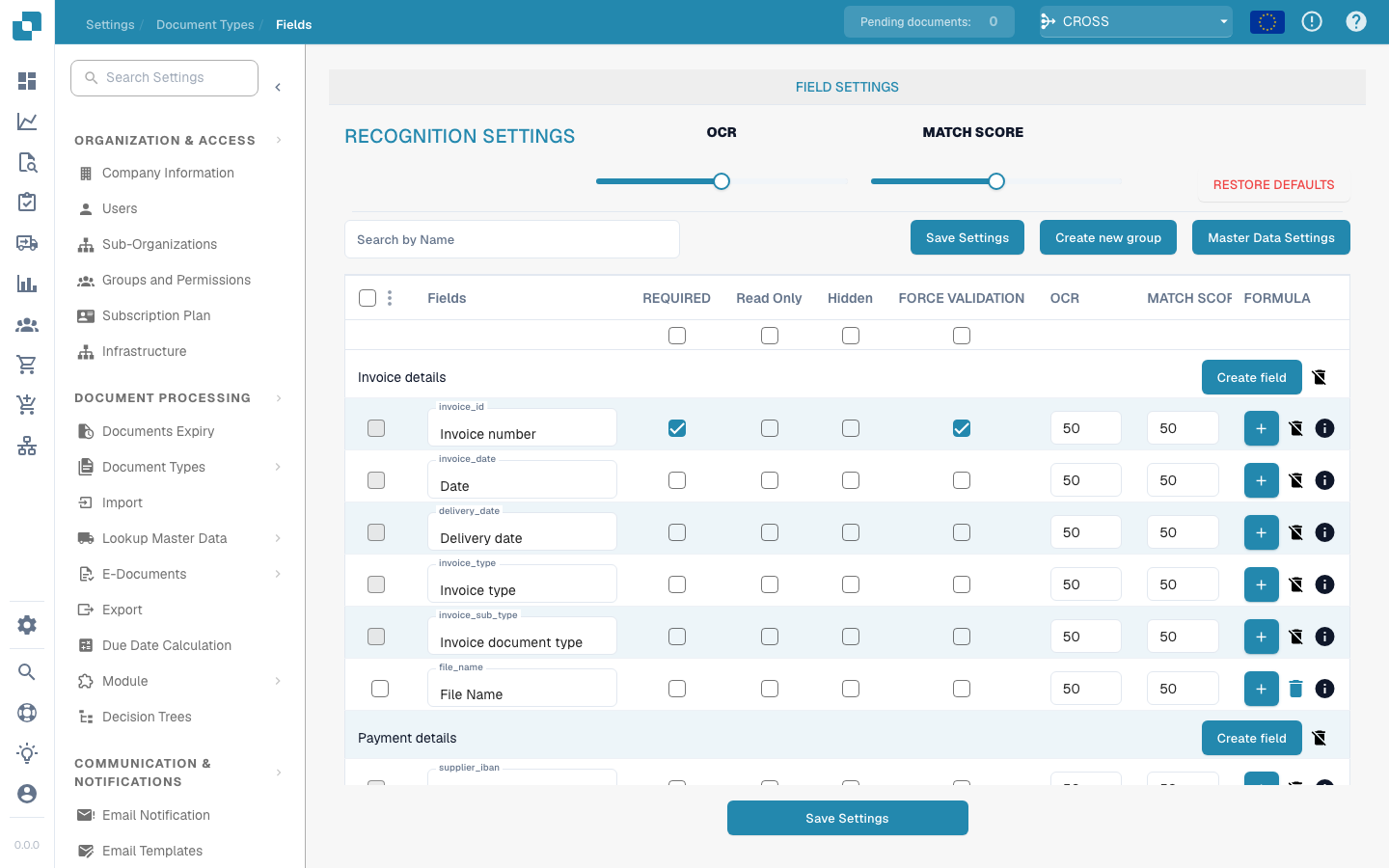
“字段”设置提供了一个用户界面,供管理员管理与文档类型关联的各个数据字段的属性和行为。管理员可以调整每个字段,以提高数据采集和验证的准确性与效率。
{% hint style="info" %}
[带费用的字段](/chinese/guan-li-yu-she-zhi/settings/global-settings/document-types/fields/new-fields-with-charges.md)
{% endhint %}
## 主要功能和选项
1. **字段配置**:
* **字段名称**:列出各个字段的名称,通常对应文档中的数据元素,例如“发票编号”或“采购订单日期”。
* **必填**:管理员可以将字段设为必填,确保完成文档处理时必须为这些字段输入或采集数据。
* **只读**:可以将字段设为只读,以防止在数据采集后或文档处理的特定阶段对其进行修改。
* **隐藏**:可以在用户界面中隐藏字段,适用于敏感信息,也有助于简化用户工作流。
2. **高级设置**:
* **强制验证**:确保输入到字段中的数据通过特定验证规则后才会被接受。
* **OCR(光学字符识别)**:启用此开关可对特定字段进行 OCR 处理,适用于从扫描文档或数字文档中自动提取数据。
* **匹配分数**:管理员可以设置匹配分数,即用于确定数据识别或匹配置信度的阈值。这会影响数据验证和质量检查的执行方式。
3. **操作按钮**:
* **创建新字段**:允许向文档类型添加新字段。
* **编辑图标**:每个字段都有一个编辑图标,管理员可通过该图标进一步配置特定字段的设置,例如数据类型、默认值或关联的业务逻辑。
* **保存设置**:提交对字段配置所做的更改。
---
# Agent Instructions
This documentation is published with GitBook. GitBook is the documentation platform designed so that both humans and AI agents can read, navigate, and reason over technical content effectively. Learn more at gitbook.com.
## Querying This Documentation
If you need additional information that is not directly available in this page, you can query the documentation by asking a question.
Perform an HTTP GET request on the following URL with the `ask` and `goal` query parameters:
```
GET https://docs.docbits.com/chinese/guan-li-yu-she-zhi/settings/global-settings/document-types/fields.md?ask=&goal=
```
`ask` is the immediate question: it should be specific, self-contained, and written in natural language.
`goal` is what the user is ultimately trying to achieve, the reason they need the answer. Sharing it helps GitBook give you a better, more relevant answer. A goal is most helpful when it describes the outcome the user wants rather than restating the question. For example, with `ask=how do I create an API token`, a goal like `automate deployments from our CI pipeline` lets GitBook tailor the answer to that use case.
The response will contain a direct answer to the question and relevant excerpts and sources from the documentation.
Use this mechanism when the answer is not explicitly present in the current page, you need clarification or additional context, or you want to retrieve related documentation sections.