> For the complete documentation index, see [llms.txt](https://docs.docbits.com/llms.txt). Markdown versions of documentation pages are available by appending `.md` to page URLs; this page is available as [Markdown](https://docs.docbits.com/chinese/guan-li-yu-she-zhi/settings/global-settings/document-types/duplicate-a-custom-validation-rule.md).
# 复制自定义验证规则
为某个文档类型单独复制现有自定义验证规则。
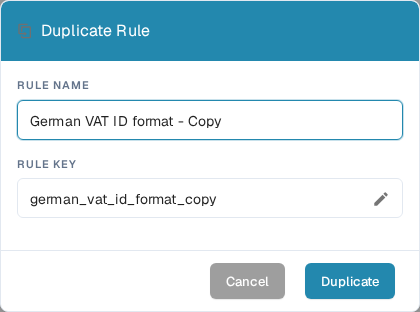
当某条规则适合作为起点,而你希望单独创建一个副本时,请使用 **Duplicate**。DocBits 会复制该规则的定义;新规则的名称和键由你选择。原规则仍会保留在列表中。
1. 前往 **Settings → Document Types**,打开要配置的文档类型,然后选择 **Custom Validation Rules**。页面会在规则卡片上方显示所选文档类型。有关此处其他可用设置,请参阅[文档类型](/chinese/guan-li-yu-she-zhi/settings/global-settings/document-types.md)。
2. 找到源规则。如果列表较长,可使用搜索框或范围和状态筛选器。打开该规则的三点操作菜单,然后选择 **Duplicate**。系统默认规则和自定义规则都可以复制。
3. 在 **Rule Name** 中保留建议名称末尾的“Copy”,或输入更清晰的名称。系统会根据名称生成 **Rule Key**。如果需要自行编辑键,请选择铅笔图标。
4. 选择 **Duplicate** 创建单独的规则。保存后,DocBits 会刷新列表。选择 **Cancel** 可关闭对话框而不创建副本。
**Duplicate** 按钮需要同时填写名称和键。如果保存失败,DocBits 会显示错误;请更正名称或键,然后重试。激活或更改新规则前,请先检查该规则,因为副本会沿用源规则的定义。
---
# Agent Instructions
This documentation is published with GitBook. GitBook is the documentation platform designed so that both humans and AI agents can read, navigate, and reason over technical content effectively. Learn more at gitbook.com.
## Querying This Documentation
If you need additional information that is not directly available in this page, you can query the documentation by asking a question.
Perform an HTTP GET request on the following URL with the `ask` and `goal` query parameters:
```
GET https://docs.docbits.com/chinese/guan-li-yu-she-zhi/settings/global-settings/document-types/duplicate-a-custom-validation-rule.md?ask=&goal=
```
`ask` is the immediate question: it should be specific, self-contained, and written in natural language.
`goal` is what the user is ultimately trying to achieve, the reason they need the answer. Sharing it helps GitBook give you a better, more relevant answer. A goal is most helpful when it describes the outcome the user wants rather than restating the question. For example, with `ask=how do I create an API token`, a goal like `automate deployments from our CI pipeline` lets GitBook tailor the answer to that use case.
The response will contain a direct answer to the question and relevant excerpts and sources from the documentation.
Use this mechanism when the answer is not explicitly present in the current page, you need clarification or additional context, or you want to retrieve related documentation sections.