> For the complete documentation index, see [llms.txt](https://docs.docbits.com/llms.txt). Markdown versions of documentation pages are available by appending `.md` to page URLs; this page is available as [Markdown](https://docs.docbits.com/chinese/guan-li-yu-she-zhi/settings/global-settings/company-information/two-factor-authentication.md).
# 双重身份验证(管理员)
## 概述
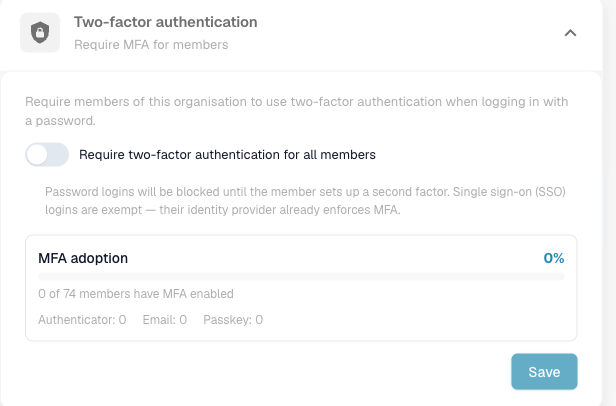
作为组织管理员,您可以**要求所有成员在使用密码登录时启用双重身份验证(2FA)**。启用此要求后,尚未设置第二种验证方式的成员在完成登录前,系统会引导其完成注册。
单点登录(SSO)方式——Google、Microsoft、SAML——**不受此要求限制**:其身份提供方已强制执行自己的多重身份验证(MFA),因此此要求仅影响密码登录。
此设置位于 **Settings → Global Settings → Company Information → Two-factor authentication**,仅组织管理员可以使用。
## 为组织要求启用 MFA
1. 前往 **Settings → Global Settings → Company Information**。
2. 打开 **Two-factor authentication** 部分。
3. 开启 **Require two-factor authentication for all members**,然后点击 **Save**。
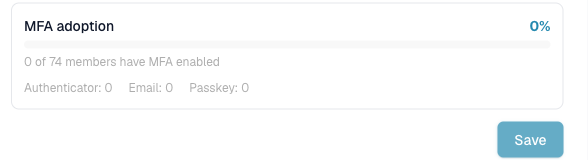
使用此报告评估准备情况:先提高使用率,再启用此要求,从而减少成员在注册环节受阻的情况。
## 成员会看到什么
需要注册的成员下次登录时会进入 2FA 设置页面,并选择一种方式(身份验证器应用、电子邮件验证码或通行密钥)。终端用户的操作步骤请参阅[双重身份验证(2FA)](/chinese/gai-shu-yu-ji-chu/two-factor-authentication.md)。
## 相关安全控制
组织范围的 MFA 要求与以下内置保护措施相辅相成:用户启用 2FA 后,这些措施始终生效,包括一次性登录码、TOTP 重放防护、每次验证挑战和每个账户的尝试次数限制(失败次数过多时,账户会被临时锁定),以及成员更改密码时自动撤销受信任设备。
---
# Agent Instructions
This documentation is published with GitBook. GitBook is the documentation platform designed so that both humans and AI agents can read, navigate, and reason over technical content effectively. Learn more at gitbook.com.
## Querying This Documentation
If you need additional information that is not directly available in this page, you can query the documentation by asking a question.
Perform an HTTP GET request on the following URL with the `ask` and `goal` query parameters:
```
GET https://docs.docbits.com/chinese/guan-li-yu-she-zhi/settings/global-settings/company-information/two-factor-authentication.md?ask=&goal=
```
`ask` is the immediate question: it should be specific, self-contained, and written in natural language.
`goal` is what the user is ultimately trying to achieve, the reason they need the answer. Sharing it helps GitBook give you a better, more relevant answer. A goal is most helpful when it describes the outcome the user wants rather than restating the question. For example, with `ask=how do I create an API token`, a goal like `automate deployments from our CI pipeline` lets GitBook tailor the answer to that use case.
The response will contain a direct answer to the question and relevant excerpts and sources from the documentation.
Use this mechanism when the answer is not explicitly present in the current page, you need clarification or additional context, or you want to retrieve related documentation sections.