> For the complete documentation index, see [llms.txt](https://docs.docbits.com/llms.txt). Markdown versions of documentation pages are available by appending `.md` to page URLs; this page is available as [Markdown](https://docs.docbits.com/chinese/guan-li-yu-she-zhi/settings/global-settings/company-information.md).
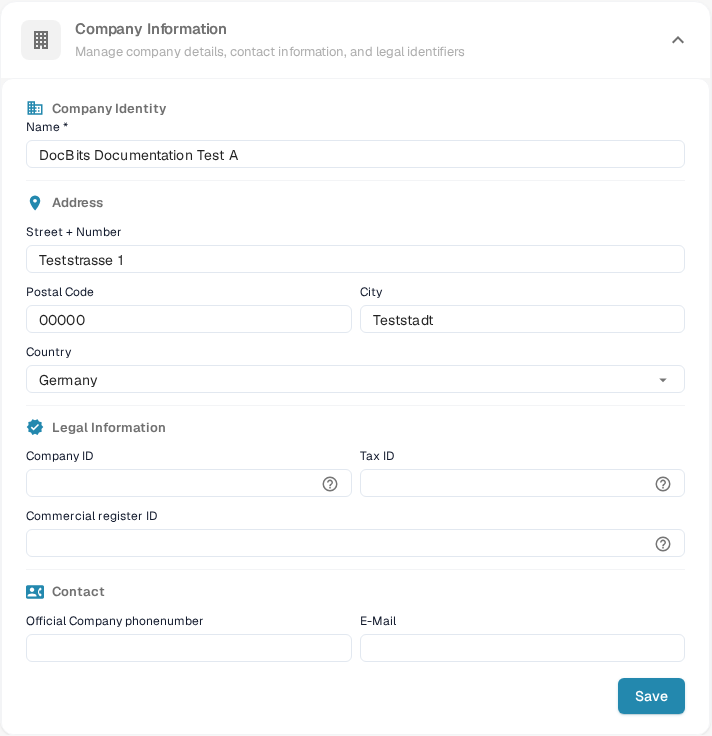
# 公司信息
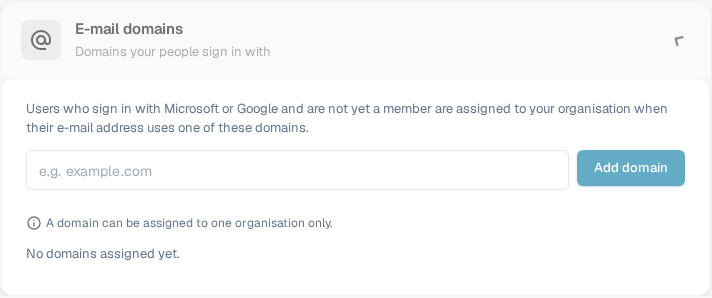
在输入框中仅输入域名,例如 `example.com`,然后选择 **Add domain** 或按 Enter。第一个域名会成为主域名。如果列表中有多个域名,可在其他行选择 **Make primary** 将其设为主域名,或选择垃圾桶图标将其删除。无效域名、个人电子邮件服务提供商域名或已分配给其他组织的域名等错误会显示在输入框下方。**No domains assigned yet** 表示此组织尚无域名规则。
添加域名前,请确认哪个组织应接收新的登录用户。要管理现有成员资格,请参阅[用户](/chinese/guan-li-yu-she-zhi/settings/global-settings/groups-users-and-permissions/users.md)。
## 公司偏好设置
配置公司范围内的默认设置:
* **Date Pattern**:选择 DocBits 中日期的显示格式(例如 `%m/%d/%Y`、`%d.%m.%Y`)。
* **Amount Formatting**:选择金额的数字格式(例如,Deutsch 对应 `1.000,00`,English 对应 `1,000.00`)。
* **New Version Info Dialog**:切换是否在 DocBits 发布新版本时向用户显示通知。
更改后点击 **Save**。
## 应用颜色
自定义 DocBits 界面的主色。此设置有助于通过视觉区分不同环境(例如开发环境与生产环境)。
* **Color**:输入十六进制颜色代码(例如 `#2388AE`),或使用颜色选择器。
* 点击 **Save** 应用更改,或点击 **Reset** 恢复默认颜色。
## 订阅计划
查看当前有效订阅计划及其详情:
* **Plan Name**:每个有效计划的名称(例如 DocBits、DocFlow Users、DocSearch)。
* **Days Left**:距离计划到期还剩多少天。
* **Start Date / End Date**:订阅周期。
* **Users Count**:组织中的用户总数。
* **Sub Organizations Count**:已配置的子组织数量。
* **Suppliers Count**:已登记的供应商数量。
## 订阅用量
监控每月的令牌和工作流用量:
| 列 | 说明 |
| -------------------- | ------------- |
| **Type** | 用量类型(文档或工作流)。 |
| **From / To** | 计费周期日期。 |
| **Tokens Used** | 当前周期已使用的令牌数。 |
| **Remaining Tokens** | 当前周期剩余可用令牌数。 |
使用 **Select** 按钮按特定日期范围筛选。
---
# Agent Instructions
This documentation is published with GitBook. GitBook is the documentation platform designed so that both humans and AI agents can read, navigate, and reason over technical content effectively. Learn more at gitbook.com.
## Querying This Documentation
If you need additional information that is not directly available in this page, you can query the documentation by asking a question.
Perform an HTTP GET request on the following URL with the `ask` and `goal` query parameters:
```
GET https://docs.docbits.com/chinese/guan-li-yu-she-zhi/settings/global-settings/company-information.md?ask=&goal=
```
`ask` is the immediate question: it should be specific, self-contained, and written in natural language.
`goal` is what the user is ultimately trying to achieve, the reason they need the answer. Sharing it helps GitBook give you a better, more relevant answer. A goal is most helpful when it describes the outcome the user wants rather than restating the question. For example, with `ask=how do I create an API token`, a goal like `automate deployments from our CI pipeline` lets GitBook tailor the answer to that use case.
The response will contain a direct answer to the question and relevant excerpts and sources from the documentation.
Use this mechanism when the answer is not explicitly present in the current page, you need clarification or additional context, or you want to retrieve related documentation sections.