> For the complete documentation index, see [llms.txt](https://docs.docbits.com/llms.txt). Markdown versions of documentation pages are available by appending `.md` to page URLs; this page is available as [Markdown](https://docs.docbits.com/chinese/guan-li-yu-she-zhi/settings/document-processing/module/po-shipment-order-setting.md).
# PO 发运订单设置
## **概述**
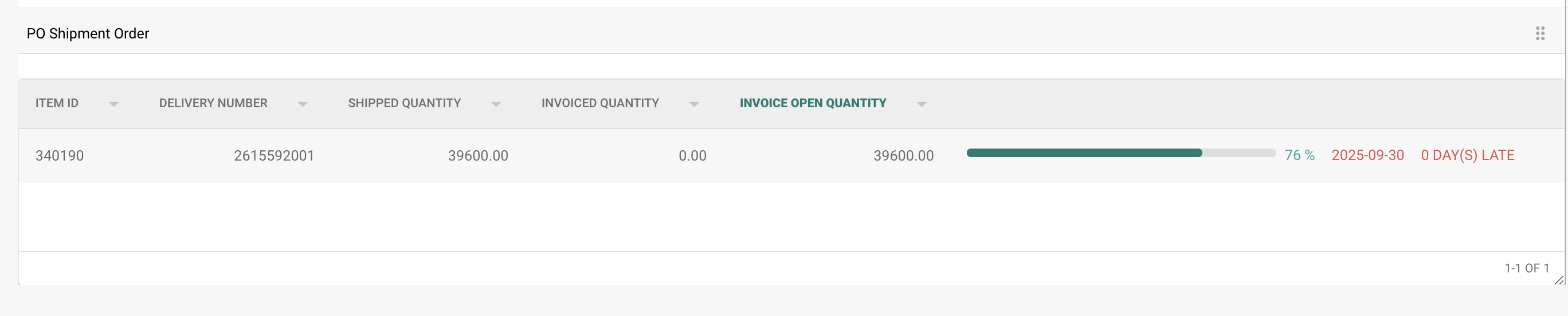
**PO Shipment Order(采购订单发运订单)部分会显示已匹配采购订单行项目的交付和开票状态明细。启用此功能后,该部分会显示在采购订单匹配**界面中。
## **如何启用**
启用此功能:
1. 前往**设置** → **文档处理** → **模块**。
2. 选择**采购订单**。
3. 启用**PO Shipment Order**选项。\
\\
## **显示位置**
启用后,**PO Shipment Order**部分会显示在采购订单匹配界面中。
### **PO Shipment Order – 字段说明**
* **Item ID**\
标识采购订单中的特定行项目。
* **Delivery Number**\
发运或交付的参考编号。
* **Shipped Quantity**\
已交付或接收的数量。
* **Invoiced Quantity**\
已开票的数量。
* **Invoice Open Quantity**\
仍待开票的数量(计算方式为 *Shipped Quantity – Invoiced Quantity*)。
* **Progress Bar and Percentage**
* 显示已与发票匹配的发运数量。
* 新建采购订单的进度从 0% 开始。
* 随着多张发票的处理,进度会累计更新。
* 反映已开票数量相对于发运数量的总体进度。
* **Promised Delivery Date**\
该采购订单行项目的预计交付日期。
* **Late Indicator**
根据**Promised Delivery Date**显示交付逾期的天数。
---
# Agent Instructions
This documentation is published with GitBook. GitBook is the documentation platform designed so that both humans and AI agents can read, navigate, and reason over technical content effectively. Learn more at gitbook.com.
## Querying This Documentation
If you need additional information that is not directly available in this page, you can query the documentation by asking a question.
Perform an HTTP GET request on the following URL with the `ask` and `goal` query parameters:
```
GET https://docs.docbits.com/chinese/guan-li-yu-she-zhi/settings/document-processing/module/po-shipment-order-setting.md?ask=&goal=
```
`ask` is the immediate question: it should be specific, self-contained, and written in natural language.
`goal` is what the user is ultimately trying to achieve, the reason they need the answer. Sharing it helps GitBook give you a better, more relevant answer. A goal is most helpful when it describes the outcome the user wants rather than restating the question. For example, with `ask=how do I create an API token`, a goal like `automate deployments from our CI pipeline` lets GitBook tailor the answer to that use case.
The response will contain a direct answer to the question and relevant excerpts and sources from the documentation.
Use this mechanism when the answer is not explicitly present in the current page, you need clarification or additional context, or you want to retrieve related documentation sections.