> For the complete documentation index, see [llms.txt](https://docs.docbits.com/llms.txt). Markdown versions of documentation pages are available by appending `.md` to page URLs; this page is available as [Markdown](https://docs.docbits.com/chinese/guan-li-yu-she-zhi/settings/document-processing/module/fulltext-search.md).

# 全文搜索

全文搜索允许用户搜索文档的实际内容以及所有提取字段，而不仅仅是文件名和 ID。

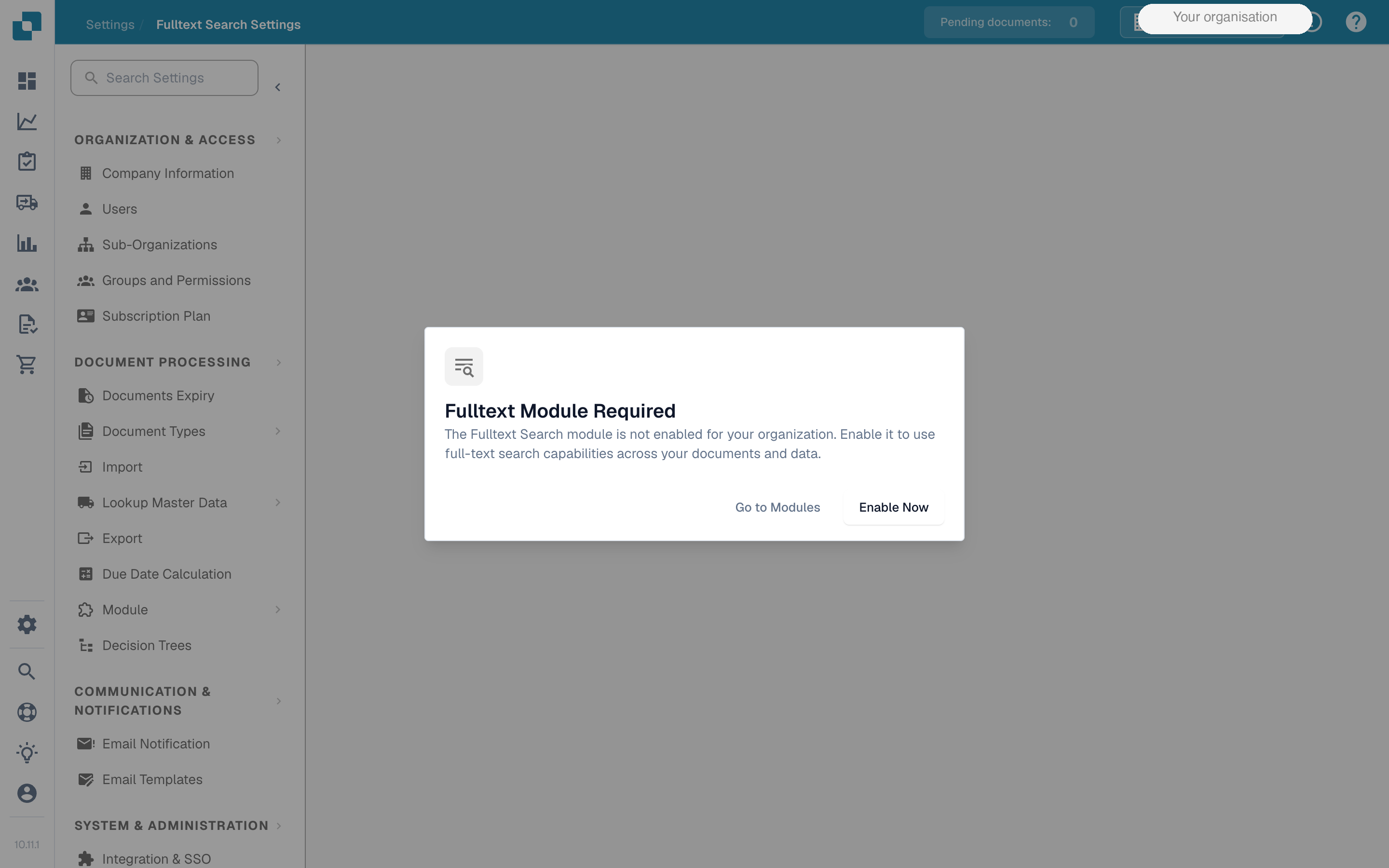
<figure><img src="https://1870485400-files.gitbook.io/~/files/v0/b/gitbook-x-prod.appspot.com/o/spaces%2FlPczlNw8zzYNLfjfispX%2Fuploads%2Fgit-blob-6360a3977345d81c519e7475cfab7b06f463efe8%2Ffulltext-search-required-dialog.png?alt=media" alt="模块已禁用时显示的“需要全文模块”对话框"><figcaption><p>依赖该模块的页面上会显示“需要全文模块”对话框。</p></figcaption></figure>

## 未启用模块时

未启用全文搜索时，仪表板搜索栏只能查询少量结构化字段。自由文本输入仅会匹配以下内容：

* `filename`
* 文档 `ID`
* `invoice_id`
* `purchase_order`

这些字段以外的内容都会被忽略。此时无法搜索文档内容，也不支持范围、运算符或智能筛选器。

## 启用模块后

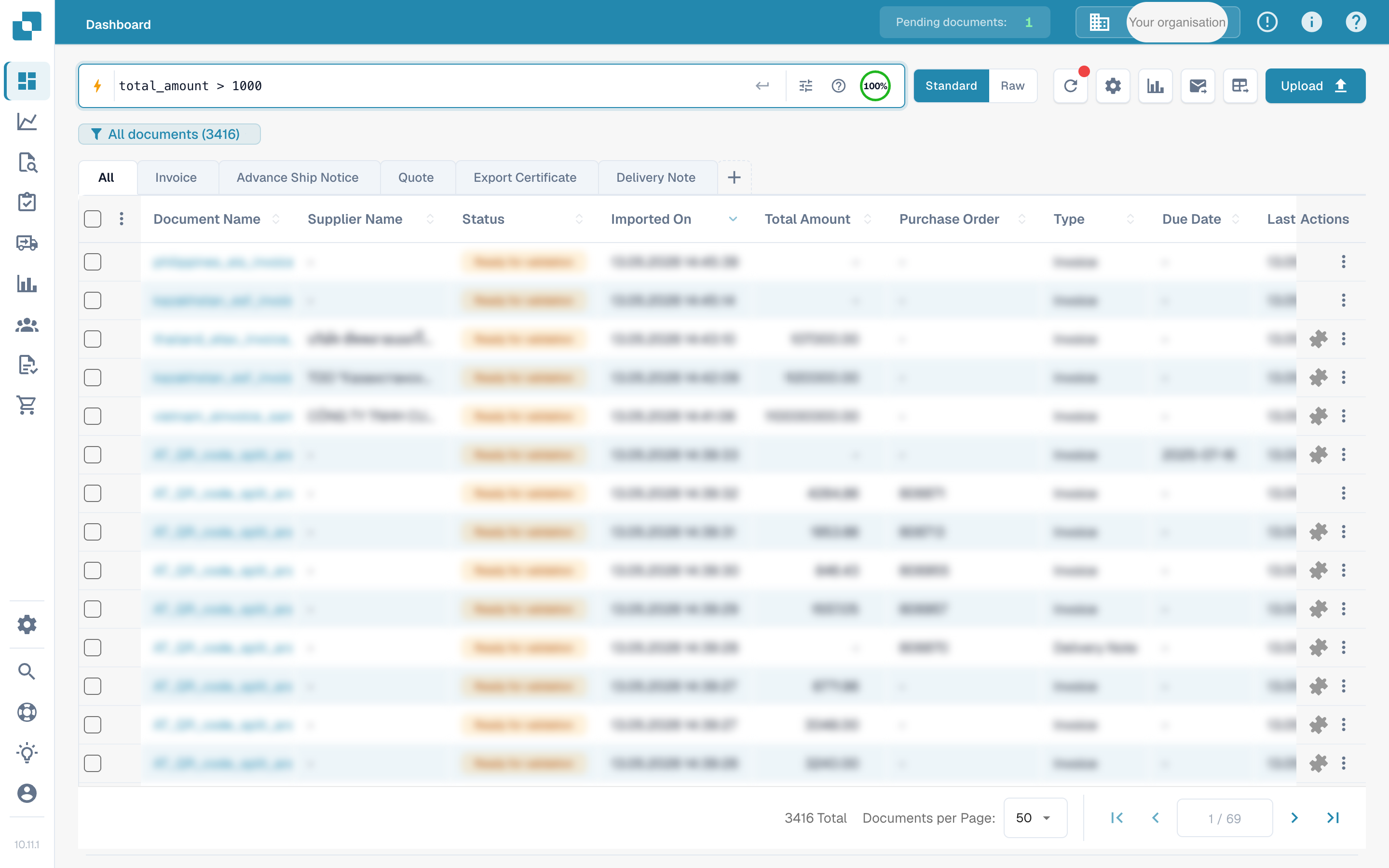
启用全文搜索后，即可搜索文档中的所有提取字段，并将仪表板搜索栏升级为更丰富的查询语言。查询可以组合字段筛选条件、范围比较、逻辑运算符、相对日期和智能筛选器快捷方式。

<figure><img src="https://1870485400-files.gitbook.io/~/files/v0/b/gitbook-x-prod.appspot.com/o/spaces%2FlPczlNw8zzYNLfjfispX%2Fuploads%2Fgit-blob-8dd964ab7d9de0e342ca03e2e95f69612f074841%2Ffulltext-search-dashboard-query.png?alt=media" alt="仪表板搜索栏中显示范围查询及筛选后的文档列表"><figcaption><p>仪表板搜索栏支持扩展查询语言。输入查询并按 <kbd>Enter</kbd>，即可筛选文档列表。</p></figcaption></figure>

### 按字段限定查询

在字段名称后加冒号，即可匹配特定提取字段。字段名称遵循 API 标识符约定（小写、snake\_case），适用于文档类型捕获的所有字段，包括供应商、发票元数据、行项目和自定义字段。

```
supplier_name: Acme
invoice_id: INV-1234
status: ready_for_validation
```

### 范围查询

对数字和日期字段使用比较运算符。支持开放式比较和有界范围。

```
total_amount > 5000
total_amount <= 10000
invoice_due_date between 2026-01-01, 2026-04-30
```

### 逻辑运算符

使用 `AND`、`OR` 和 `NOT` 组合子句，并用括号设置优先级。`IN` 列表可在单个字段中匹配集合中的任意值。

```
supplier_name: Acme AND total_amount > 1000
(status: ready_for_validation OR status: validated) AND invoice_date: this_month
NOT status: archived
status IN (ready_for_validation, exported)
```

### 相对日期

根据查询时间戳计算的时间表达式。可在需要日期的任何位置使用。

```
imported_on: today()
invoice_date: last_week
imported_on: this_quarter
```

### 智能筛选器

用于常见查询的单词快捷方式。可单独使用，也可作为较大表达式的一部分。

```
overdue
@User
#INV-1234
$5k+
```

* `overdue` — 已超过到期日的文档。
* `@User` — 按受派人筛选；将 `User` 替换为受派人的姓名。
* `#INV-1234` — 按文档标识符快速查找。
* `$5k+` — 查找金额大于 5,000 的文档，金额以文档所用币种计。

## 子功能

全文模块还包含两种专用搜索模式。两者都依赖已启用该模块，无法独立使用。

### 向量搜索

向量搜索会查找与查询在语义上相似的文档，而不只是词面匹配的文档。仪表板会将任何以 `vector:` 开头的查询视为向量搜索，通过文档嵌入进行搜索，并按相似度对结果排序。

```
vector: frozen food invoices
```

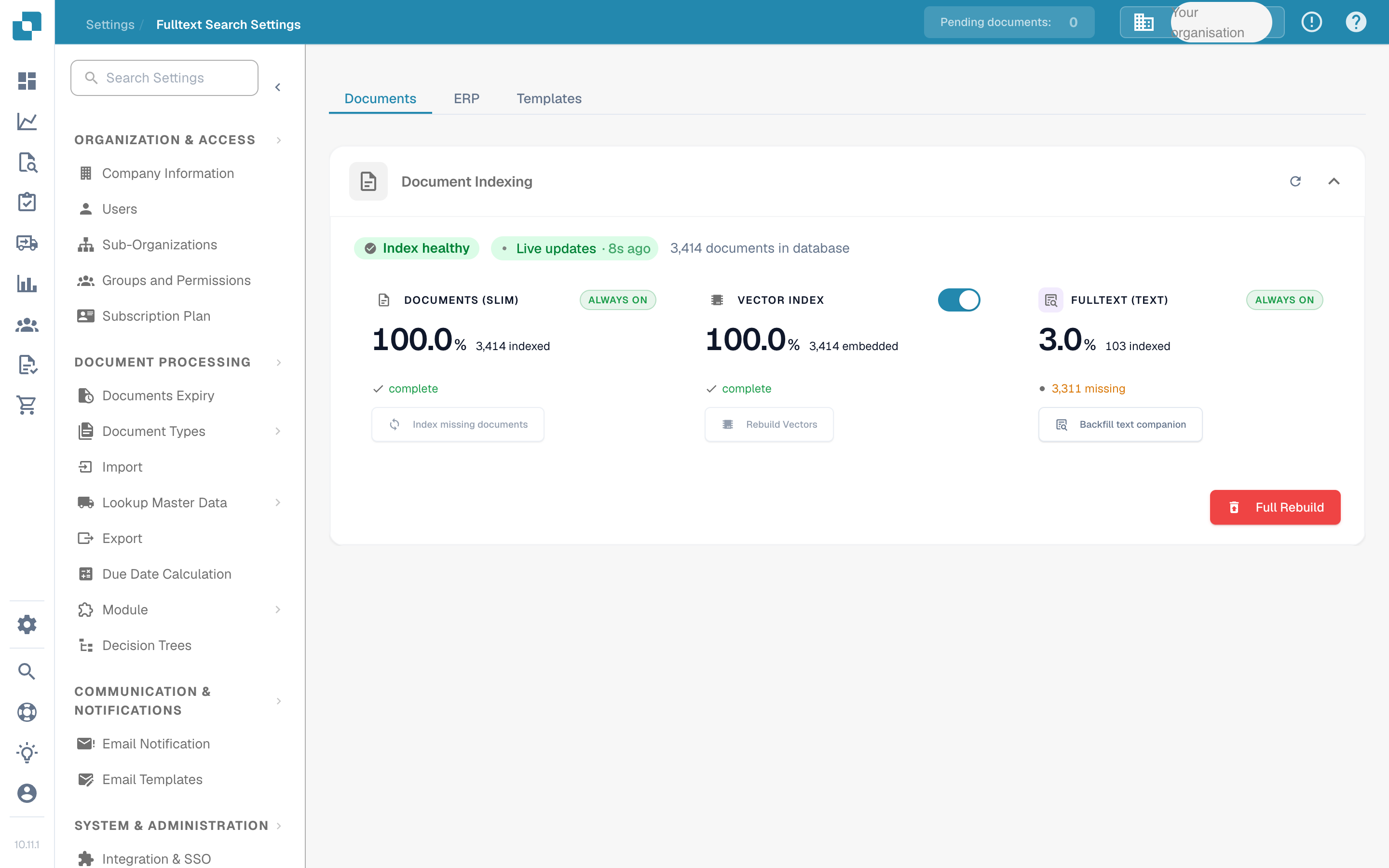
向量索引可在“全文搜索设置”页面单独切换，与全文文本索引分开管理。禁用向量索引后，系统将停止为新文档生成嵌入，但会保留文本索引。

### AI 搜索

AI 搜索接受自然语言查询，并使用 LLM 提取结构化筛选条件，然后通过全文索引执行这些条件。请在查询前加上 `ai:`。

```
ai: invoices from Ruiz over 1000 last quarter
```

AI 搜索和向量搜索不可互换：向量搜索用于匹配相似内容，AI 搜索则将自然语言转换为筛选条件。AI 搜索没有单独的开关，而是通过现有的全文索引和向量索引执行。

<figure><img src="https://1870485400-files.gitbook.io/~/files/v0/b/gitbook-x-prod.appspot.com/o/spaces%2FlPczlNw8zzYNLfjfispX%2Fuploads%2Fgit-blob-33cee82ed2d7ea5a4a8c662831bb7e697e49b4d9%2Ffulltext-search-settings-page.png?alt=media" alt="全文搜索设置页面，显示 Documents、Vector Index 和 Fulltext（文本）子索引"><figcaption><p>全文搜索设置。向量索引有独立的开关；启用模块后，全文文本索引会持续运行。</p></figcaption></figure>

## 先决条件

* OpenSearch 基础设施在后台运行，为索引提供支持。
* 首次启用模块时，系统会为所有现有文档重新编制索引。索引所需时间取决于组织中的文档数量。
* 只有组织管理员可以切换模块。

## 如何启用

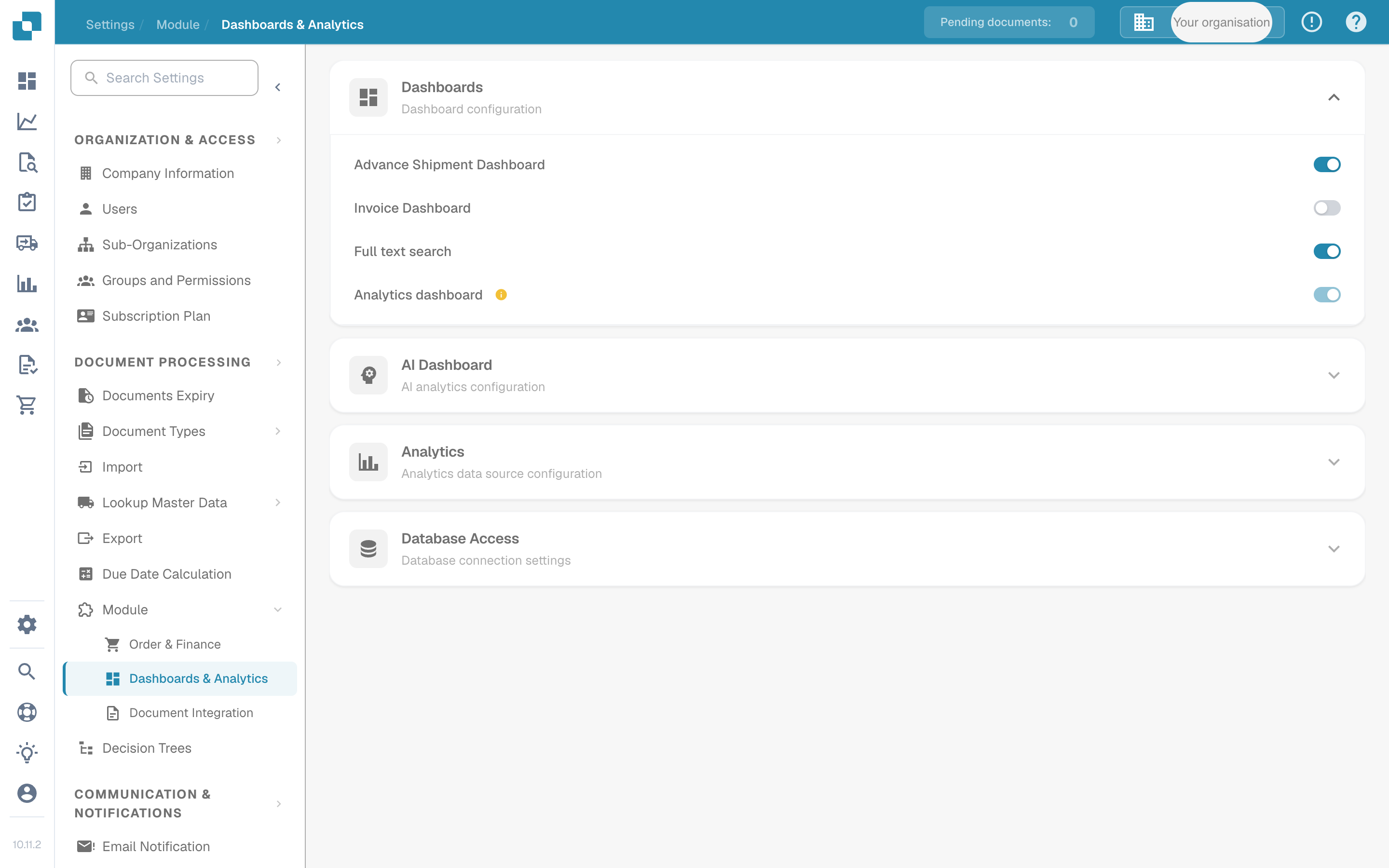
1. 前往 **设置 → 文档处理 → 模块**。
2. 在 **仪表板** 组下，启用 **全文搜索**。
3. 出现订阅对话框时确认订阅。
4. 等待初始重新索引完成，再使用全文查询。

<figure><img src="https://1870485400-files.gitbook.io/~/files/v0/b/gitbook-x-prod.appspot.com/o/spaces%2FlPczlNw8zzYNLfjfispX%2Fuploads%2Fgit-blob-2b318378b05da8897b253a17d9ac80fad7bfc801%2Ffulltext-search-module-toggle.png?alt=media" alt="模块页面中“仪表板”组下的全文搜索开关"><figcaption><p>全文搜索开关位于 <strong>模块 → 仪表板 &#x26; 分析</strong> 下。</p></figcaption></figure>

{% hint style="info" %}
全文搜索模块的定价由您的 DocBits 销售联系人处理。首次启用该模块时会显示订阅确认窗口。
{% endhint %}

## 另请参阅

* [全文搜索设置](/chinese/guan-li-yu-she-zhi/settings/log-settings/fulltext-search-settings.md) — 索引管理和向量索引开关。
* [全文搜索函数](/chinese/guan-li-yu-she-zhi/settings/global-settings/document-types/script/scripting-in-docbits/fulltext-search-functions.md) — `fulltext_search()` 和 `vector_search()` 的脚本 API。
* [模块概览](/chinese/guan-li-yu-she-zhi/settings/document-processing/module.md) — DocBits 可选模块的完整列表。


---

# Agent Instructions
This documentation is published with GitBook. GitBook is the documentation platform designed so that both humans and AI agents can read, navigate, and reason over technical content effectively. Learn more at gitbook.com.

## Querying This Documentation
If you need additional information that is not directly available in this page, you can query the documentation by asking a question.

Perform an HTTP GET request on the following URL with the `ask` and `goal` query parameters:

```
GET https://docs.docbits.com/chinese/guan-li-yu-she-zhi/settings/document-processing/module/fulltext-search.md?ask=<question>&goal=<user_goal>
```

`ask` is the immediate question: it should be specific, self-contained, and written in natural language.
`goal` is what the user is ultimately trying to achieve, the reason they need the answer. Sharing it helps GitBook give you a better, more relevant answer. A goal is most helpful when it describes the outcome the user wants rather than restating the question. For example, with `ask=how do I create an API token`, a goal like `automate deployments from our CI pipeline` lets GitBook tailor the answer to that use case.

The response will contain a direct answer to the question and relevant excerpts and sources from the documentation.

Use this mechanism when the answer is not explicitly present in the current page, you need clarification or additional context, or you want to retrieve related documentation sections.