> For the complete documentation index, see [llms.txt](https://docs.docbits.com/llms.txt). Markdown versions of documentation pages are available by appending `.md` to page URLs; this page is available as [Markdown](https://docs.docbits.com/chinese/guan-li-yu-she-zhi/settings/document-processing/module.md).
# 模块
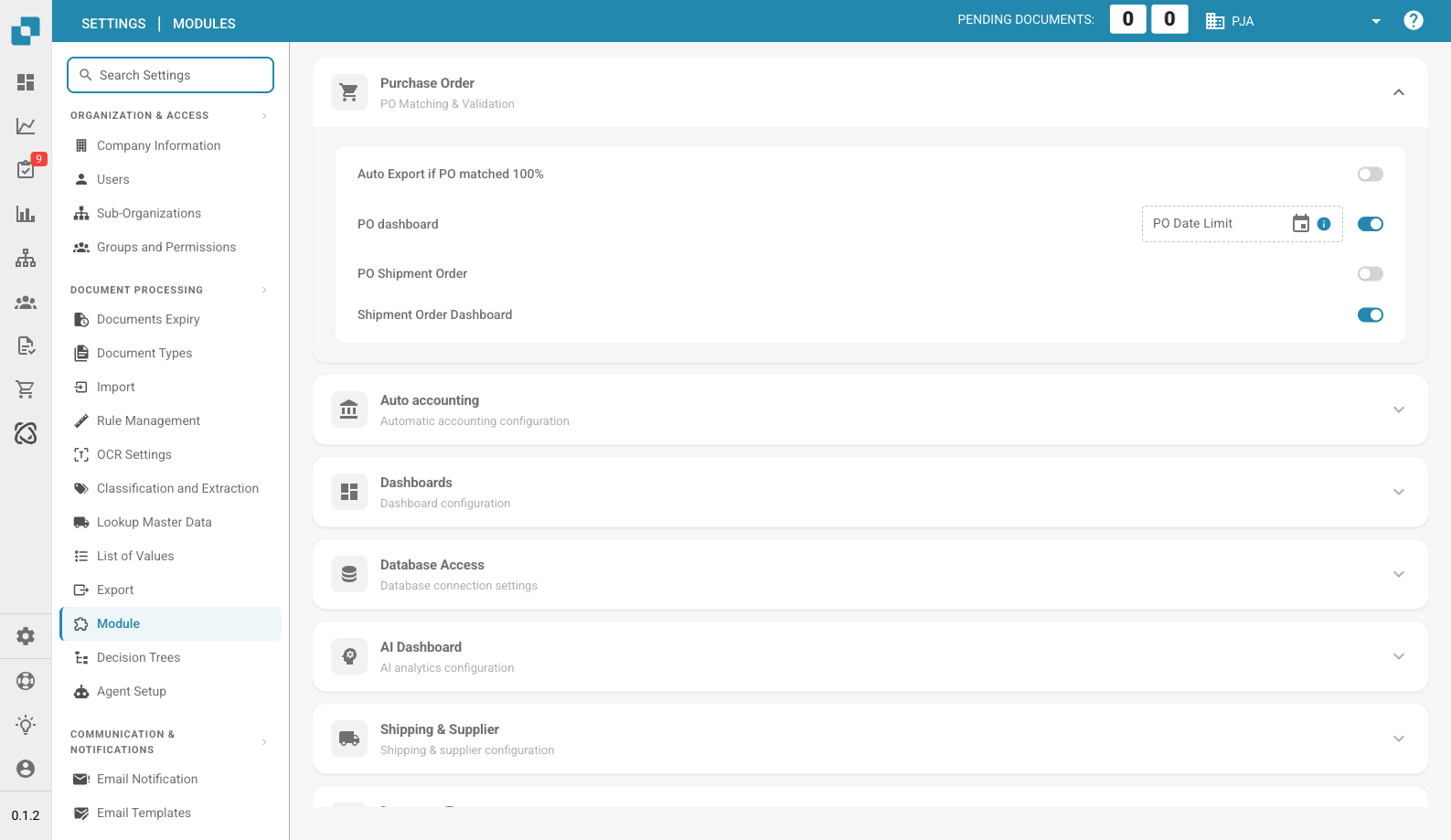
模块设置页面
“模块”页面可用于启用或停用 DocBits 中的可选功能。每个部分将相关模块归在一起,可分别开启或关闭。
## 采购订单
采购订单匹配与验证设置。
| 设置 | 说明 |
| ---------------------------------- | ----------------------------------------------- |
| **Auto Export if PO matched 100%** | 采购订单匹配度达到 100% 时自动导出文档。 |
| **PO Dashboard** | 启用采购订单仪表板。包含 **PO Date Limit** 字段,可按日期限制采购订单数据。 |
| **PO Shipment Order** | 启用与采购订单关联的装运订单处理。 |
| **Shipment Order Dashboard** | 启用专用的装运订单仪表板。 |
## 自动记账
| 设置 | 说明 |
| ------------------- | ----------------------------- |
| **Auto Accounting** | 启用文档自动记账。选择 ERP 类型(例如 LN、M3)。 |
## 仪表板
| 设置 | 说明 |
| ------------------------------ | --------------- |
| **Advance Shipment Dashboard** | 用于监控预先装运活动的仪表板。 |
| **Invoice Dashboard** | 用于发票监控和分析的仪表板。 |
| **Full Text Search** | 启用跨文档全文搜索。 |
| **Analytics Dashboard** | 启用分析概览仪表板。 |
## 数据库访问
| 设置 | 说明 |
| ------------- | ------------- |
| **DB Access** | 为组织启用直接数据库访问。 |
## AI 仪表板
| 设置 | 说明 |
| ---------------------------- | ---------------------- |
| **AI Document Warehouse** | 由 AI 驱动的文档仓库分析功能。 |
| **Dashboard v2** | 具有改进功能的更新版仪表板。 |
| **Clickhouse Direct Access** | 启用 Clickhouse 数据库直接访问。 |
| **Supplier Statistics** | 启用供应商级别的统计和报告。 |
## 运输与供应商
| 设置 | 说明 |
| ------------------- | ---------- |
| **Supplier Portal** | 启用供应商协作门户。 |
## 文档类型
| 设置 | 说明 |
| -------------------------------------- | ---------------------------------------------------------------------------------- |
| **Workflow Builder** | 创建和自定义文档处理工作流。 |
| **Annotation Mode** | 允许用户在验证视图中为文档添加注释。 |
| **Show Report** | 启用文档报告生成。 |
| **Inbound Emails** | 启用按文档类型处理入站电子邮件。 |
| **Models & Labels** | 管理用于文档识别的 AI 模型和标签。 |
| **Document Script** | 启用文档处理自定义脚本。 |
| **Document Scan** | 启用文档扫描功能。 |
| **Bar-Code/QR Code Extraction** | 从文档中提取条形码或二维码数据。选择支持的代码类型。 |
| **Custom Master Data** | 启用自定义主数据字段。 |
| **Tasks & Notifications** | 启用任务管理和通知功能。包含 **Dashboard Tasks Count** 开关。 |
| **DocBits Operator** | 启用 DocBits Operator 浏览器自动化功能。 |
| **DocNet** | 启用 DocNet 文档网络功能。 |
| **IDM ACL Updater** | 更新 Infor Document Management 访问控制列表。上传 ION-Mapping 文件,并配置 Infor-Doctype 与 ACL 的映射。 |
| **Barcode Assignment** | 启用为文档分配条形码的功能。 |
| **Set Negative Sign For Credit Notes** | 自动将贷项通知单金额设为负数。 |
## BOD 连接流
| 设置 | 说明 |
| ------------------------- | ----------------------------------------- |
| **BOD Connection Stream** | 启用 BOD(业务对象文档)集成。显示用于连接的 **Stream Name**。 |
## 分析
| 设置 | 说明 |
| ---------------------------------------- | ------------------------------------------------------------------------ |
| **Use PostgreSQL for Quality Analytics** | 可在 Prometheus(实时数据,部署时会重置)与 PostgreSQL(数据持久保留 90 天,支持趋势分析和最差表现字段分析)之间切换。 |
## Vertex 税务集成
| 设置 | 说明 |
| -------------------------- | --------------------------------------------------------------------------------------------- |
| **Vertex Tax Integration** | 启用 Vertex 税额计算。配置 **Base URL**、**Client ID** 和 **Client Secret**。使用 **Test Connection** 验证连接。 |
---
# Agent Instructions
This documentation is published with GitBook. GitBook is the documentation platform designed so that both humans and AI agents can read, navigate, and reason over technical content effectively. Learn more at gitbook.com.
## Querying This Documentation
If you need additional information that is not directly available in this page, you can query the documentation by asking a question.
Perform an HTTP GET request on the following URL with the `ask` and `goal` query parameters:
```
GET https://docs.docbits.com/chinese/guan-li-yu-she-zhi/settings/document-processing/module.md?ask=&goal=
```
`ask` is the immediate question: it should be specific, self-contained, and written in natural language.
`goal` is what the user is ultimately trying to achieve, the reason they need the answer. Sharing it helps GitBook give you a better, more relevant answer. A goal is most helpful when it describes the outcome the user wants rather than restating the question. For example, with `ask=how do I create an API token`, a goal like `automate deployments from our CI pipeline` lets GitBook tailor the answer to that use case.
The response will contain a direct answer to the question and relevant excerpts and sources from the documentation.
Use this mechanism when the answer is not explicitly present in the current page, you need clarification or additional context, or you want to retrieve related documentation sections.