
> For the complete documentation index, see [llms.txt](https://docs.docbits.com/llms.txt). Markdown versions of documentation pages are available by appending `.md` to page URLs; this page is available as [Markdown](https://docs.docbits.com/chinese/guan-li-yu-she-zhi/settings/document-processing/classification-and-extraction/auto-extract-tax-code.md).

# 自动提取税码

## **在哪里启用**

1. 前往 **Settings → Document Processing → Classification and Extraction**。
2. 启用 **Auto extract tax code**。

<figure><img src="https://1870485400-files.gitbook.io/~/files/v0/b/gitbook-x-prod.appspot.com/o/spaces%2FlPczlNw8zzYNLfjfispX%2Fuploads%2Fgit-blob-d19f8f744b2c42973273f56183e6f3294bc73b23%2Fauto_extract_tax_code_1.png?alt=media" alt=""><figcaption></figcaption></figure>

## **此功能的作用**

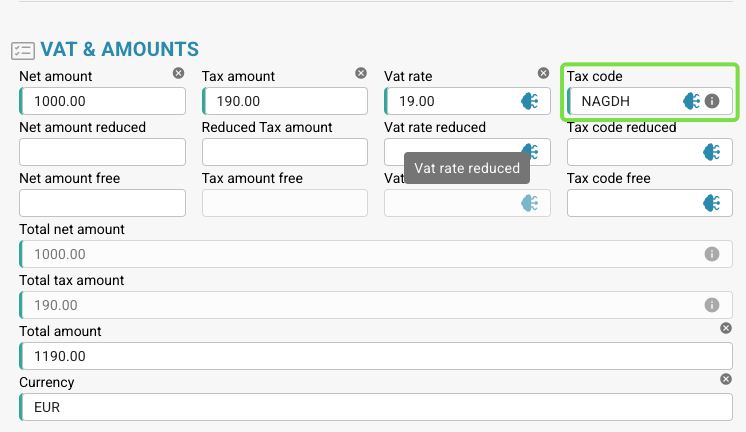
* 启用后，只要已设置**税码字段**，系统就会在**验证界面**中**自动填充税码字段**。

<figure><img src="https://1870485400-files.gitbook.io/~/files/v0/b/gitbook-x-prod.appspot.com/o/spaces%2FlPczlNw8zzYNLfjfispX%2Fuploads%2Fgit-blob-9d34fc14362ee6bd51e6662735b20b758029ae46%2Fauto_extract_tax_code_2.png?alt=media" alt=""><figcaption></figcaption></figure>

* 下表列出了用于确定税码的逻辑。

<table data-full-width="true"><thead><tr><th>发票文档类型</th><th></th><th>税码</th><th>或在文本字段中</th><th>采购订单号</th><th>供应商所在国家/地区</th><th>规则</th></tr></thead><tbody><tr><td>费用发票</td><td>含税额</td><td>NAGDH</td><td>LD + %（按最高 ABS 金额取整）</td><td>空</td><td>可以是 TaX Id 的前两位数字<br>或供应商地址所在国家/地区 tccom120.cadr --> tccom130.cadr 字段 tcom130.ccty</td><td>当国家/地区为公司所在国家/地区时</td></tr><tr><td>费用发票</td><td>不含税额</td><td>NAGD0</td><td>LD + %（按最高 ABS 金额取整）</td><td>空</td><td>可以是 TaX Id 的前两位数字<br>或供应商地址所在国家/地区 tccom120.cadr --> tccom130.cadr 字段 tcom130.ccty</td><td>当国家/地区为公司所在国家/地区时</td></tr><tr><td>费用发票</td><td>不含税额</td><td>EUDH</td><td>ED 0 %</td><td>空</td><td>可以是 TaX Id 的前两位数字<br>或供应商地址所在国家/地区 tccom120.cadr --> tccom130.cadr 字段 tcom130.ccty</td><td>当国家/地区与公司所在国家/地区不同，且属于国家/地区表 (tcmcs010) 中的欧盟国家/地区时</td></tr><tr><td>订单发票</td><td>含税额</td><td>NAHGH</td><td>IG + %（按最高 ABS 金额取整）</td><td>非空</td><td>可以是 TaX Id 的前两位数字<br>或供应商地址所在国家/地区 tccom120.cadr --> tccom130.cadr 字段 tcom130.ccty</td><td>当国家/地区为公司所在国家/地区时</td></tr><tr><td>订单发票</td><td>不含税额</td><td>NAHG0</td><td>IG + %（按最高 ABS 金额取整）</td><td>非空</td><td>可以是 TaX Id 的前两位数字<br>或供应商地址所在国家/地区 tccom120.cadr --> tccom130.cadr 字段 tcom130.ccty</td><td>当国家/地区为公司所在国家/地区时</td></tr><tr><td>订单发票</td><td>含税额</td><td>EUGH</td><td>ED 0 %</td><td>非空</td><td>可以是 TaX Id 的前两位数字<br>或供应商地址所在国家/地区 tccom120.cadr --> tccom130.cadr 字段 tcom130.ccty</td><td>当国家/地区与公司所在国家/地区不同，且属于国家/地区表 (tcmcs010) 中的欧盟国家/地区时</td></tr><tr><td>费用发票</td><td>不含税额</td><td>IMGD</td><td>ID 0 %</td><td>空</td><td>可以是 TaX Id 的前两位数字<br>或供应商地址所在国家/地区 tccom120.cadr --> tccom130.cadr 字段 tcom130.ccty</td><td>当国家/地区与公司所在国家/地区不同，且不是国家/地区表 (tcmcs010) 中的欧盟成员国时</td></tr><tr><td>订单发票</td><td>含税额</td><td>IMHG</td><td>IG 0 %</td><td>非空</td><td>可以是 TaX Id 的前两位数字<br>或供应商地址所在国家/地区 tccom120.cadr --> tccom130.cadr 字段 tcom130.ccty</td><td>当国家/地区与公司所在国家/地区不同，且不是国家/地区表 (tcmcs010) 中的欧盟成员国时</td></tr></tbody></table>


---

# Agent Instructions
This documentation is published with GitBook. GitBook is the documentation platform designed so that both humans and AI agents can read, navigate, and reason over technical content effectively. Learn more at gitbook.com.

## Querying This Documentation
If you need additional information that is not directly available in this page, you can query the documentation by asking a question.

Perform an HTTP GET request on the following URL with the `ask` and `goal` query parameters:

```
GET https://docs.docbits.com/chinese/guan-li-yu-she-zhi/settings/document-processing/classification-and-extraction/auto-extract-tax-code.md?ask=<question>&goal=<user_goal>
```

`ask` is the immediate question: it should be specific, self-contained, and written in natural language.
`goal` is what the user is ultimately trying to achieve, the reason they need the answer. Sharing it helps GitBook give you a better, more relevant answer. A goal is most helpful when it describes the outcome the user wants rather than restating the question. For example, with `ask=how do I create an API token`, a goal like `automate deployments from our CI pipeline` lets GitBook tailor the answer to that use case.

The response will contain a direct answer to the question and relevant excerpts and sources from the documentation.

Use this mechanism when the answer is not explicitly present in the current page, you need clarification or additional context, or you want to retrieve related documentation sections.
