> For the complete documentation index, see [llms.txt](https://docs.docbits.com/llms.txt). Markdown versions of documentation pages are available by appending `.md` to page URLs; this page is available as [Markdown](https://docs.docbits.com/chinese/guan-li-yu-she-zhi/settings/document-processing/classification-and-extraction/ai-model.md).

# AI 模型

## 概述

**AI 模型**设置用于定义文档处理期间默认用于**字段提取**和**表格提取**的 AI 模型。\
在本部分中，您可以查看每种模型的令牌成本，以及当前为每个供应商分配的模型。

## 如何访问

1. 前往 **Settings** → **Document Processing** → **Classification and Extraction**

   <figure><img src="https://1870485400-files.gitbook.io/~/files/v0/b/gitbook-x-prod.appspot.com/o/spaces%2FlPczlNw8zzYNLfjfispX%2Fuploads%2Fgit-blob-ff6b5f4eb6ebe5c4f551a6b7332e05b0075e7897%2Fsettings_classification_and_extraction.png?alt=media" alt="设置导航中高亮显示了 Document Processing 和 Classification and Extraction"><figcaption><p>打开 <strong>Settings → Document Processing → Classification and Extraction</strong>。</p></figcaption></figure>
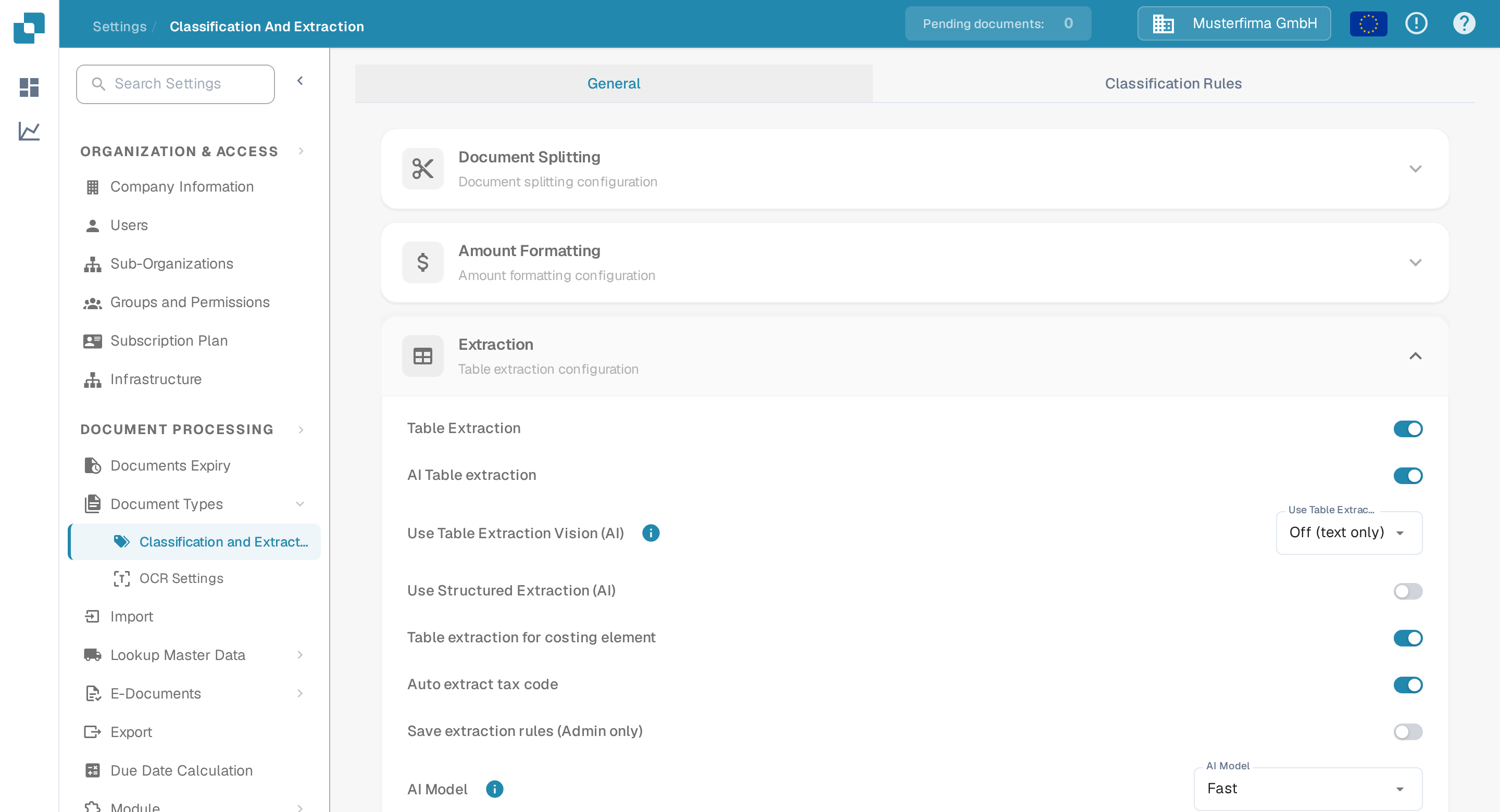
2. 向下滚动到 **Table Extraction** 部分

   <figure><img src="https://1870485400-files.gitbook.io/~/files/v0/b/gitbook-x-prod.appspot.com/o/spaces%2FlPczlNw8zzYNLfjfispX%2Fuploads%2Fgit-blob-c335bc477d4ac69b298f05d0eb0999919052c7bf%2Fai_model_1.png?alt=media" alt="提取部分，其中包含 Table Extraction 卡片和 AI Model 设置"><figcaption><p><strong>Extraction</strong> 部分包含 <strong>AI Model</strong> 设置和供应商分配表。</p></figcaption></figure>

## AI 模型选项

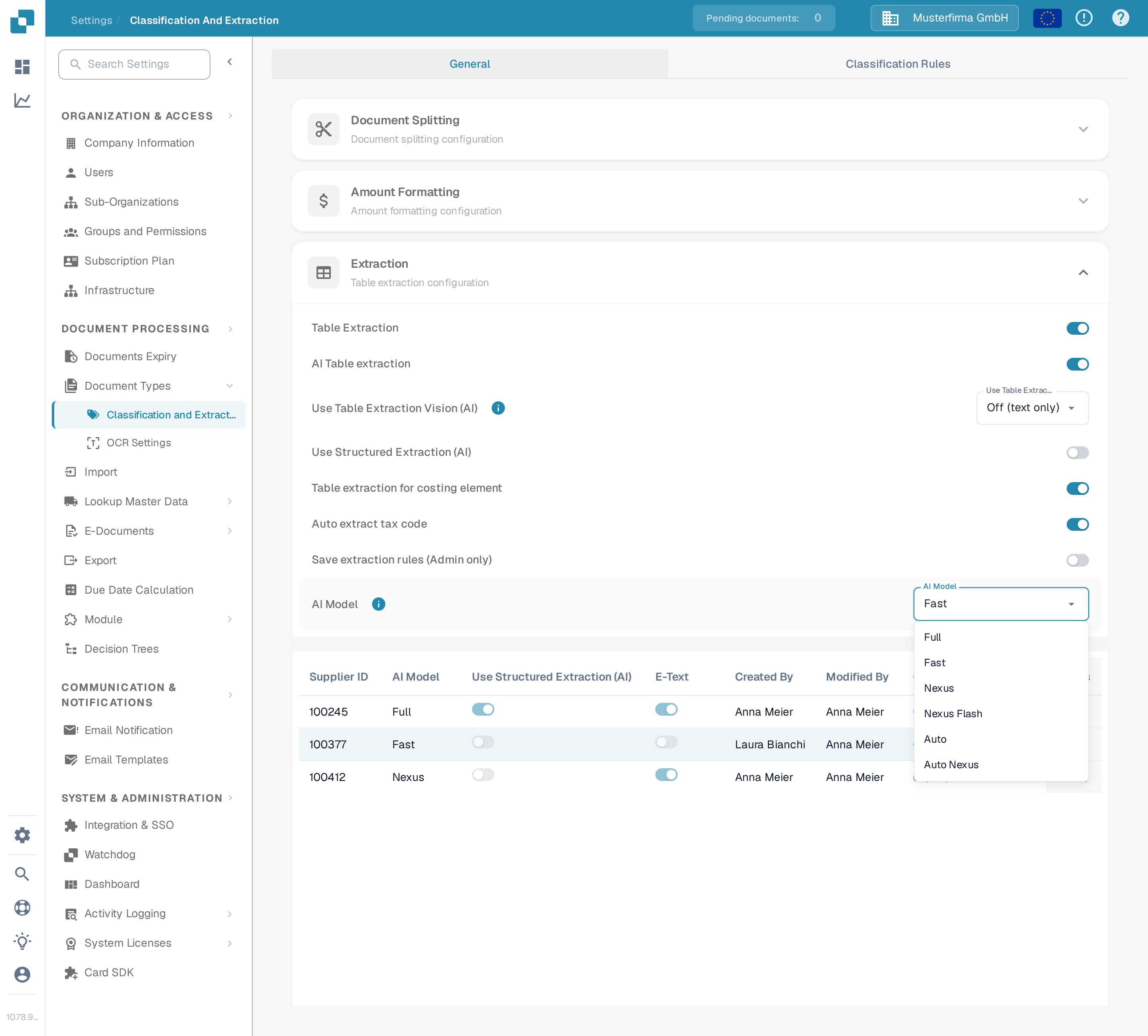
DocBits 为字段提取和表格提取提供六种 AI 模型选项。它们在**提取准确性**、**处理速度**和**每份文档的令牌成本**之间各有侧重，您可以根据所处理文档的类型选择合适的选项。将鼠标悬停在设置旁的信息图标上，即可查看当前所选选项的令牌成本。如果未为某个供应商设置模型，则会使用 Fast。

* **Full** – 最全面的选项，提取准确性最高。最适合布局复杂、扫描质量较差或对精确度要求最高的文档。作为功能最强的选项，它的处理速度也最慢，每份文档消耗 **2 个令牌**。
* **Fast** – 平衡选项，以较低成本兼顾良好的准确性和更快的处理速度。这是默认级别：未单独设置 AI 模型的供应商会使用 Fast，每份文档消耗 **1 个令牌**。
* **Nexus** – 可选启用的选项，使用不同的模型系列（Qwen 3.8 Max）。当您希望对 Fast 和 Full 结果不一致的供应商进行交叉核对，或替代模型更擅长读取特定布局时，可使用此选项。每份文档消耗 **1 个令牌**。
* **Nexus Flash** – Nexus 系列中速度更快的级别（GLM-5.3 Flash）。令牌成本相同，但处理文档的速度比 Nexus 更快，每份文档消耗 **1 个令牌**。
* **Auto** – 它本身不是一种模型：DocBits 会针对每份文档判断 Fast 是否足够，还是需要使用 Full，因此复杂文档会自动使用更强的模型。每份文档消耗 **1 个令牌**。
* **Auto Nexus** – 与 Auto 类似，但仅限于 Nexus 模型系列（Nexus Flash 和 Nexus）。文档始终不会使用标准模型系列处理，每份文档消耗 **1 个令牌**。

| 选项              | 最适用场景                 | 准确性   | 速度    | 令牌成本   |
| --------------- | --------------------- | ----- | ----- | ------ |
| **Full**        | 布局复杂、扫描质量较差或对精度要求高的文档 | 最高    | 最慢    | 2 / 文档 |
| **Fast**        | 日常文档（未设置时的默认选项）       | 高     | 快     | 1 / 文档 |
| **Nexus**       | 替代模型系列表现更好的供应商（可选启用）  | 高     | 快     | 1 / 文档 |
| **Nexus Flash** | Nexus 质量，处理速度更快       | 高     | 更快    | 1 / 文档 |
| **Auto**        | 文档质量不一且无需手动调整         | 按文档决定 | 按文档决定 | 1 / 文档 |
| **Auto Nexus**  | 将 Auto 决策限定在 Nexus 系列 | 按文档决定 | 按文档决定 | 1 / 文档 |

<figure><img src="https://1870485400-files.gitbook.io/~/files/v0/b/gitbook-x-prod.appspot.com/o/spaces%2FlPczlNw8zzYNLfjfispX%2Fuploads%2Fgit-blob-840b9f8d2d7291ce06d8f769fa1c62bbfa549422%2Fai_model_2.png?alt=media" alt="AI Model 下拉菜单已展开，显示 Full、Fast、Nexus、Nexus Flash、Auto 和 Auto Nexus"><figcaption><p><strong>AI Model</strong> 下拉菜单及其六种可用选项。</p></figcaption></figure>

## AI 模型分配表

您也可以直接在**验证界面**中为特定供应商配置专属的 **AI 模型**，从而针对各个供应商微调提取准确性。\
\
更多信息请参阅相应文档[此处](/chinese/zui-zhong-yong-hu-yu-he-zuo-huo-ban/end-user-section/validation-screen/supplier-specific-ai-model-for-field-and-table-extraction.md)。

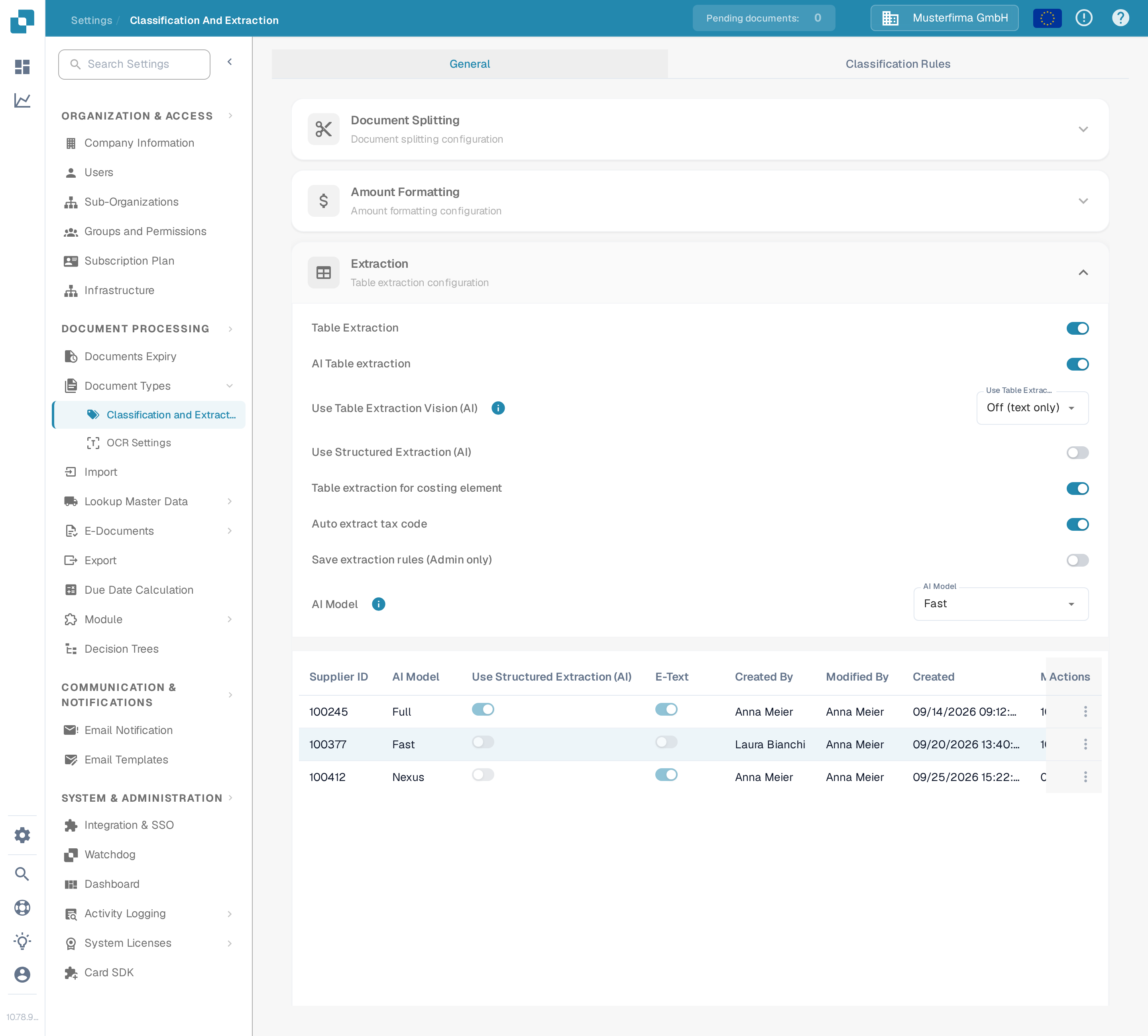
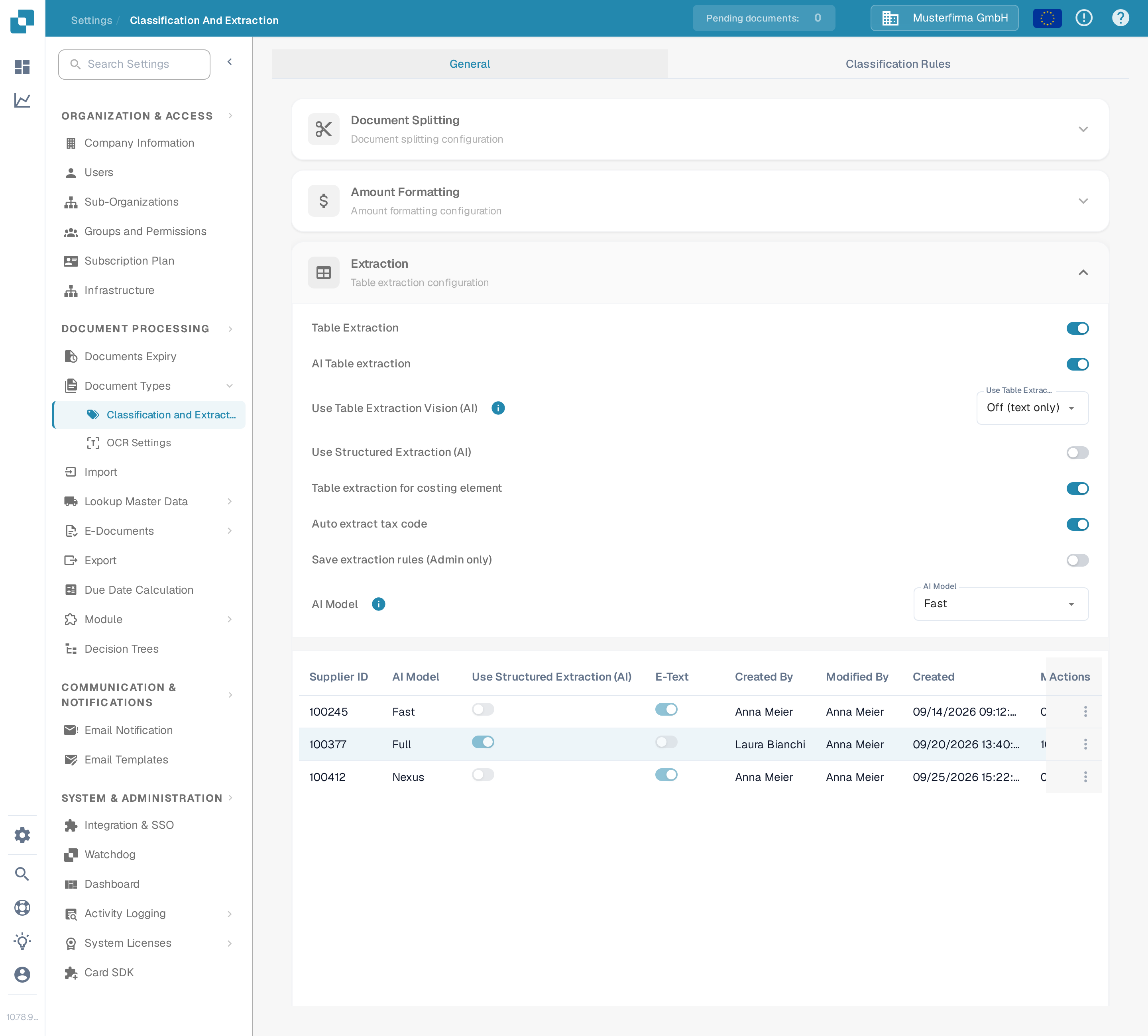
分配表会显示每个供应商的 AI 模型设置，并包含以下详细信息：

* **Supplier ID** – 供应商的唯一标识符
* **AI Model** – 当前分配给该供应商的 AI 模型级别
* **Use Structured Extraction (AI)** – 是否为该供应商启用了结构化提取
* **E-Text** – 指示是否启用了 E-Text 功能
* **Created By / Modified By / Created On / Modified On** – 设置条目的人员以及设置或修改时间
* **Action** – 包含删除条目的选项

<figure><img src="https://1870485400-files.gitbook.io/~/files/v0/b/gitbook-x-prod.appspot.com/o/spaces%2FlPczlNw8zzYNLfjfispX%2Fuploads%2Fgit-blob-0a65069f6b67d46efee76ef5105260771a14de62%2Fai_model_3.png?alt=media" alt="AI Model 分配表，包含 Supplier ID、AI Model、Use Structured Extraction (AI)、E-Text 和审计列"><figcaption><p>分配表会显示每个供应商对应的级别标签，不会显示原始模型 ID。</p></figcaption></figure>

### 删除条目 – 重置供应商专属设置

要将供应商的 AI 模型设置重置为默认值：

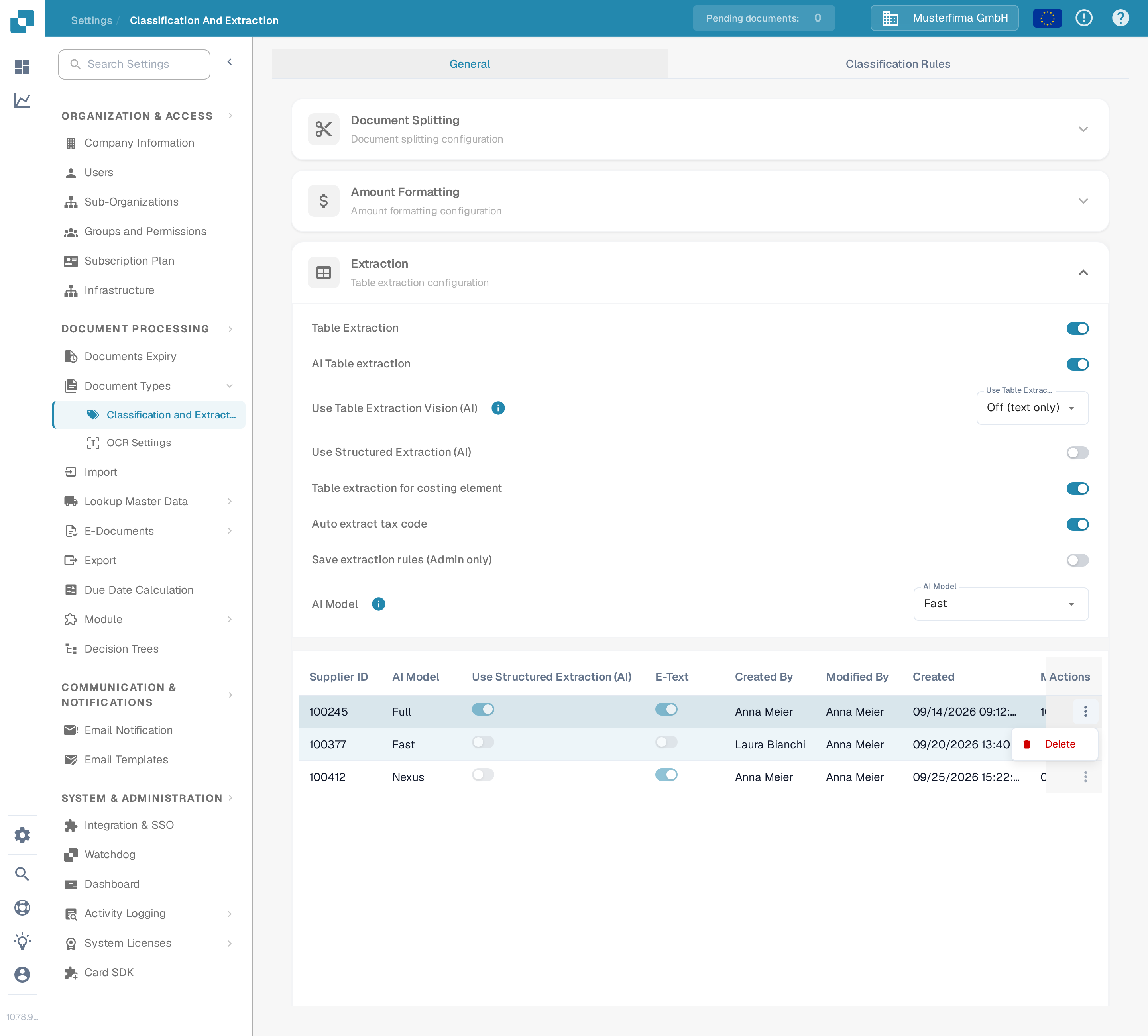
1. 点击供应商条目旁 **Action** 列中的三点菜单，然后选择 **Delete**。

   <figure><img src="https://1870485400-files.gitbook.io/~/files/v0/b/gitbook-x-prod.appspot.com/o/spaces%2FlPczlNw8zzYNLfjfispX%2Fuploads%2Fgit-blob-2061a772aa813e9f2ef1ff4bc7a69245cb200d5f%2Fai_model_4.png?alt=media" alt="AI Model 表格中的行操作菜单，包含 Delete 选项"><figcaption><p>打开行操作菜单并选择 <strong>Delete</strong>。</p></figcaption></figure>
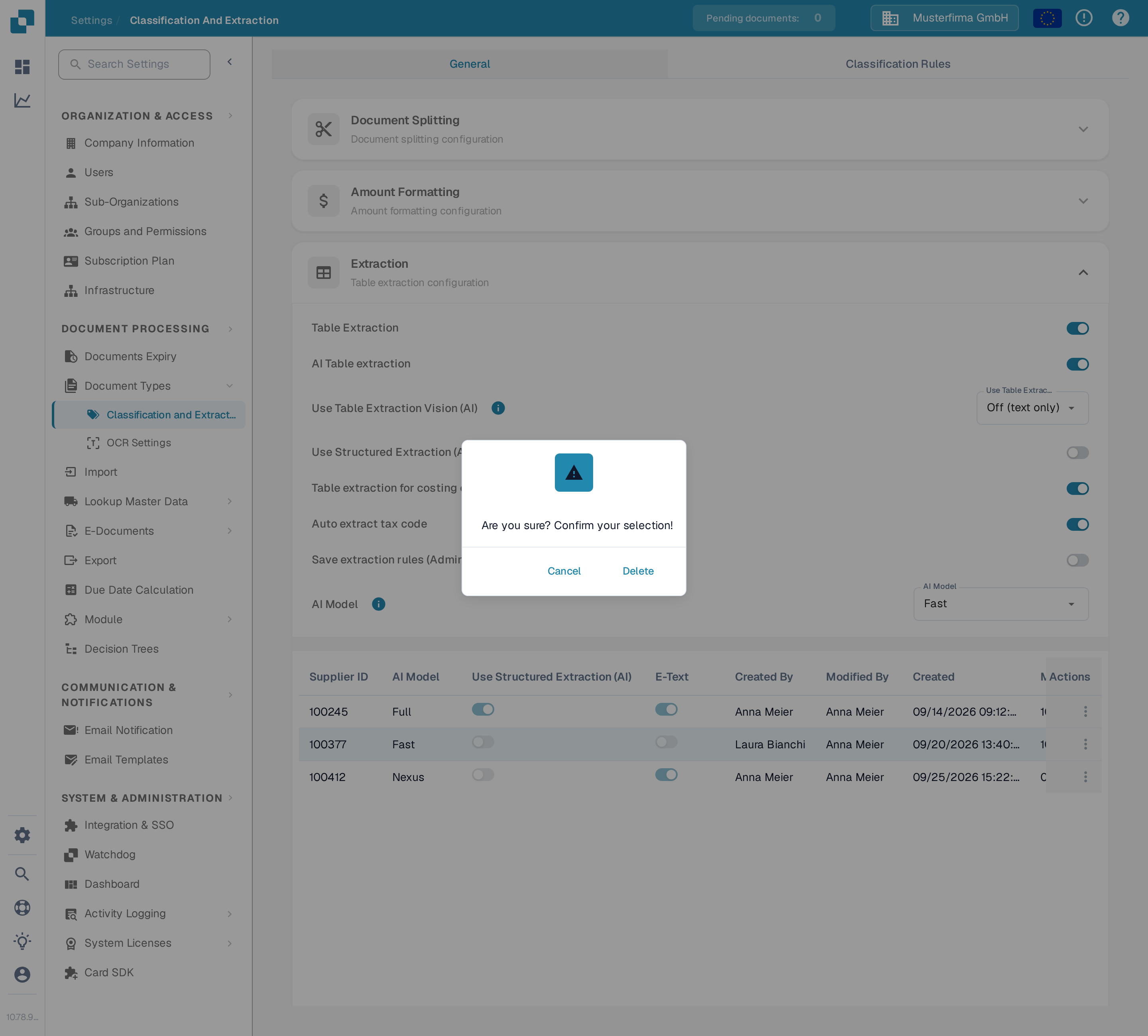
2. 系统会显示确认对话框，请确认要删除该条目。

   <figure><img src="https://1870485400-files.gitbook.io/~/files/v0/b/gitbook-x-prod.appspot.com/o/spaces%2FlPczlNw8zzYNLfjfispX%2Fuploads%2Fgit-blob-1aa776bd84c626ccc27e9dcea7ea78ab2b68666d%2Fai_model_5.png?alt=media" alt="确认对话框，询问是否删除该条目"><figcaption><p>在对话框中确认删除。</p></figcaption></figure>

删除后，该供应商将恢复使用默认 **AI 模型**进行**字段提取**和**表格提取**。


---

# Agent Instructions
This documentation is published with GitBook. GitBook is the documentation platform designed so that both humans and AI agents can read, navigate, and reason over technical content effectively. Learn more at gitbook.com.

## Querying This Documentation
If you need additional information that is not directly available in this page, you can query the documentation by asking a question.

Perform an HTTP GET request on the following URL with the `ask` and `goal` query parameters:

```
GET https://docs.docbits.com/chinese/guan-li-yu-she-zhi/settings/document-processing/classification-and-extraction/ai-model.md?ask=<question>&goal=<user_goal>
```

`ask` is the immediate question: it should be specific, self-contained, and written in natural language.
`goal` is what the user is ultimately trying to achieve, the reason they need the answer. Sharing it helps GitBook give you a better, more relevant answer. A goal is most helpful when it describes the outcome the user wants rather than restating the question. For example, with `ask=how do I create an API token`, a goal like `automate deployments from our CI pipeline` lets GitBook tailor the answer to that use case.

The response will contain a direct answer to the question and relevant excerpts and sources from the documentation.

Use this mechanism when the answer is not explicitly present in the current page, you need clarification or additional context, or you want to retrieve related documentation sections.