> For the complete documentation index, see [llms.txt](https://docs.docbits.com/llms.txt). Markdown versions of documentation pages are available by appending `.md` to page URLs; this page is available as [Markdown](https://docs.docbits.com/chinese/guan-li-yu-she-zhi/analytics-dashboard/touchless-intelligence/touchless-supplier-diagnosis.md).
# 供应商诊断与问题集群
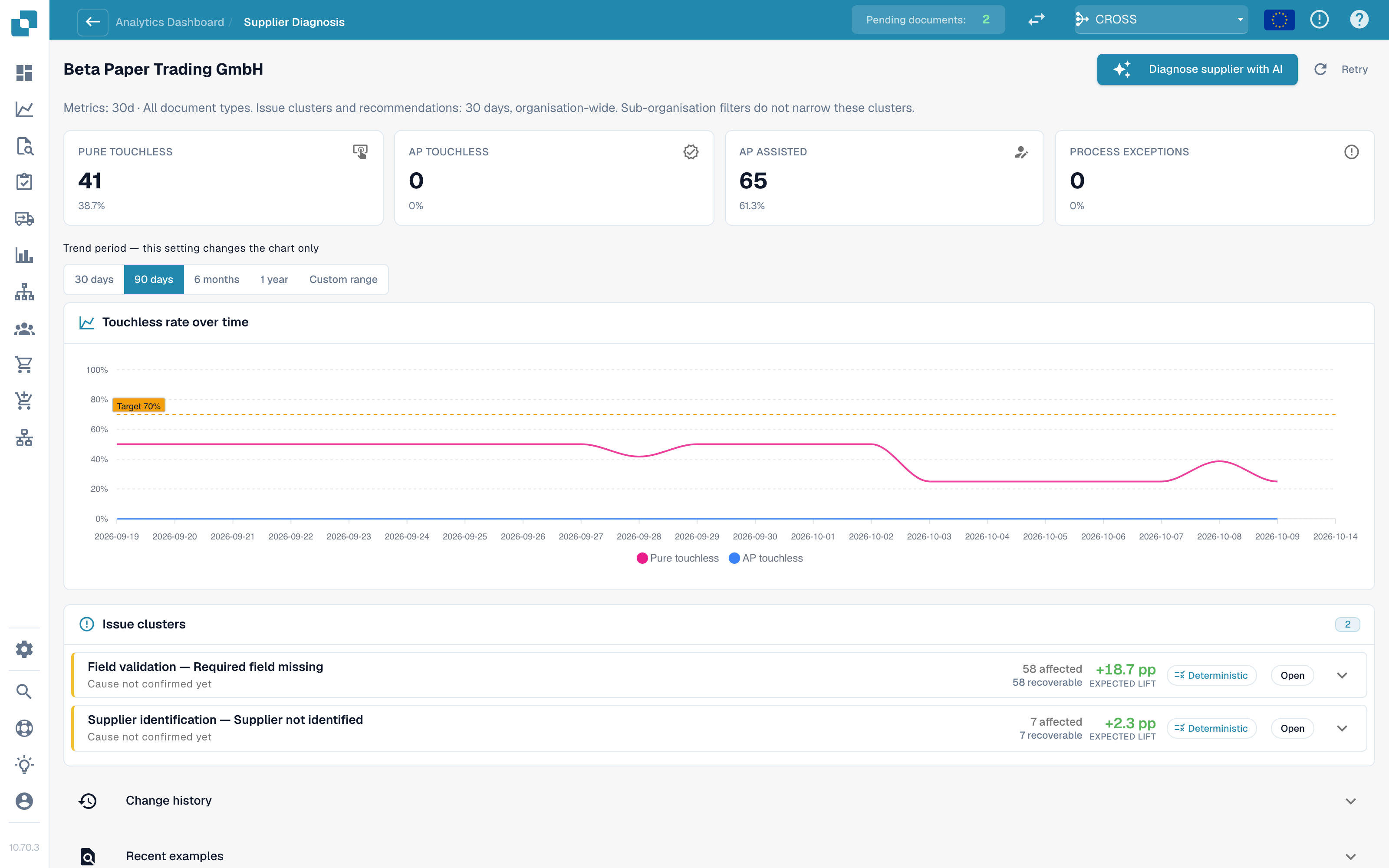
点击队列中的供应商即可打开其诊断页面。
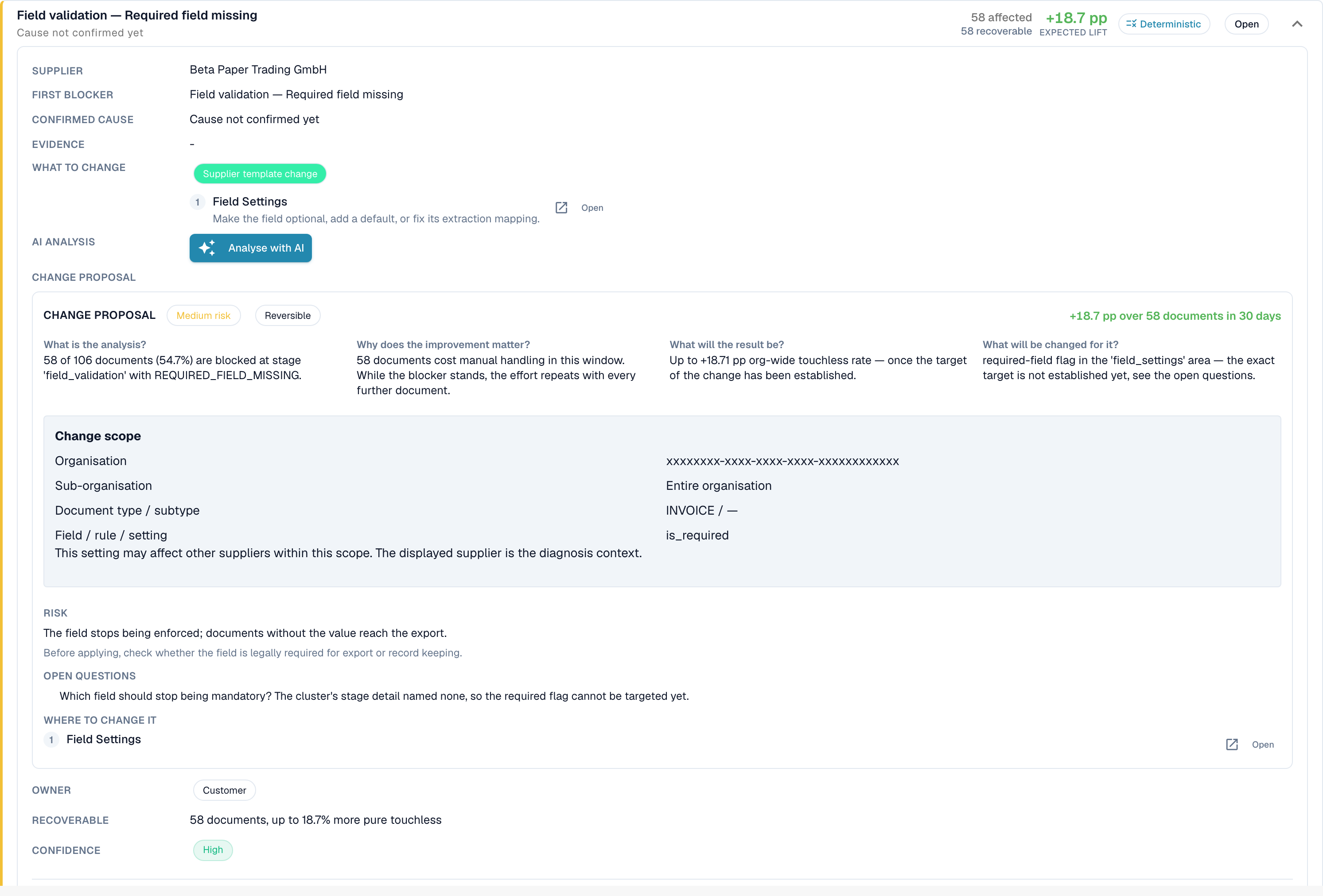
**集群示例(仅供说明)。**
* **标题**:阶段 *字段验证* 中的 *缺少必填字段*
* **受影响**:28 份文档。**可挽回**:28 份文档。**预期提升幅度**:+2.8 个百分点
* **疑似原因**:供应商将采购订单编号打印在表格下方,提取时不会查看该位置
* **要更改的内容**:*主数据变更*:添加该供应商的版式。点击 **打开** 可前往相应的设置页面
* **负责人**:顾问。**置信度**:中。**来源**:假设
集群卡片显示的内容:
| 部分 | 含义 |
| ---------------------- | -------------------------------------------------------------------------------------- |
| **首要阻碍因素**和**阶段** | 文档停止处理的原因及其所在的流水线阶段。原因超过 30 种,例如 *未识别供应商*、*未找到采购订单*、*单价超出采购订单容差*、*被 ERP 拒绝*、*电子发票验证失败* |
| **受影响 / 可挽回 / 预期提升幅度** | 受影响的文档数量、能够挽回的文档数量,以及可带来的百分点提升幅度 |
| **疑似原因 / 已确认原因** | DocBits 推测的原因(或人员确认的原因) |
| **证据**和**缺失证据** | 该发现的依据,以及 DocBits **无法**确认的内容。请先阅读**缺失证据**,再决定是否采信其余内容 |
| **要更改的内容** | 具体步骤及指向相关设置的**打开**链接。标签会说明类型:*配置变更*、*主数据变更*、*供应商模板变更*、*流程变更*、*需要供应商采取操作*、*无法修复* |
| **负责人** | DocBits、客户、顾问、供应商或未分配 |
| **示例文档** | 可供查看的集群实际文档 |
**可在 DocBits 中修复**和**仅需供应商采取操作**会分组显示。对于\_仅需供应商采取操作\_的情况,DocBits 中的任何变更都不会改变结果:供应商必须更正文档并重新发送。
### 建议的来源
每个原因都会显示其**来源**,以便你区分推导出的发现和猜测:
| 来源 | 含义 |
| ------------------ | --------------------------------- |
| **确定性** / **基于规则** | 根据记录的流水线证据推导出的规则。未使用语言模型 |
| **假设** | 语言模型根据集群证据提出的建议。请将其视为线索,并在采取行动前核实 |
| **已确认** | 人员审查证据后确认了原因 |
AI 文本使用你所在组织的语言。如果某个集群使用其他语言进行了分析,请使用**使用此语言分析**。
## 采购订单匹配集群
如果集群的首要阻碍因素属于采购订单匹配原因(例如\_采购订单行项目不匹配\_或\_未找到采购订单\_),集群卡片会显示 DocBits 如何尝试将发票与采购订单匹配。请参阅[采购订单匹配诊断](/chinese/guan-li-yu-she-zhi/analytics-dashboard/touchless-intelligence/touchless-po-matching-diagnosis.md)。
## 相关页面
* [自动处理智能分析](/chinese/guan-li-yu-she-zhi/analytics-dashboard/touchless-intelligence.md)
* [采购订单匹配诊断](/chinese/guan-li-yu-she-zhi/analytics-dashboard/touchless-intelligence/touchless-po-matching-diagnosis.md)
* [文档追踪](/chinese/guan-li-yu-she-zhi/analytics-dashboard/touchless-intelligence/touchless-document-trace.md)
* [变更提案与报告](/chinese/guan-li-yu-she-zhi/analytics-dashboard/touchless-intelligence/touchless-change-proposals.md)
---
# Agent Instructions
This documentation is published with GitBook. GitBook is the documentation platform designed so that both humans and AI agents can read, navigate, and reason over technical content effectively. Learn more at gitbook.com.
## Querying This Documentation
If you need additional information that is not directly available in this page, you can query the documentation by asking a question.
Perform an HTTP GET request on the following URL with the `ask` and `goal` query parameters:
```
GET https://docs.docbits.com/chinese/guan-li-yu-she-zhi/analytics-dashboard/touchless-intelligence/touchless-supplier-diagnosis.md?ask=&goal=
```
`ask` is the immediate question: it should be specific, self-contained, and written in natural language.
`goal` is what the user is ultimately trying to achieve, the reason they need the answer. Sharing it helps GitBook give you a better, more relevant answer. A goal is most helpful when it describes the outcome the user wants rather than restating the question. For example, with `ask=how do I create an API token`, a goal like `automate deployments from our CI pipeline` lets GitBook tailor the answer to that use case.
The response will contain a direct answer to the question and relevant excerpts and sources from the documentation.
Use this mechanism when the answer is not explicitly present in the current page, you need clarification or additional context, or you want to retrieve related documentation sections.