> For the complete documentation index, see [llms.txt](https://docs.docbits.com/llms.txt). Markdown versions of documentation pages are available by appending `.md` to page URLs; this page is available as [Markdown](https://docs.docbits.com/chinese/gai-shu-yu-ji-chu/infor-infrastructure.md).
# Infor 基础设施
### 开放 443 端口与安全通信
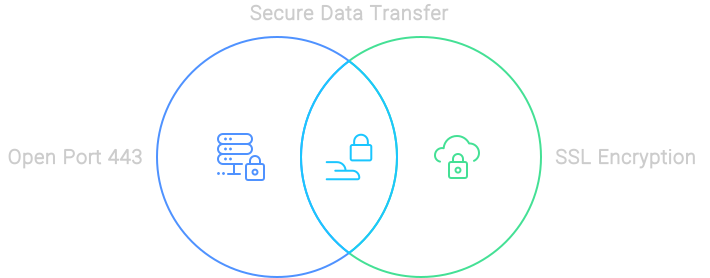
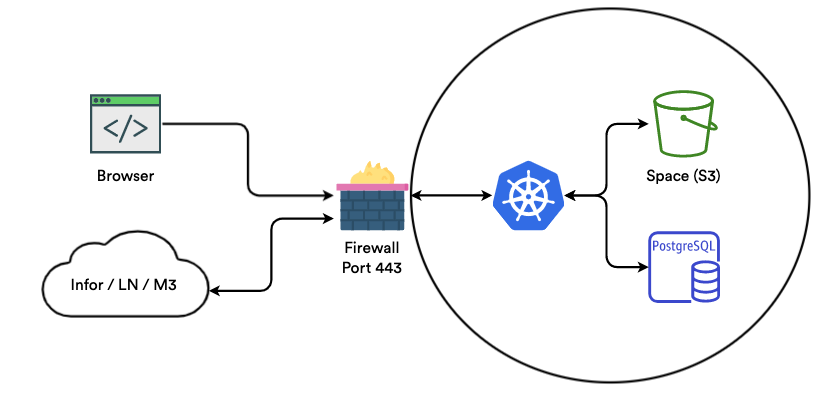
我们深知安全传输数据的重要性。因此,我们使用开放的 443 端口(HTTPS 的标准端口),确保传输的所有数据都经过加密并受到保护。通过 SSL 保护的连接,确保您的数据在整个流程的每一步都安全无虞。
安全的数据传输
### 与数据库通信
在数据库通信方面,我们绝不冒险。我们的 Kubernetes 环境与数据库位于同一个虚拟私有云 (VPC) 中。这意味着我们只通过本地 IP 访问数据库,确保传输的数据始终留在本地网络内。这就像为您的数据开辟了一条专用高速公路。
### 空间
使用 Docbits 处理文档轻松便捷。所有上传的文档都会安全地存储在专用的“Space”中。我们使用 SSL 加密数据流量,并要求通过多个密钥访问文件,确保您的文档安全如保险库。
### 流量安全
我们只允许通过 HTTPS 安全连接与服务器通信。这能确保所有传输的数据都经过加密,妥善保护您的敏感信息。这就像全天候为您的数据配备了一名保安。
### Infor Cloud
### Infor 本地部署
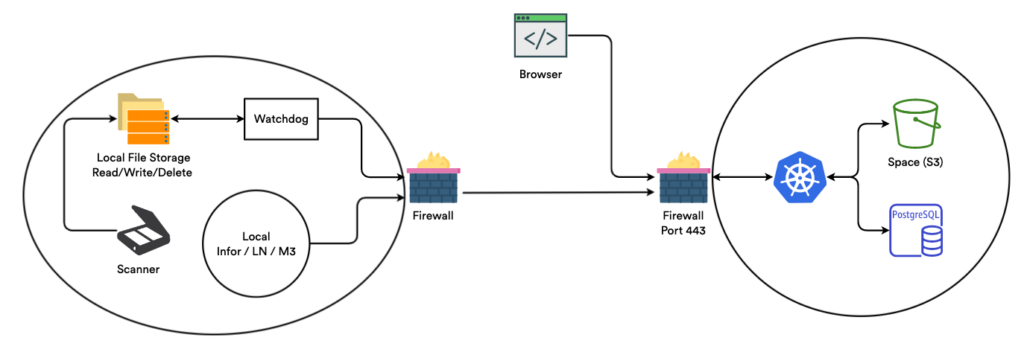
灵活性至关重要,因此我们同时提供云端和本地部署解决方案。使用本地部署选项时,无需开放任何端口,从而确保您的网络安全不受影响。无论您使用云端,还是选择在本地部署,我们都能为您提供支持。
---
# Agent Instructions
This documentation is published with GitBook. GitBook is the documentation platform designed so that both humans and AI agents can read, navigate, and reason over technical content effectively. Learn more at gitbook.com.
## Querying This Documentation
If you need additional information that is not directly available in this page, you can query the documentation by asking a question.
Perform an HTTP GET request on the following URL with the `ask` and `goal` query parameters:
```
GET https://docs.docbits.com/chinese/gai-shu-yu-ji-chu/infor-infrastructure.md?ask=&goal=
```
`ask` is the immediate question: it should be specific, self-contained, and written in natural language.
`goal` is what the user is ultimately trying to achieve, the reason they need the answer. Sharing it helps GitBook give you a better, more relevant answer. A goal is most helpful when it describes the outcome the user wants rather than restating the question. For example, with `ask=how do I create an API token`, a goal like `automate deployments from our CI pipeline` lets GitBook tailor the answer to that use case.
The response will contain a direct answer to the question and relevant excerpts and sources from the documentation.
Use this mechanism when the answer is not explicitly present in the current page, you need clarification or additional context, or you want to retrieve related documentation sections.