> For the complete documentation index, see [llms.txt](https://docs.docbits.com/llms.txt). Markdown versions of documentation pages are available by appending `.md` to page URLs; this page is available as [Markdown](https://docs.docbits.com/administration-and-setup/workflow/cards-overview/patterns/data-transformation-pattern.md).
# Data Transformation Pattern
**Pattern Type:** Data Processing & Manipulation **Complexity:** Medium **Estimated Setup:** 30-45 minutes **Common Use Cases:** Field calculations, data formatting, currency conversion, unit conversion, data enrichment
***
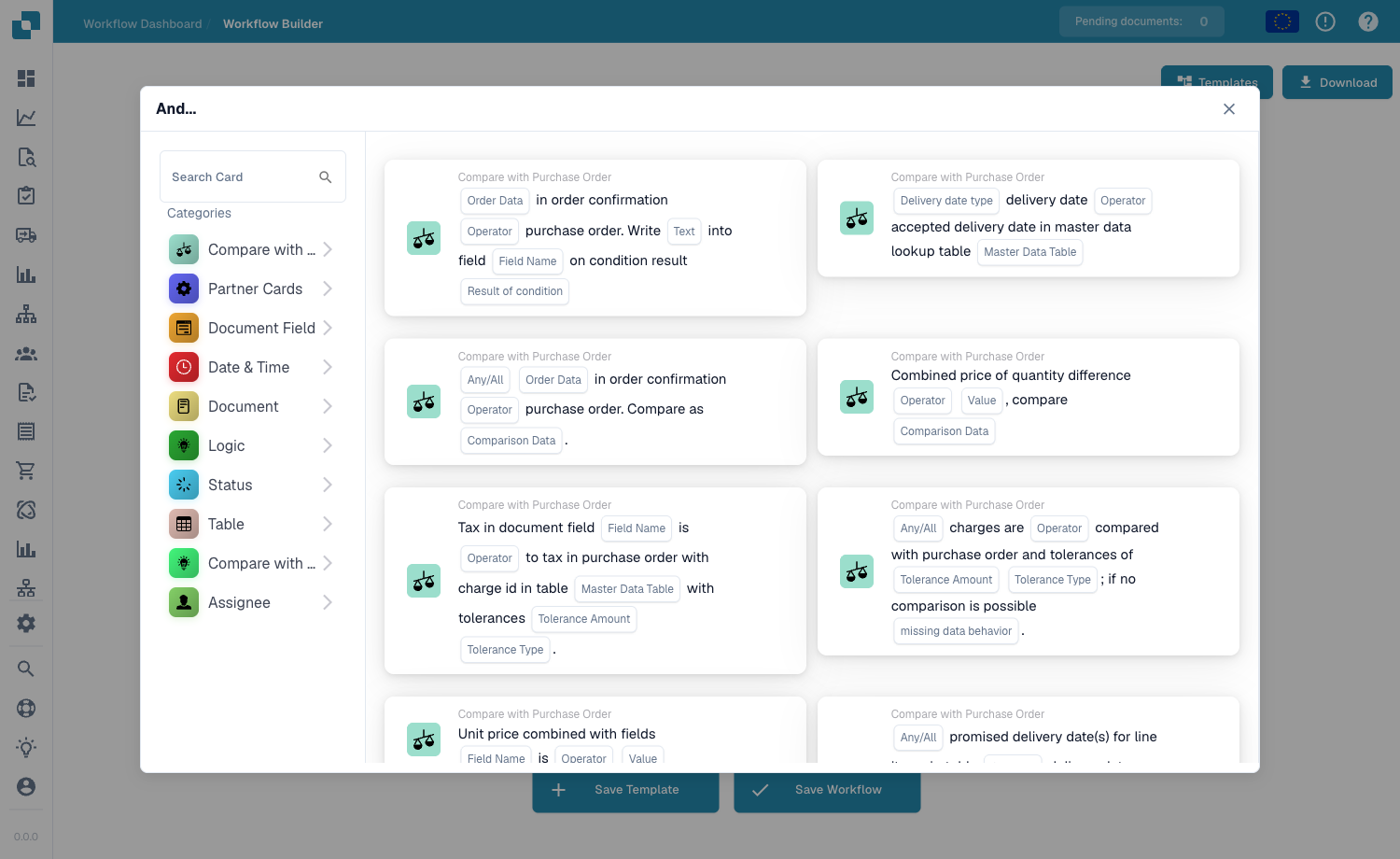
You build this pattern in the **Workflow Builder** (Workflow Dashboard → Workflow List → Add Workflow). Click **Add Card** and open the **Document Field** category — it holds the read, write, calculate and format cards this pattern chains together:
The Add Card library — field read/write, calculation and formatting cards live under the Document Field category.
***
## Pattern Overview
This pattern demonstrates how to transform, calculate, format, and enrich document data in DocBits workflows. Data transformation is essential for preparing data for export, performing calculations, standardizing formats, and enriching documents with additional information.
**What This Pattern Does:**
1. Extracts data from document fields
2. Performs calculations and transformations
3. Formats data to required standards
4. Converts between units, currencies, dates
5. Enriches documents with derived or lookup data
6. Validates and cleanses data
***
## When to Use This Pattern
Use this pattern when you need to:
* ✅ Calculate totals, subtotals, taxes
* ✅ Convert currencies or units
* ✅ Format dates, numbers, text
* ✅ Derive values from existing fields
* ✅ Enrich data from external sources
* ✅ Standardize data formats
* ✅ Clean and validate data
* ✅ Prepare data for export
**Don't use this pattern when:**
* ❌ No transformation needed
* ❌ Data is already in correct format
* ❌ Simple field copy is sufficient
***
## Data Transformation Types
### 1. Calculations
**Mathematical Operations:**
```
- Addition: Quantity + Bonus_Quantity = Total_Quantity
- Subtraction: Invoice_Total - Tax_Amount = Net_Amount
- Multiplication: Quantity × Unit_Price = Line_Total
- Division: Total_Amount / Quantity = Unit_Price
- Percentage: (Discount / Subtotal) × 100 = Discount_Percent
```
### 2. String Operations
**Text Manipulation:**
```
- Concatenation: First_Name + " " + Last_Name = Full_Name
- Uppercase: "invoice" → "INVOICE"
- Lowercase: "SUPPLIER" → "supplier"
- Substring: "INV-2025-001" → "2025" (extract year)
- Replace: "01/23/2025" → "2025-01-23"
- Trim: " ABC Corp " → "ABC Corp"
```
### 3. Data Type Conversion
**Type Transformations:**
```
- String to Number: "123.45" → 123.45
- Number to String: 123.45 → "123.45"
- Date to String: 2025-10-23 → "October 23, 2025"
- String to Date: "23.10.2025" → 2025-10-23
- Boolean to String: true → "Yes"
```
### 4. Unit Conversions
**Measurement Conversions:**
```
- Weight: kg → lbs, tons → kg
- Length: cm → inches, m → ft
- Volume: liters → gallons
- Temperature: Celsius → Fahrenheit
- Quantity: pieces → dozens, units → pallets
```
### 5. Currency Conversions
**Exchange Rate Applications:**
```
- USD → EUR: Amount_USD × Rate = Amount_EUR
- Multi-currency: Convert all to base currency
- Historical rates: Use rate from invoice date
```
### 6. Date Transformations
**Date Operations:**
```
- Format change: 10/23/2025 → 2025-10-23
- Add days: Invoice_Date + 30 = Due_Date
- Calculate age: Today - Invoice_Date = Age_Days
- Extract parts: "2025-10-23" → Year: 2025, Month: 10, Day: 23
```
***
## Complete Workflow Example
### Scenario: Invoice Total Calculation & Data Enrichment
**Business Requirement:**
* Extract line items from invoice
* Calculate line totals (Qty × Price)
* Calculate subtotal (sum of line totals)
* Calculate tax amount (Subtotal × Tax\_Rate)
* Calculate grand total (Subtotal + Tax)
* Convert to EUR if invoice in other currency
* Format amounts to 2 decimal places
* Add company GL account based on product category
* Validate calculations against invoice total
* Flag if variance > 1%
**Workflow Cards Used:**
1. ACTION\_CALCULATE\_FIELD - Perform calculations
2. ACTION\_SET\_FIELD\_TO\_TEXT - Store results
3. ACTION\_COPY\_FIELD\_VALUE - Copy values
4. CALL\_API - Get exchange rates (if needed)
5. CONDITION\_COMPARE\_TWO\_DOCFIELD\_VALUES - Validate calculations
6. ACTION\_SET\_FIELD\_FROM\_MASTER\_DATA - Enrich with GL accounts
***
## Step-by-Step Implementation
### Step 1: Line Item Calculations
**Calculate Line Totals:**
**Card:** ACTION\_CALCULATE\_FIELD
**For each line item:**
```
Field: Line_Total
Formula: {{TABLE_FIELD:Quantity}} * {{TABLE_FIELD:Unit_Price}}
Result Type: Number
Decimal Places: 2
```
**Example:**
```
Line 1:
Quantity: 100
Unit Price: €50.00
Calculation: 100 × 50.00 = €5,000.00
Store in: Line_Total
Line 2:
Quantity: 50
Unit Price: €20.00
Calculation: 50 × 20.00 = €1,000.00
Store in: Line_Total
Line 3:
Quantity: 25
Unit Price: €15.50
Calculation: 25 × 15.50 = €387.50
Store in: Line_Total
```
**Guide Reference:** [Field Manipulation Guide - Calculations](/administration-and-setup/workflow/cards-overview/field-manipulation-guide.md)
***
### Step 2: Calculate Document Subtotal
**Sum All Line Totals:**
**Card:** ACTION\_CALCULATE\_FIELD
**Configuration:**
```
Field: Calculated_Subtotal
Formula: SUM({{TABLE_COLUMN:Line_Total}})
Result Type: Number
Decimal Places: 2
```
**Example:**
```
Line 1 Total: €5,000.00
Line 2 Total: €1,000.00
Line 3 Total: €387.50
Subtotal = 5000 + 1000 + 387.50 = €6,387.50
Store in: Calculated_Subtotal
```
***
### Step 3: Calculate Tax Amount
**Apply Tax Rate to Subtotal:**
**Card:** ACTION\_CALCULATE\_FIELD
**Configuration:**
```
Field: Calculated_Tax_Amount
Formula: {{Calculated_Subtotal}} * ({{Tax_Rate}} / 100)
Result Type: Number
Decimal Places: 2
```
**Example:**
```
Calculated_Subtotal: €6,387.50
Tax_Rate: 19% (VAT)
Tax Amount = 6387.50 × (19 / 100)
= 6387.50 × 0.19
= €1,213.63
Store in: Calculated_Tax_Amount
```
***
### Step 4: Calculate Grand Total
**Add Subtotal and Tax:**
**Card:** ACTION\_CALCULATE\_FIELD
**Configuration:**
```
Field: Calculated_Grand_Total
Formula: {{Calculated_Subtotal}} + {{Calculated_Tax_Amount}}
Result Type: Number
Decimal Places: 2
```
**Example:**
```
Calculated_Subtotal: €6,387.50
Calculated_Tax_Amount: €1,213.63
Grand Total = 6387.50 + 1213.63 = €7,601.13
Store in: Calculated_Grand_Total
```
***
### Step 5: Currency Conversion (if needed)
**Check if conversion needed:**
**Card:** CONDITION\_DOC\_FIELD\_IS
**Configuration:**
```
Field: Invoice_Currency
Operator: IS NOT EQUAL TO
Value: EUR
```
**If conversion needed:**
**Step 5a: Get Exchange Rate**
**Card:** CALL\_API
**Configuration:**
```
Endpoint: https://api.exchangerate-api.com/v4/latest/{{Invoice_Currency}}
Method: GET
Response Path: rates.EUR
Store in: Exchange_Rate_To_EUR
```
**Example:**
```
Invoice Currency: USD
API Response: {
"base": "USD",
"rates": {
"EUR": 0.92
}
}
Exchange_Rate_To_EUR = 0.92
```
**Step 5b: Convert Amounts**
**Card:** ACTION\_CALCULATE\_FIELD
**Configuration:**
```
Field: Grand_Total_EUR
Formula: {{Calculated_Grand_Total}} * {{Exchange_Rate_To_EUR}}
Result Type: Number
Decimal Places: 2
```
**Example:**
```
Grand Total (USD): $7,601.13
Exchange Rate: 0.92
Grand Total (EUR) = 7601.13 × 0.92 = €6,993.04
Store in: Grand_Total_EUR
```
**Guide Reference:** [API Integration Pattern - Currency Conversion](/administration-and-setup/workflow/cards-overview/patterns/api-integration-pattern.md)
***
### Step 6: Data Enrichment - Add GL Accounts
**Lookup GL Account by Product Category:**
**Card:** ACTION\_SET\_FIELD\_FROM\_MASTER\_DATA
**Configuration:**
```
Lookup Table: GL_Account_Mapping
Lookup Key: {{TABLE_FIELD:Product_Category}}
Return Field: GL_Account_Number
Store in: GL_Account
```
**Example:**
```
Line 1:
Product Category: "Office Supplies"
Lookup → GL_Account_Mapping table
Result: GL Account "4200-100" (Office Expense)
Line 2:
Product Category: "IT Equipment"
Lookup → GL_Account_Mapping table
Result: GL Account "6100-200" (IT Assets)
Line 3:
Product Category: "Services"
Lookup → GL_Account_Mapping table
Result: GL Account "5000-300" (Services Expense)
```
**Guide Reference:** [Field Manipulation Guide - Master Data](/administration-and-setup/workflow/cards-overview/field-manipulation-guide.md)
***
### Step 7: Validate Calculations
**Compare Calculated Total with Invoice Total:**
**Card:** CONDITION\_COMPARE\_TWO\_DOCFIELD\_VALUES
**Configuration:**
```
Field 1: Calculated_Grand_Total
Field 2: Invoice_Total (from OCR)
Operator: Calculate Variance Percentage
Tolerance: 1%
```
**Calculation:**
```
Variance % = |Calculated - Invoice| / Invoice × 100
Example:
Calculated Total: €7,601.13
Invoice Total: €7,600.00
Variance = |7601.13 - 7600.00| / 7600.00 × 100
= 1.13 / 7600.00 × 100
= 0.015%
Is 0.015% ≤ 1% tolerance? YES ✅
Result: PASS (calculations match invoice)
```
**Logic:**
```
IF Variance ≤ 1%:
Set Validation_Status = "PASS"
Continue processing
ELSE:
Set Validation_Status = "FAIL"
Create review task
Flag for manual verification
```
**Guide Reference:** [Condition Cards Guide - Field Comparison](/administration-and-setup/workflow/cards-overview/condition-cards-complete-guide.md)
***
### Step 8: Format Data for Export
**Standardize Formats:**
**Card:** ACTION\_SET\_FIELD\_TO\_TEXT
**Date Formatting:**
```
Field: Invoice_Date_Formatted
Value: FORMATDATE({{Invoice_Date}}, "YYYY-MM-DD")
Example: 10/23/2025 → 2025-10-23
```
**Number Formatting:**
```
Field: Amount_Formatted
Value: FORMATNUMBER({{Grand_Total_EUR}}, 2, ",", ".")
Example: 7601.13 → 7.601,13 (German format)
```
**Text Formatting:**
```
Field: Supplier_Name_Upper
Value: UPPERCASE({{Supplier_Name}})
Example: "ABC Corporation" → "ABC CORPORATION"
```
***
## Advanced Transformations
### Transformation 1: Multi-Level Tax Calculation
**Scenario:** Different tax rates per line item
```
Line 1: Product A (Tax Rate 19%)
Line 2: Product B (Tax Rate 7% - reduced)
Line 3: Product C (Tax Rate 0% - exempt)
Calculation:
Line 1 Tax = €5,000.00 × 0.19 = €950.00
Line 2 Tax = €1,000.00 × 0.07 = €70.00
Line 3 Tax = €387.50 × 0.00 = €0.00
Total Tax = €950.00 + €70.00 + €0.00 = €1,020.00
```
**Implementation:**
```
For each line:
1. Get product tax category
2. Lookup applicable tax rate
3. Calculate: Line_Net × Tax_Rate = Line_Tax
4. Sum all Line_Tax values = Total_Tax
```
***
### Transformation 2: Discount Calculations
**Scenario:** Apply volume discount and early payment discount
```
Original Subtotal: €10,000.00
Step 1: Volume Discount (10% for orders > €5,000)
Discount = €10,000.00 × 0.10 = €1,000.00
After Volume Discount = €10,000.00 - €1,000.00 = €9,000.00
Step 2: Early Payment Discount (2% if paid within 10 days)
Discount = €9,000.00 × 0.02 = €180.00
After Payment Discount = €9,000.00 - €180.00 = €8,820.00
Step 3: Calculate Tax (on discounted amount)
Tax = €8,820.00 × 0.19 = €1,675.80
Final Total = €8,820.00 + €1,675.80 = €10,495.80
```
**Implementation:**
```
1. Check order value for volume discount eligibility
2. Calculate volume discount
3. Apply volume discount to subtotal
4. Check payment terms for early payment discount
5. Calculate early payment discount
6. Apply early payment discount
7. Calculate tax on final discounted amount
8. Calculate grand total
```
***
### Transformation 3: Unit of Measure Conversion
**Scenario:** Convert invoice UOM to standard UOM
```
Invoice shows:
Product: Steel Rods
Quantity: 50
Unit: Meters
Unit Price: €10.00/meter
Line Total: €500.00
Company standard UOM: Feet
Conversion:
1 meter = 3.28084 feet
Quantity (feet) = 50 meters × 3.28084 = 164.042 feet
Unit Price (feet) = €10.00/meter ÷ 3.28084 = €3.05/foot
Verification: 164.042 feet × €3.05/foot ≈ €500.00 ✅
```
**Implementation:**
```
1. Identify invoice UOM
2. Get conversion factor to standard UOM
3. Convert quantity
4. Convert unit price
5. Verify line total remains same
6. Store both original and converted values
```
***
### Transformation 4: Date Calculations
**Scenario:** Calculate payment terms and due dates
```
Invoice Date: 2025-10-23
Payment Terms: NET30
Calculations:
Due Date = Invoice Date + 30 days = 2025-11-22
Early Payment Discount Available If:
Payment Date ≤ Invoice Date + 10 days
Discount End Date = 2025-11-02
Days Until Due = Due Date - Today
If Today = 2025-10-23: Days = 30
If Today = 2025-11-15: Days = 7
If Today = 2025-11-23: Days = -1 (overdue)
```
**Implementation:**
```
1. Extract Invoice_Date
2. Extract Payment_Terms (e.g., "NET30", "NET60", "2/10 NET30")
3. Parse payment terms
4. Calculate Due_Date
5. Calculate Discount_End_Date (if applicable)
6. Calculate Days_Until_Due
7. Set Status: "Current", "Due Soon", "Overdue"
```
***
### Transformation 5: Text Parsing & Extraction
**Scenario:** Extract structured data from unstructured text
```
Original Field: "PO-2025-ABC-12345-REV2"
Extract:
Year: "2025"
Department: "ABC"
PO Number: "12345"
Revision: "2"
Method:
Split by delimiter "-"
Array: ["PO", "2025", "ABC", "12345", "REV2"]
Extract:
Year = Array[1] = "2025"
Department = Array[2] = "ABC"
PO_Number = Array[3] = "12345"
Revision = Extract digits from Array[4] = "2"
```
***
## Complete Transformation Workflow Diagram
```
INVOICE DATA EXTRACTED
│
├─ STEP 1: LINE ITEM CALCULATIONS
│ For each line:
│ Quantity × Unit_Price = Line_Total
│ Result: Line totals calculated
│
├─ STEP 2: SUBTOTAL CALCULATION
│ SUM(All Line_Totals) = Subtotal
│ Result: €6,387.50
│
├─ STEP 3: TAX CALCULATION
│ Subtotal × Tax_Rate = Tax_Amount
│ €6,387.50 × 19% = €1,213.63
│
├─ STEP 4: GRAND TOTAL CALCULATION
│ Subtotal + Tax_Amount = Grand_Total
│ €6,387.50 + €1,213.63 = €7,601.13
│
├─ STEP 5: CURRENCY CHECK
│ │
│ ├─ Currency = EUR? YES
│ │ → Skip conversion
│ │ → Use Grand_Total as is
│ │
│ └─ Currency ≠ EUR? NO (e.g., USD)
│ │
│ ├─ Call Exchange Rate API
│ │ Get: USD → EUR rate (0.92)
│ │
│ ├─ Convert Amount
│ │ $7,601.13 × 0.92 = €6,993.04
│ │
│ └─ Store converted amount
│ Grand_Total_EUR = €6,993.04
│
├─ STEP 6: DATA ENRICHMENT
│ For each line:
│ Lookup Product_Category → GL_Account
│ Store GL_Account in line item
│ Result: All lines have GL accounts
│
├─ STEP 7: VALIDATION
│ │
│ ├─ Compare Calculated vs Invoice Total
│ │ Variance = |Calculated - Invoice| / Invoice × 100
│ │
│ ├─ Variance ≤ 1%? ✅
│ │ Set Validation_Status = "PASS"
│ │ Continue processing
│ │
│ └─ Variance > 1%? ❌
│ Set Validation_Status = "FAIL"
│ Create review task
│ Flag for manual check
│
├─ STEP 8: FORMATTING
│ │
│ ├─ Format Dates
│ │ 10/23/2025 → 2025-10-23
│ │
│ ├─ Format Numbers
│ │ 7601.13 → 7.601,13 (locale-specific)
│ │
│ ├─ Format Text
│ │ "abc corp" → "ABC CORP"
│ │
│ └─ Format for Export
│ All fields in ERP-compatible format
│
└─ TRANSFORMATION COMPLETE
Document ready for next workflow step
```
***
## Configuration Templates
### Template 1: Standard Invoice Calculations
```json
{
"transformations": [
{
"step": 1,
"name": "Calculate Line Totals",
"card": "ACTION_CALCULATE_FIELD",
"formula": "{{Quantity}} * {{Unit_Price}}",
"result_field": "Line_Total"
},
{
"step": 2,
"name": "Calculate Subtotal",
"card": "ACTION_CALCULATE_FIELD",
"formula": "SUM({{Line_Total}})",
"result_field": "Calculated_Subtotal"
},
{
"step": 3,
"name": "Calculate Tax",
"card": "ACTION_CALCULATE_FIELD",
"formula": "{{Calculated_Subtotal}} * {{Tax_Rate}} / 100",
"result_field": "Calculated_Tax"
},
{
"step": 4,
"name": "Calculate Total",
"card": "ACTION_CALCULATE_FIELD",
"formula": "{{Calculated_Subtotal}} + {{Calculated_Tax}}",
"result_field": "Calculated_Total"
}
]
}
```
***
### Template 2: Currency Conversion Workflow
```json
{
"currency_conversion": {
"check_needed": {
"card": "CONDITION_DOC_FIELD_IS",
"field": "Invoice_Currency",
"operator": "NOT EQUAL TO",
"value": "EUR"
},
"get_rate": {
"card": "CALL_API",
"endpoint": "https://api.exchangerate.com/v1/rates/{{Invoice_Currency}}",
"method": "GET",
"response_path": "rates.EUR"
},
"convert": {
"card": "ACTION_CALCULATE_FIELD",
"formula": "{{Amount}} * {{Exchange_Rate}}",
"result_field": "Amount_EUR"
},
"store_details": {
"original_currency": "{{Invoice_Currency}}",
"original_amount": "{{Amount}}",
"exchange_rate": "{{Exchange_Rate}}",
"converted_amount": "{{Amount_EUR}}",
"conversion_date": "{{Today}}"
}
}
}
```
***
## Error Handling
### Common Transformation Errors
**Error 1: Division by Zero**
```
Problem: Unit_Price = Total / Quantity, but Quantity = 0
Solution:
IF Quantity = 0 OR Quantity IS NULL:
Set Unit_Price = 0
Flag for review
ELSE:
Calculate normally
```
**Error 2: Invalid Number Format**
```
Problem: Field contains "€1,234.56" but need number 1234.56
Solution:
1. Remove currency symbols
2. Remove thousand separators
3. Convert decimal separator if needed
4. Parse to number
5. Validate result
```
**Error 3: Date Parse Failure**
```
Problem: Date in unexpected format
Solution:
1. Try multiple date formats
2. If all fail: Set to null
3. Flag for manual review
4. Log original value
```
**Error 4: Missing Conversion Factor**
```
Problem: Unknown UOM conversion
Solution:
1. Check conversion table
2. If not found: Skip conversion
3. Flag for admin to add conversion
4. Use original values
```
***
## Testing Checklist
* [ ] All calculations produce correct results
* [ ] Decimal precision maintained
* [ ] Currency conversions accurate
* [ ] Date calculations correct
* [ ] Text transformations work
* [ ] Null/empty values handled
* [ ] Division by zero prevented
* [ ] Number formats validated
* [ ] Rounding rules applied correctly
* [ ] All transformed fields populated
* [ ] Validation catches errors
* [ ] Export format correct
***
## Related Patterns
### Patterns That Work Well Together:
* [**API Integration Pattern**](/administration-and-setup/workflow/cards-overview/patterns/api-integration-pattern.md) - Fetch exchange rates, enrichment data
* [**PO Matching Pattern**](/administration-and-setup/workflow/cards-overview/patterns/po-matching-pattern.md) - Variance calculations
* [**Decision Logic Pattern**](/administration-and-setup/workflow/cards-overview/patterns/decision-logic-pattern.md) - Route based on calculated values
* [**Task Management Pattern**](/administration-and-setup/workflow/cards-overview/patterns/task-management-pattern.md) - Create tasks for validation failures
***
## Related Guides
### Prerequisites
* [Field Manipulation Guide](/administration-and-setup/workflow/cards-overview/field-manipulation-guide.md) - All field operations
* [Condition Cards Guide](/administration-and-setup/workflow/cards-overview/condition-cards-complete-guide.md) - Validation conditions
* [Call API Guide](/administration-and-setup/workflow/cards-overview/call-api-guide.md)
### Related Cards
* **ACTION\_CALCULATE\_FIELD** - [Field Manipulation Guide](/administration-and-setup/workflow/cards-overview/field-manipulation-guide.md)
* **ACTION\_SET\_FIELD\_TO\_TEXT** - [Field Manipulation Guide](/administration-and-setup/workflow/cards-overview/field-manipulation-guide.md)
* **ACTION\_COPY\_FIELD\_VALUE** - [Field Manipulation Guide](/administration-and-setup/workflow/cards-overview/field-manipulation-guide.md)
* **CALL\_API** - [Call API Guide](/administration-and-setup/workflow/cards-overview/call-api-guide.md)
* **CONDITION\_COMPARE\_TWO\_DOCFIELD\_VALUES** - [Condition Cards Guide](/administration-and-setup/workflow/cards-overview/condition-cards-complete-guide.md)
### Next Steps
* Validate results: [Decision Logic Pattern](/administration-and-setup/workflow/cards-overview/patterns/decision-logic-pattern.md)
* Create tasks for errors: [Task Management Pattern](/administration-and-setup/workflow/cards-overview/patterns/task-management-pattern.md)
* Use in PO matching: [PO Matching Pattern](/administration-and-setup/workflow/cards-overview/patterns/po-matching-pattern.md)
***
**Pattern Version:** 1.0 **Last Updated:** October 23, 2025 **Difficulty:** Medium **Estimated Time:** 30-45 minutes **Success Rate:** High
---
# Agent Instructions
This documentation is published with GitBook. GitBook is the documentation platform designed so that both humans and AI agents can read, navigate, and reason over technical content effectively. Learn more at gitbook.com.
## Querying This Documentation
If you need additional information that is not directly available in this page, you can query the documentation by asking a question.
Perform an HTTP GET request on the following URL with the `ask` and `goal` query parameters:
```
GET https://docs.docbits.com/administration-and-setup/workflow/cards-overview/patterns/data-transformation-pattern.md?ask=&goal=
```
`ask` is the immediate question: it should be specific, self-contained, and written in natural language.
`goal` is what the user is ultimately trying to achieve, the reason they need the answer. Sharing it helps GitBook give you a better, more relevant answer. A goal is most helpful when it describes the outcome the user wants rather than restating the question. For example, with `ask=how do I create an API token`, a goal like `automate deployments from our CI pipeline` lets GitBook tailor the answer to that use case.
The response will contain a direct answer to the question and relevant excerpts and sources from the documentation.
Use this mechanism when the answer is not explicitly present in the current page, you need clarification or additional context, or you want to retrieve related documentation sections.