> For the complete documentation index, see [llms.txt](https://docs.docbits.com/llms.txt). Markdown versions of documentation pages are available by appending `.md` to page URLs; this page is available as [Markdown](https://docs.docbits.com/administration-and-setup/workflow/cards-overview/condition-cards-complete-guide.md).
# Condition Cards - Complete Guide
## Condition Cards - Complete Guide
**Covers:** 31 remaining condition cards
***
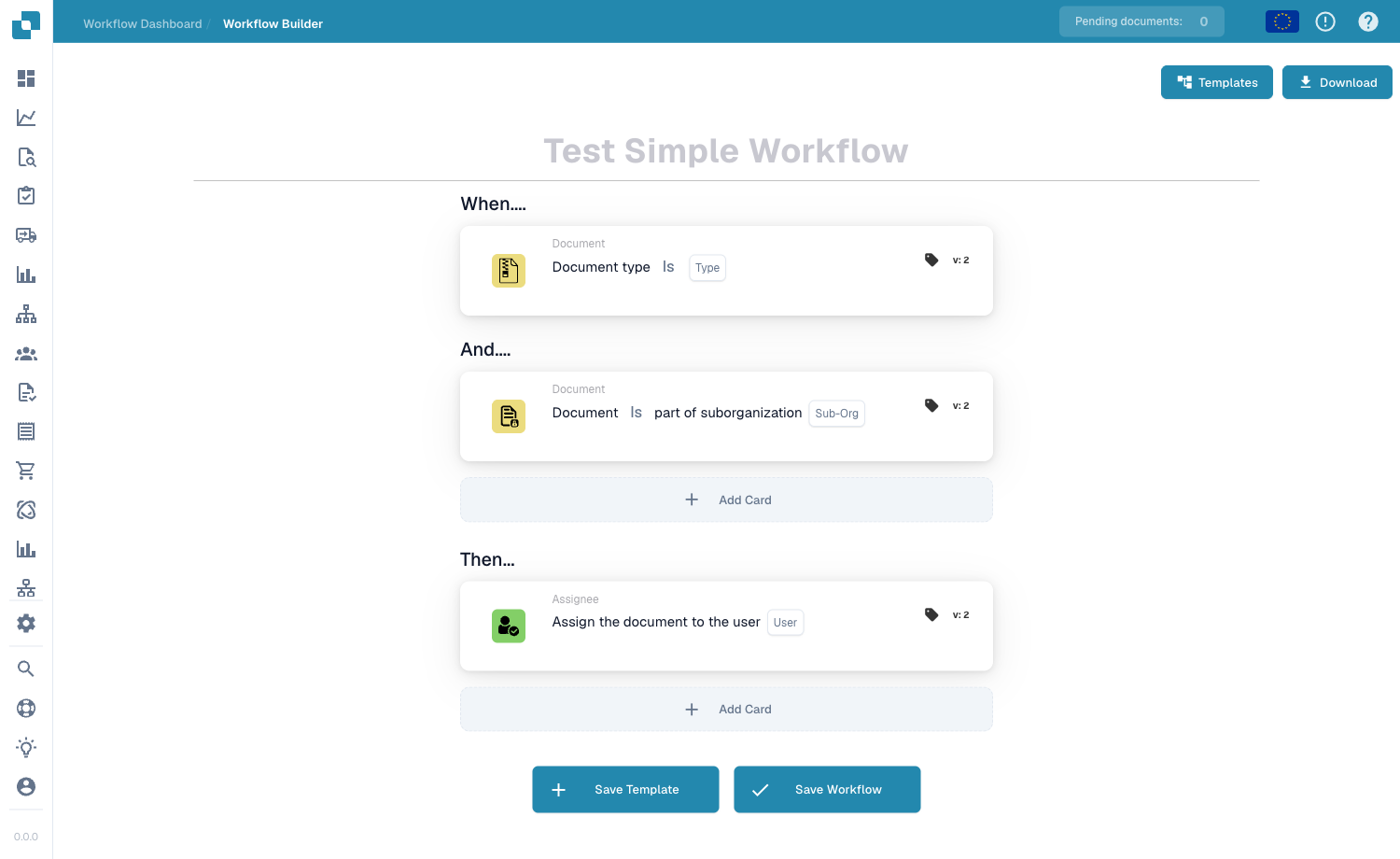
The condition cards on this page go in the **When** and **And** groups of the Workflow Builder — they decide whether the Then actions run:
Condition cards are added to the When and And groups via Add Card.
***
### 📌 Version Information
**Status:** Most condition cards are stable with single or dual-version structures **Version Pattern:** Most follow v1 → v2 pattern (adding i18n support) **Multi-Version Example:** CONDITION\_DECISION\_TREE\_DATA (v2-v3)
**Note:** Some PO comparison condition cards have several versions. Use this guide for the current behavior and the release notes below for published changes.
📖 [Product release notes](/overview-and-basics/release-notes.md) | [PO Matching Guide](/administration-and-setup/workflow/cards-overview/po-matching-complete-guide.md)
***
## Document State & Status Conditions
### Card: CONDITION\_DOC\_STATUS\_IS\_ISNOT / Document Status Check
#### Purpose
Checks if document has specific status
#### When to Use
* Before approving
* At specific workflow stage
* Status-based routing
#### Document Status Types
```
- Upload: Being uploaded
- OCR: Being scanned
- Classification: Type detection
- Ready for Validation: Waiting for review
- Workflow: In process
- Pending Approval: Needs approval
- Pending Second Approval: Needs secondary approval
- Auto Accounting: Auto-booking
- Export: Being exported
- Error: Problem occurred
```
#### How It Works
```
Current Status: "Pending Approval"
↓
Check: Is status = "Pending Approval"?
↓
YES → Continue with action
NO → Stop or do alternative action
```
#### Example
```
Condition: "Document status IS Pending Approval?"
↓
If YES: Create approval task
If NO: Do something else
```
#### Parameters
```
Operator: IS / IS NOT
Status: [Select status]
```
***
### Card: CONDITION\_DOC\_STATUS\_IS\_ISNOT\_IN\_LIST
#### Purpose
Checks if status matches any in a list
#### When to Use
* Multiple valid statuses
* OR logic for status
#### Example
```
Condition: "Status is one of: [Pending Approval, Pending Second Approval, Workflow]?"
↓
If status matches any: Continue
If doesn't match: Stop
```
***
### Card: CONDITION\_DOC\_TYPE\_IS\_ISNOT / Document Type Check
#### Purpose
Checks if document is specific type
#### Document Types
```
- Invoice
- Credit Note
- Purchase Order
- Delivery Note
- ASN (Advanced Ship Notice)
- Receipt
- Return
- Custom Types
```
#### How It Works
```
Document type: "Invoice"
↓
Check: Is type = "Invoice"?
↓
YES → Process as invoice
NO → Process differently
```
#### Example
```
Condition: "Document type IS Invoice?"
↓
If YES: Check PO match
If NO: Skip PO validation
```
***
### Card: CONDITION\_DOC\_TYPE\_IS\_ISNOT\_LIST
#### Purpose
Checks if type matches any in list
#### Example
```
Condition: "Type is one of: [Invoice, Credit Note]?"
↓
YES: Process financial document
NO: Skip financial checks
```
***
### Card: CONDITION\_SUB\_ORG\_IS\_ISNOT / Sub-Organization Check
#### Purpose
Checks which organization/department owns document
#### Organizations
```
- Finance Department
- Procurement
- Warehouse
- Manufacturing
- Quality Control
- Distribution
- Regional Offices
```
#### Example
```
Document belongs to: "Berlin Office"
↓
Check: Sub-Org = "Berlin Office"?
↓
YES: Assign to Berlin team
NO: Check other offices
```
***
### Card: CONDITION\_PURCHASE\_ORDER\_IMPORT / PO Import Check
#### Purpose
Checks if PO is newly imported or existing
#### How It Works
```
PO Status: "Newly Imported" (First time seeing this PO)
↓
Check: Is new import?
↓
YES: Do initial validation
NO: Use cached PO data
```
#### When to Use
* Different handling for new POs
* Skip validation for known POs
* Track first time seeing supplier
***
## Assignee Conditions
### Card: CONDITION\_USER\_IS\_ISNOT / User Check
#### Purpose
Checks if document assigned to specific user
#### How It Works
```
Assigned to: "John Smith"
↓
Check: Is assigned to "John Smith"?
↓
YES: Continue
NO: Stop
```
#### Example
```
Condition: "Assigned to IS 'Finance Manager'"?
↓
If YES: Create approval task
If NO: Skip approval
```
***
### Card: CONDITION\_USER\_IS\_ISNOT\_IN\_LIST
#### Purpose
Checks if assigned to any user in list
#### Example
```
Condition: "Assigned to one of: [John, Sarah, Mike]?"
↓
YES: Continue
NO: Stop
```
***
### Card: CONDITION\_GROUP\_IS\_ISNOT / Group Check
#### Purpose
Checks if assigned to specific group
#### Example
```
Assigned to: "Finance Team" (10 members)
↓
Check: Is assigned to Finance Team?
↓
YES: Process for group
NO: Check other groups
```
***
### Card: CONDITION\_GROUP\_IS\_ISNOT\_IN\_LIST
#### Purpose
Checks if assigned to any group in list
#### Example
```
Condition: "Assigned to one of: [Finance, Procurement, Quality]?"
↓
YES: Continue
NO: Stop
```
***
## Date & Time Conditions
### Card: CONDITION\_TIME\_IS\_ISNOT\_BETWEEN / Date Range Check
#### Purpose
Checks if date falls between two dates
#### How It Works
```
Document Date: 2025-10-23
↓
Check: Is date between 2025-10-01 and 2025-10-31?
↓
YES (October) → Continue
NO (Other month) → Stop
```
#### Calculation
```
Formula:
Start Date ≤ Document Date ≤ End Date?
Example:
2025-01-01 ≤ 2025-10-23 ≤ 2025-10-31?
YES ✅ Within range
```
#### When to Use
* Check if in fiscal period
* Check if within deadline
* Check if in promotional period
#### Example
```
Condition: "Document date between Oct 1 and Oct 31?"
↓
If YES: Oct invoices (monthly processing)
If NO: Other month invoices
```
#### Parameters
```
Start Date: [Select or enter]
End Date: [Select or enter]
Date Field: [Which field to check]
```
***
### Card: CONDITION\_TODAY\_IS\_ISNOT / Today Check
#### Purpose
Checks if today's date matches criteria
#### How It Works
```
Today: 2025-10-23
↓
Check: Is today > 2025-10-31?
↓
NO → Deadline not passed
YES → Deadline passed (overdue)
```
#### Use Cases
```
Is today past deadline? → Invoice is overdue
Is today past promotion date? → Promotion ended
Is today in quarter? → For quarterly reporting
```
#### Example
```
Condition: "Is today AFTER invoice due date?"
↓
If YES: Invoice is overdue, escalate
If NO: Invoice still within deadline
```
***
### Card: CONDITION\_CONFIRMED\_DELIVERY\_ACCEPTED\_DATE\_IN\_CALENDAR\_MASTER\_DATA
#### Purpose
Checks if delivery date matches approved delivery dates in calendar
#### How It Works
```
Delivery Date from Invoice: 2025-10-25
↓
Check Master Calendar: Is 2025-10-25 acceptable?
↓
(Master calendar has list of acceptable dates)
↓
YES: Date is acceptable
NO: Date not in approved list
```
#### When to Use
* Verify delivery matches agreed dates
* Check against holiday calendar
* Validate against contracted dates
#### Example
```
Supplier promised: 2025-10-25
Invoice shows delivery: 2025-10-25
Check Master Calendar: Is 2025-10-25 valid delivery date?
↓
YES: Delivery date acceptable ✅
```
***
## Logic Conditions
### Card: CONDITION\_DECISION\_TREE\_DATA / Decision Table Returns
#### Purpose
Checks if decision table has return values
#### How It Works
```
Run Decision Table
↓
Does it return values?
↓
YES: Data is available for next cards
NO: No matching results
```
#### When to Use
* Before using decision table results
* As gate condition
* To check if routing available
#### Example
```
Decision Table: "Route by supplier"
↓
Condition: "Decision table returns data?"
↓
If YES: Use returned values for routing
If NO: Use default routing
```
***
### Card: CONDITION\_CONTINUE\_CHANCE / Random Probability
#### Purpose
Continues with specified probability
#### How It Works
```
Probability: 50%
↓
Roll dice
↓
Random chance: 50% YES, 50% NO
```
#### When to Use
* A/B testing workflows
* Sampling documents
* Random quality checks
#### Example
```
Condition: "Continue with 10% chance?"
↓
90% of documents: Stop here
10% of documents: Continue for detailed review
```
#### Calculation
```
If probability = 50%:
- 50% of documents continue
- 50% of documents stop
If probability = 10%:
- 10% continue (1 in 10 documents)
- 90% stop
```
***
### Card: CONDITION\_MODULE\_IS\_ISNOT\_ACTIVE / Feature Check
#### Purpose
Checks if specific module/feature is enabled
#### Modules
```
- PO Matching
- Auto Accounting
- OCR
- Document Classification
- Supplier Management
- Custom Modules
```
#### How It Works
```
Module: "PO Matching"
↓
Is PO Matching enabled?
↓
YES: Do PO match validation
NO: Skip PO checks
```
#### When to Use
* Feature-dependent workflows
* Optional processing
* Check if licensed feature active
***
### Card: CONDITION\_HTTPS\_REQUEST\_STATUS / Request Result Check
#### Purpose
Checks if HTTPS request was successful
#### Status Codes
```
200-299: ✅ Success
300-399: ↪️ Redirect
400-499: ❌ Client Error
500-599: ❌ Server Error
```
#### How It Works
```
Send HTTPS request
↓
Receive response code
↓
Check: Was request successful (200)?
↓
YES: Continue with response data
NO: Error handling
```
#### Example
```
Send pricing request to API
↓
Condition: "Did request return 200 (success)?"
↓
If YES: Use returned price
If NO: Use fallback price
```
***
### Card: CONDITION\_SUPPLIER\_STATUS\_IS\_ISNOT / Supplier Status Check
#### Purpose
Checks supplier's status in system
#### Supplier Statuses
```
✅ ACTIVE: Can do business
⚠️ ON HOLD: Temporarily blocked
❌ INACTIVE: No longer doing business
⚠️ CONDITIONAL: Only for specific items
```
#### How It Works
```
Supplier: ABC Corp
Status in Database: ACTIVE
↓
Check: Is status ACTIVE?
↓
YES: Process normally
NO: Flag for review
```
#### Example
```
Invoice from ABC Corp
↓
Condition: "Is supplier status ACTIVE?"
↓
If YES: Process normally
If NO: Block or escalate
```
***
### Card: CONDITION\_SPECIFY\_SUPPLIER\_TYPE
#### Purpose
Specifies/checks supplier type
#### Supplier Types
```
- Preferred Supplier
- Standard Supplier
- Spot Purchase
- Framework Agreement
- Strategic Partner
```
#### How It Works
```
Supplier Type: "Preferred"
↓
Check: Is preferred supplier?
↓
YES: Apply preferred supplier discounts
NO: Standard pricing
```
***
## Example Decision Flows
### Flow 1: Status-Based Processing
```
Document Arrives
↓
Check: Status = "Ready for Validation"?
↓
YES: Validate document
↓
Check: Status = "Pending Approval"?
↓
YES: Create approval task
↓
Check: Status = "Error"?
↓
YES: Escalate to manager
```
### Flow 2: Supplier-Based Processing
```
Invoice Arrives
↓
Check: Supplier status ACTIVE?
↓
NO: Block and escalate
↓
YES: Check: Supplier is preferred?
↓
YES: Fast track approval
NO: Standard approval
```
### Flow 3: Amount-Based with Date Check
```
Invoice Arrives
↓
Check: Amount > €10,000?
↓
YES: Check: Date within Oct (fiscal period)?
↓
YES: Assign to Finance Director
NO: Assign to Finance Manager
```
***
## Condition Card Comparison
| Card | Checks | Operator | Use |
| ------------------------------------------- | --------------- | ------------- | ----------------- |
| CONDITION\_DOC\_STATUS\_IS\_ISNOT | Document status | IS / IS NOT | Stage check |
| CONDITION\_DOC\_STATUS\_IS\_ISNOT\_IN\_LIST | Status in list | IN / NOT IN | Multiple statuses |
| CONDITION\_DOC\_TYPE\_IS\_ISNOT | Document type | IS / IS NOT | Type filtering |
| CONDITION\_DOC\_TYPE\_IS\_ISNOT\_LIST | Type in list | IN / NOT IN | Multiple types |
| CONDITION\_SUB\_ORG\_IS\_ISNOT | Organization | IS / IS NOT | Department check |
| CONDITION\_USER\_IS\_ISNOT | Assigned user | IS / IS NOT | User check |
| CONDITION\_USER\_IS\_ISNOT\_IN\_LIST | User in list | IN / NOT IN | Multiple users |
| CONDITION\_GROUP\_IS\_ISNOT | Assigned group | IS / IS NOT | Group check |
| CONDITION\_GROUP\_IS\_ISNOT\_IN\_LIST | Group in list | IN / NOT IN | Multiple groups |
| CONDITION\_TIME\_IS\_ISNOT\_BETWEEN | Date range | BETWEEN | Date window |
| CONDITION\_TODAY\_IS\_ISNOT | Today's date | IS / IS NOT | Today check |
| CONDITION\_DECISION\_TREE\_DATA | DT returns | HAS / HAS NOT | DT result check |
| CONDITION\_CONTINUE\_CHANCE | Probability | CHANCE | Random gate |
| CONDITION\_MODULE\_IS\_ISNOT\_ACTIVE | Feature enabled | IS / IS NOT | Feature check |
| CONDITION\_HTTPS\_REQUEST\_STATUS | Request result | STATUS | Response check |
| CONDITION\_SUPPLIER\_STATUS\_IS\_ISNOT | Supplier status | IS / IS NOT | Supplier check |
***
## Best Practices for Conditions
✅ **Do:**
* Use specific conditions
* Test logic with samples
* Order conditions logically
* Have fallback for all paths
* Document complex logic
❌ **Don't:**
* Create circular conditions (A if B, B if A)
* Make conditions too complex
* Forget about edge cases
* Assume field always has value
* Create impossible conditions
***
## Combining Multiple Conditions
```
Condition 1: Type = Invoice?
AND
Condition 2: Amount > €5000?
AND
Condition 3: Supplier status = Active?
↓
ALL TRUE → Process
SOME FALSE → Stop
```
***
## Related Cards
* **CONDITION\_DOC\_FIELD\_CONTAINS** - Field content check
* **CONDITION\_COMPARE\_TWO\_DOCFIELD\_VALUES** - Field comparison
* **CONDITION\_CHECKBOX\_IS** - Checkbox check
### Purchase-order import trigger example
**Configuration:** Under When select the new-purchase-order import event (`wf_new_purchase_order`) and leave the update event (`wf_updated_purchase_order`) unselected. Configure subsequent actions for this document-independent workflow context.
**Expected result and counterexample:** A run triggered by a newly imported purchase order satisfies this condition. A run triggered only by an update does not. Selecting both events allows either event. This checks the workflow trigger information, not whether an invoice currently contains a purchase-order number.
This is an illustrative test configuration and expected outcome; it was not executed. Use data and recipients configured in your test organization.
### Supplier status-change trigger example
**Configuration:** Under When choose operator `is` and one target status actually offered in your organization. Call that selected status A in this example. Leave another available status B unselected.
**Expected result and counterexample:** The condition is true for a supplier status-change event whose new status is A; it is false for an event whose new status is B. With operator `is not`, those results reverse. This is an event trigger based on workflow run information, not a general check of the supplier status on an invoice. Confirm the actual event and selected status in the log.
This is an illustrative test configuration and expected outcome; it was not executed. Use data and recipients configured in your test organization.
---
# Agent Instructions
This documentation is published with GitBook. GitBook is the documentation platform designed so that both humans and AI agents can read, navigate, and reason over technical content effectively. Learn more at gitbook.com.
## Querying This Documentation
If you need additional information that is not directly available in this page, you can query the documentation by asking a question.
Perform an HTTP GET request on the following URL with the `ask` and `goal` query parameters:
```
GET https://docs.docbits.com/administration-and-setup/workflow/cards-overview/condition-cards-complete-guide.md?ask=&goal=
```
`ask` is the immediate question: it should be specific, self-contained, and written in natural language.
`goal` is what the user is ultimately trying to achieve, the reason they need the answer. Sharing it helps GitBook give you a better, more relevant answer. A goal is most helpful when it describes the outcome the user wants rather than restating the question. For example, with `ask=how do I create an API token`, a goal like `automate deployments from our CI pipeline` lets GitBook tailor the answer to that use case.
The response will contain a direct answer to the question and relevant excerpts and sources from the documentation.
Use this mechanism when the answer is not explicitly present in the current page, you need clarification or additional context, or you want to retrieve related documentation sections.