> For the complete documentation index, see [llms.txt](https://docs.docbits.com/llms.txt). Markdown versions of documentation pages are available by appending `.md` to page URLs; this page is available as [Markdown](https://docs.docbits.com/administration-and-setup/workflow/cards-overview/and/document-field/if-country-in-field.md).
# If Country in Field
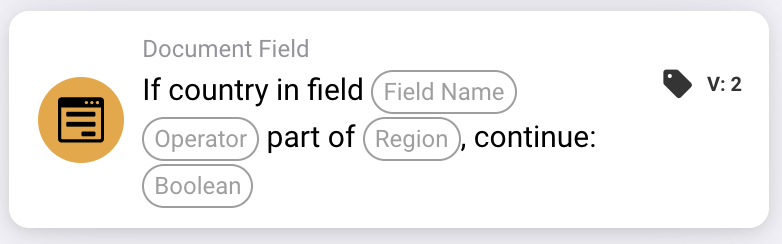
Intended use: an additional processing step depends on a country group. The example below describes a rule for membership of the European Union.
## Current limitation — development source checked on 22 October 2026
Local source tests using the native region-selection type fail before comparing the country, returning `missing_variable` or `error`. Full country names do not bypass this problem. A successful run on the deployed backend has not been verified for this version.
**Where:** Standard workflow → additional conditions (AND) → Document Field. Configure the subsequent action separately under THEN.
## Configuration — version 2
| Setting | Value |
| -------------- | -------------------------------------------------- |
| Field | An existing text field containing the country name |
| Operator | `is` |
| Region | European Union (EU) |
| Continue value | `true` |
## Intended example — verify the fix before use
Verify the correction and both example cases in your installed version before enabling this rule. The table describes the intended business rule, not a confirmed successful execution.
| Country field value | Intended country grouping |
| ------------------- | ------------------------- |
| `Germany` | Inside the EU |
| `United States` | Outside the EU |
The country names shown as code are fixed input values for this example.
## Limits and checks
`false` does not invert the comparison. Even a matching country does not produce a positive condition with that setting. To check the opposite condition, select `isnot` with `true`.
Handle missing fields and empty country values separately; they can return a missing-data result rather than an ordinary non-match.
The ISO conversion issue for inputs such as `DE` and `DEU` is separate. Replacing ISO codes with full country names does not resolve the region-selection error.
The offered groups, including EU, Schengen and NAFTA, come from the card implementation. Check the country membership implemented in your version before using a group for a business rule.
---
# Agent Instructions
This documentation is published with GitBook. GitBook is the documentation platform designed so that both humans and AI agents can read, navigate, and reason over technical content effectively. Learn more at gitbook.com.
## Querying This Documentation
If you need additional information that is not directly available in this page, you can query the documentation by asking a question.
Perform an HTTP GET request on the following URL with the `ask` and `goal` query parameters:
```
GET https://docs.docbits.com/administration-and-setup/workflow/cards-overview/and/document-field/if-country-in-field.md?ask=&goal=
```
`ask` is the immediate question: it should be specific, self-contained, and written in natural language.
`goal` is what the user is ultimately trying to achieve, the reason they need the answer. Sharing it helps GitBook give you a better, more relevant answer. A goal is most helpful when it describes the outcome the user wants rather than restating the question. For example, with `ask=how do I create an API token`, a goal like `automate deployments from our CI pipeline` lets GitBook tailor the answer to that use case.
The response will contain a direct answer to the question and relevant excerpts and sources from the documentation.
Use this mechanism when the answer is not explicitly present in the current page, you need clarification or additional context, or you want to retrieve related documentation sections.